A Linux alternative to Tablacus Explorer. Independent open-source project, not affiliated with or endorsed by Gaku.
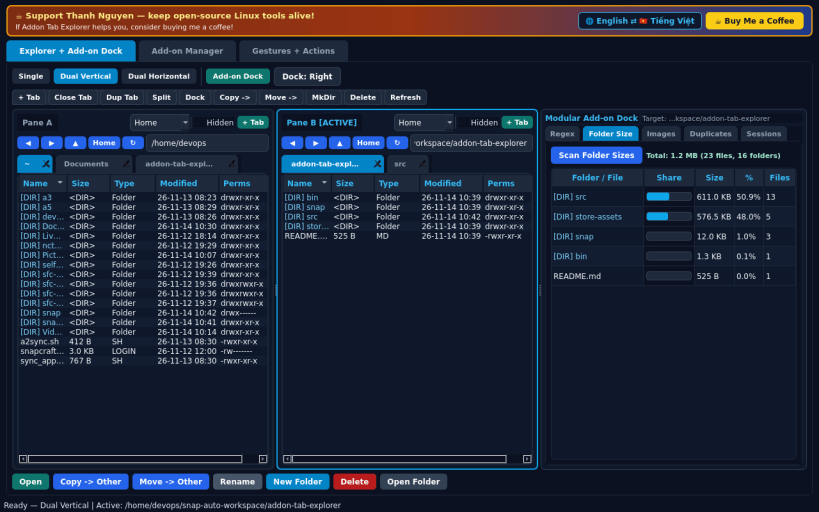
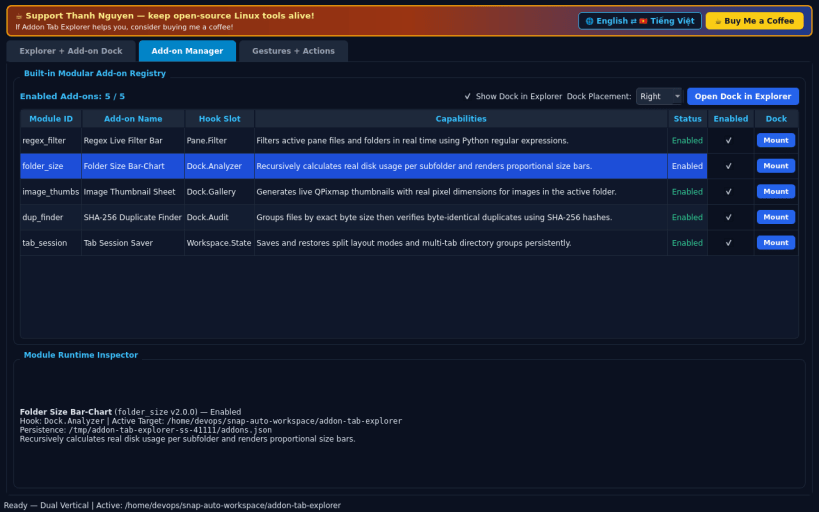
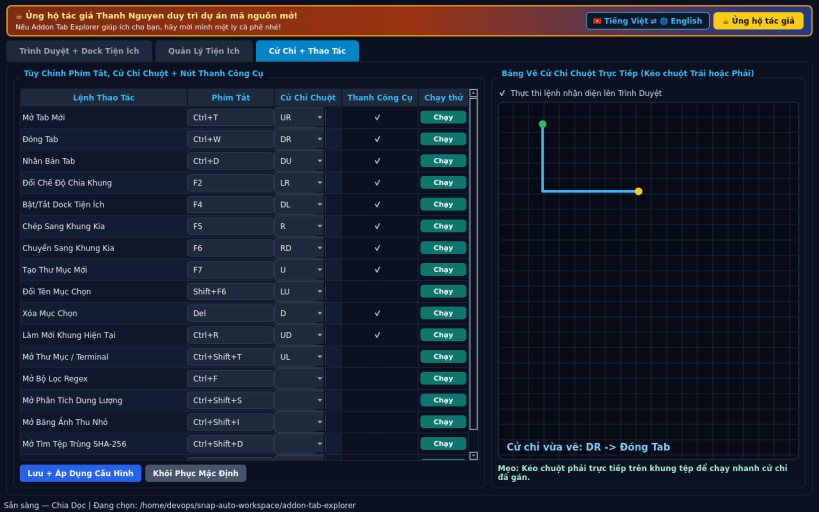
FEATURES • Multi-Tab Split Explorer & Live Add-on Dock: switch smoothly between Single, Dual Vertical, and Dual Horizontal split layouts where each pane hosts independent multi-tabbed directory browsers, real file operations (Copy, Move, Rename, MkDir, Delete, Open), mount-point quick-jump, and a toggleable side or bottom modular add-on dock. • Built-in Add-on Manager & Pluggable Tool Panels: dynamically enable or disable Regex Live Filter Bar, recursive Folder Size Bar-Chart Analyzer, Image Thumbnail Contact Sheet, SHA-256 Duplicate File Finder, and persistent Tab Session Saver — immediately updating the live explorer dock. • Custom Mouse/Key Gestures & Toolbar Actions: map keyboard shortcuts, right-drag mouse gesture strokes (U/D/L/R combinations), and customizable quick-toolbar buttons to explorer commands with EN/VI interface support.
SUPPORT & DONATE • Created by Thanh Nguyen — https://buymeacoffee.com/thanhnv128b
You are about to open
Do you wish to proceed?
Thank you for your report. Information you provided will help us investigate further.
There was an error while sending your report. Please try again later.
Snaps are applications packaged with all their dependencies to run on all popular Linux distributions from a single build. They update automatically and roll back gracefully.
Snaps are discoverable and installable from the Snap Store, an app store with an audience of millions.
If you’re running Ubuntu 16.04 LTS (Xenial Xerus) or later, including Ubuntu 18.04 LTS (Bionic Beaver) and Ubuntu 20.04 LTS (Focal Fossa), you don’t need to do anything. Snap is already installed and ready to go.
For versions of Ubuntu between 14.04 LTS (Trusty Tahr) and 15.10 (Wily Werewolf), as well as Ubuntu flavours that don’t include snap by default, snap can be installed from the Ubuntu Software Centre by searching for snapd.
Alternatively, snapd can be installed from the command line:
sudo apt update
sudo apt install snapd
Either log out and back in again, or restart your system, to ensure snap’s paths are updated correctly.
To install Addon Tab Explorer, simply use the following command:
sudo snap install addon-tab-explorer
Browse and find snaps from the convenience of your desktop using the snap store snap.
Interested to find out more about snaps? Want to publish your own application? Visit snapcraft.io now.