A lightweight Linux alternative to FL Studio for 16-step drum sequencing, piano-roll synth composition, Standard MIDI export, and WAV rendering. Disclaimer: Independent open-source project, not affiliated with Image-Line.
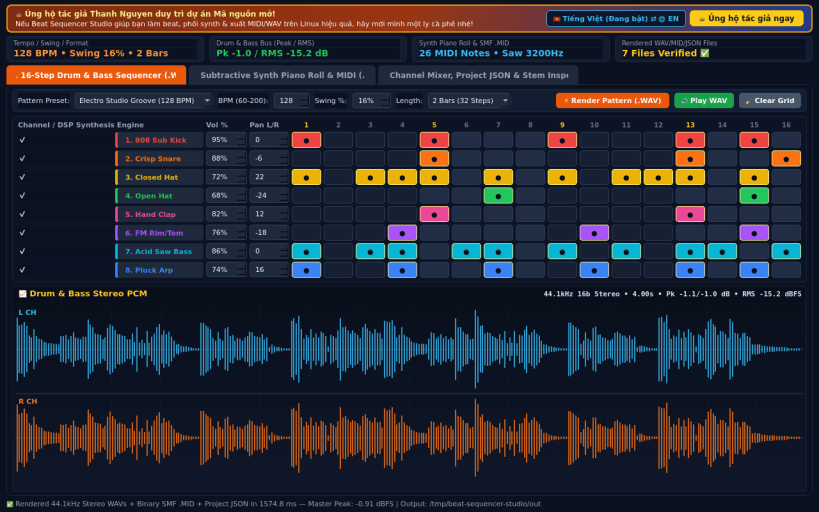
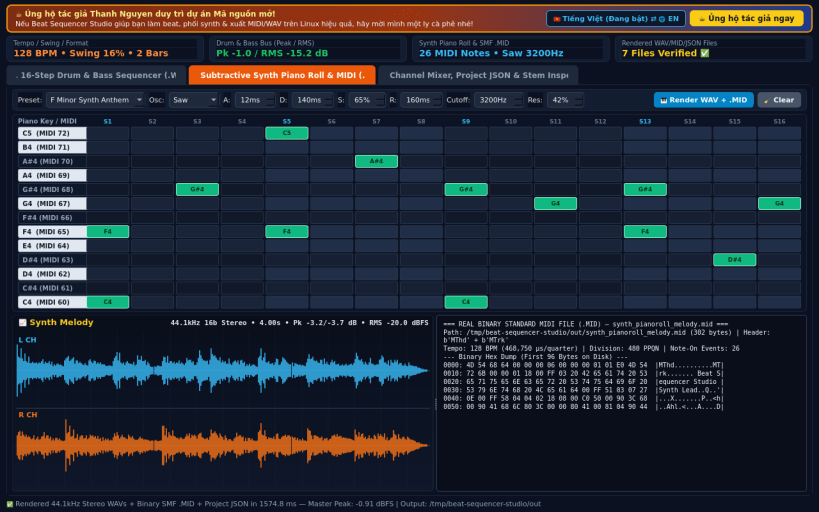
Beat Sequencer Studio is a Linux alternative to FL Studio built for fast pattern-based beatmaking, subtractive synthesizer melody composition, binary Standard MIDI (.mid) export, and 44.1 kHz 16-bit Stereo PCM WAV rendering.
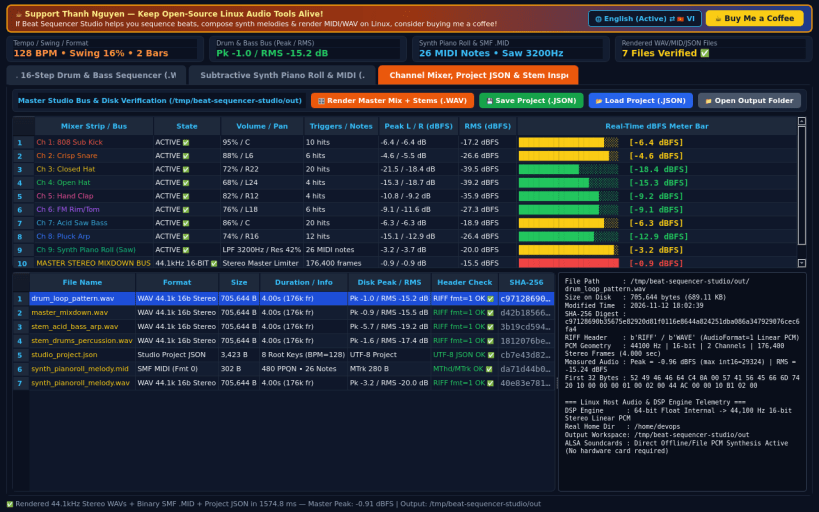
KEY FEATURES: • 16-Step x 8-Channel Drum & Bass Sequencer: Interactive step grid with BPM (60-200), Swing %, and per-channel Volume & Pan using sample-by-sample DSP synthesis (808 Sub Kick, Crisp Snare, Closed Hat, Open Hat, Hand Clap, FM Rim/Tom, Acid Saw Bass, Pluck Arp). • Subtractive Synth Piano Roll & Standard MIDI Exporter: Compose melodies on an interactive Piano Roll grid with Saw, Square, Sine, and Triangle oscillators, ADSR envelope, and resonant low-pass filter; render directly to 44.1 kHz Stereo PCM WAV and Standard MIDI (.mid). • Multi-Channel Mixer, JSON Projects & Stem/Master Inspector: Mix drum and synth stems to a master WAV, inspect measured per-channel Peak/RMS dBFS levels, save/load JSON project files, and verify RIFF/MIDI headers and SHA-256 checksums on disk.
LEGAL DISCLAIMER: • Independent open-source project. Not affiliated with or endorsed by Image-Line.
SUPPORT & DONATE: • Created by Thanh Nguyen — Support ongoing development: https://buymeacoffee.com/thanhnv128b
You are about to open
Do you wish to proceed?
Thank you for your report. Information you provided will help us investigate further.
There was an error while sending your report. Please try again later.
Snaps are applications packaged with all their dependencies to run on all popular Linux distributions from a single build. They update automatically and roll back gracefully.
Snaps are discoverable and installable from the Snap Store, an app store with an audience of millions.
If you’re running Kubuntu 16.04 LTS (Xenial Xerus) or later, including Kubuntu 18.04 LTS (Bionic Beaver) and Kubuntu 18.10 (Cosmic Cuttlefish), you don’t need to do anything. Snap is already installed and ready to go.
Versions of Kubuntu between 14.04 LTS (Trusty Tahr) and 15.10 (Wily Werewolf) don’t include snap by default, but snap can be installed from the command line as follows:
sudo apt update
sudo apt install snapd
To install Beat Sequencer Studio, simply use the following command:
sudo snap install beat-sequencer-studio
Browse and find snaps from the convenience of your desktop using the snap store snap.
Interested to find out more about snaps? Want to publish your own application? Visit snapcraft.io now.