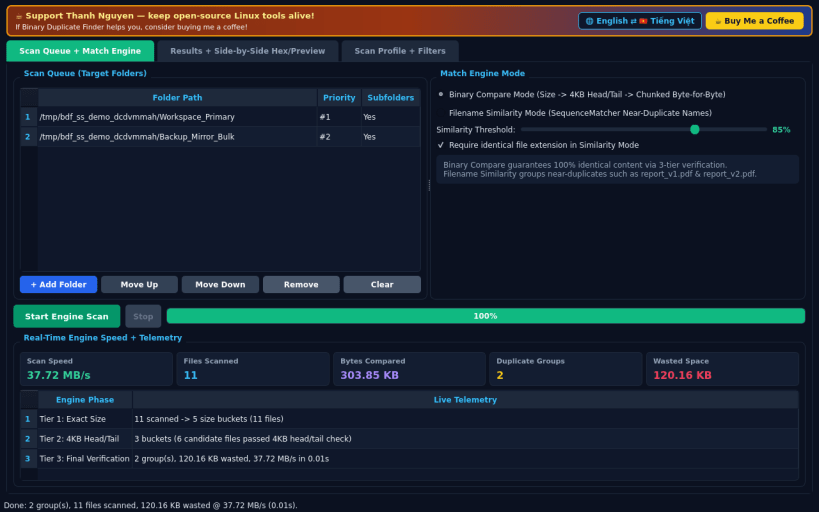
Binary Duplicate Finder is a fast, deterministic Linux desktop utility for verifying exact binary duplicates byte-by-byte and detecting near-duplicate filenames across multiple folders. Independent open-source project, not affiliated with or endorsed by any third-party software vendor.
BYTE-BY-BYTE BINARY COMPARE ENGINE • Verifies exact duplicates through a 3-tier binary check: Exact Size bucket -> 4 KB Head + Tail signature -> Chunked Byte-for-Byte stream comparison. • Live telemetry displays scan throughput (MB/s), total files scanned, duplicate groups, and reclaimable bytes.
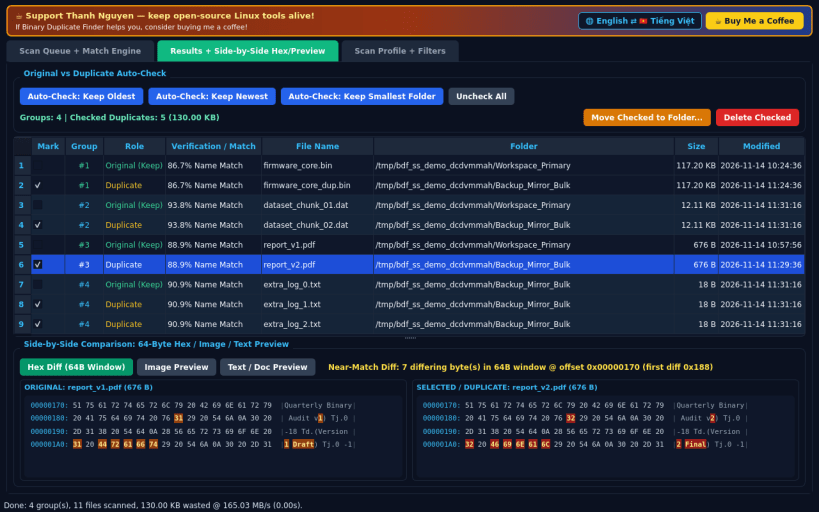
FILENAME SIMILARITY & HEX DIFF INSPECTOR • Optional SequenceMatcher filename similarity mode (adjustable 50% to 100% threshold) surfaces near-duplicate revisions and versioned documents. • Side-by-side inline inspector previews text, images, and hexadecimal byte dumps with highlighted first-64-byte binary differences between pairs.
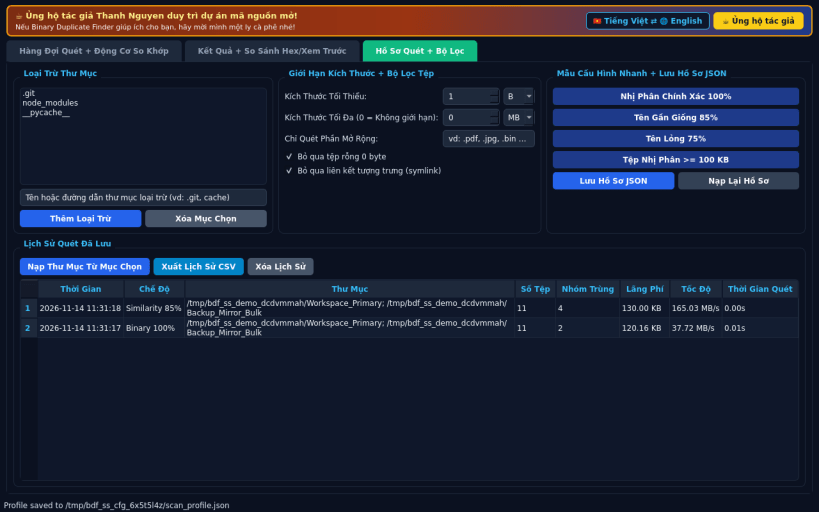
SMART AUTO-CHECK, MOVE/DELETE & SCAN PROFILES • Auto-check copies with Keep Oldest, Keep Newest, or Keep Smallest Folder rules, then safely Move Checked to Folder or confirm deletion. • Save exclusion folder patterns, size bounds, similarity presets, and JSON scan history across sessions, with English and Vietnamese interface support.
SUPPORT & DONATE • Created by Thanh Nguyen — https://buymeacoffee.com/thanhnv128b
You are about to open
Do you wish to proceed?
Thank you for your report. Information you provided will help us investigate further.
There was an error while sending your report. Please try again later.
Snaps are applications packaged with all their dependencies to run on all popular Linux distributions from a single build. They update automatically and roll back gracefully.
Snaps are discoverable and installable from the Snap Store, an app store with an audience of millions.
On Arch Linux, snap can be installed from the Arch User Repository (AUR). The manual build process is the Arch-supported install method for AUR packages, and you’ll need the prerequisites installed before you can install any AUR package. You can then install snap with the following:
git clone https://aur.archlinux.org/snapd.git
cd snapd
makepkg -si
Once installed, the systemd unit that manages the main snap communication socket needs to be enabled:
sudo systemctl enable --now snapd.socket
If AppArmor is enabled in your system, enable the service which loads AppArmor profiles for snaps:
sudo systemctl enable --now snapd.apparmor.service
To enable classic snap support, enter the following to create a symbolic link between /var/lib/snapd/snap and /snap:
sudo ln -s /var/lib/snapd/snap /snap
Either log out and back in again, or restart your system, to ensure snap’s paths are updated correctly.
To install Binary Duplicate Finder, simply use the following command:
sudo snap install binary-dup-finder
Browse and find snaps from the convenience of your desktop using the snap store snap.
Interested to find out more about snaps? Want to publish your own application? Visit snapcraft.io now.