
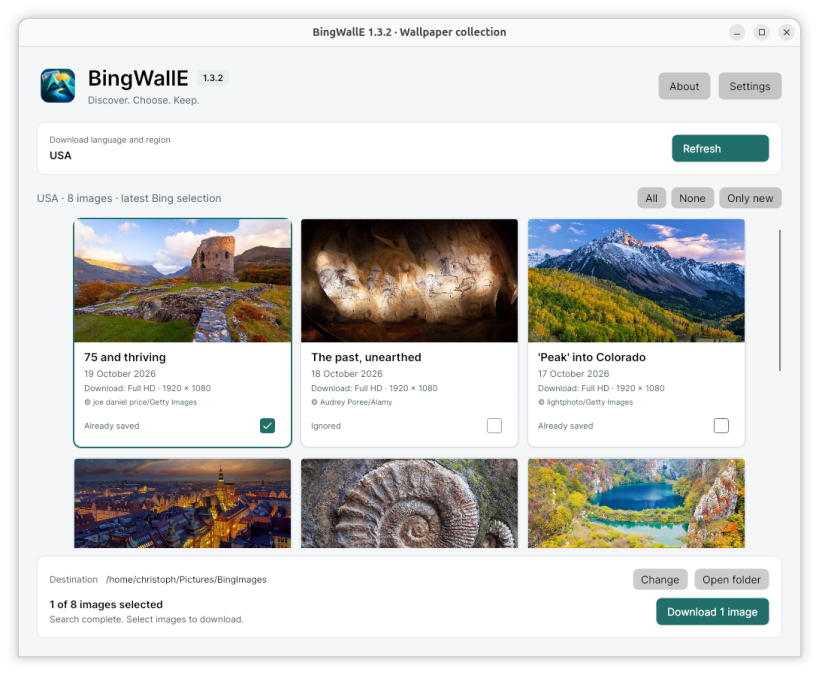
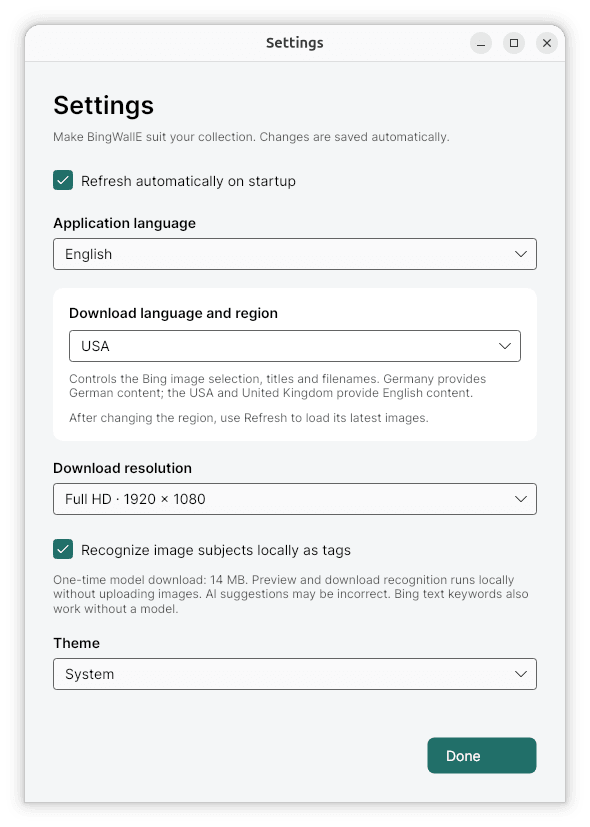
Discover Bing's daily photographs and keep your favourites in your own collection. Browse the latest eight days of images from twelve regions, inspect large previews and download selected wallpapers in HD, Full HD or UHD where available.
Downloaded JPEGs include descriptive metadata: title, subject/description, copyright and keywords (tags), using EXIF and standard XMP. Comments contain only the concise image description. Bing's publication date and source links are kept in separate XMP fields. Existing photographer and camera metadata is preserved; no author, rating or camera capture date is invented, and the JPEG image data is not recompressed.
The image preview shows the description, copyright, resolution and tags. Keywords derived from Bing's captions include recognised subjects, categories and locations. Optional local image recognition adds further subject suggestions after a one-time model download. Images are not uploaded for recognition, runtime telemetry is disabled, and suggested tags may be incorrect.
Choose German or English for the interface independently of the Bing download region. Includes light and dark themes, remembered window size and maximised state, optional refresh on startup, existing-file detection and a context menu for showing images, opening their folder, ignoring images and deleting local files.
BingWallE is developed by Grütze-Software. It is an independent project, not an official Microsoft or Bing application. Image copyrights remain with the credited photographers and rights holders. The application does not change the desktop wallpaper automatically.
Enjoy BingWallE? Support its development with a voluntary contribution on Ko-fi: https://ko-fi.com/gruetzesoftware
You are about to open
Do you wish to proceed?
Thank you for your report. Information you provided will help us investigate further.
There was an error while sending your report. Please try again later.
Snaps are applications packaged with all their dependencies to run on all popular Linux distributions from a single build. They update automatically and roll back gracefully.
Snaps are discoverable and installable from the Snap Store, an app store with an audience of millions.
Snap can be installed from the command line on openSUSE Leap 15.x and Tumbleweed.
You need first add the snappy repository from the terminal. Choose the appropriate command depending on your installed openSUSE flavor.
Tumbleweed:
sudo zypper addrepo --refresh https://download.opensuse.org/repositories/system:/snappy/openSUSE_Tumbleweed snappy
Leap 15.x:
sudo zypper addrepo --refresh https://download.opensuse.org/repositories/system:/snappy/openSUSE_Leap_15.6 snappy
If needed, Swap out openSUSE_Leap_15. for, openSUSE_Leap_16.0 if you’re using a different version of openSUSE.
With the repository added, import its GPG key:
sudo zypper --gpg-auto-import-keys refresh
Finally, upgrade the package cache to include the new snappy repository:
sudo zypper dup --from snappy
Snap can now be installed with the following:
sudo zypper install snapd
You then need to either reboot, logout/login or source /etc/profile to have /snap/bin added to PATH.
Additionally, enable and start both the snapd and the snapd.apparmor services with the following commands:
sudo systemctl enable --now snapd
sudo systemctl enable --now snapd.apparmor
To install BingWallE, simply use the following command:
sudo snap install bingwalle
Browse and find snaps from the convenience of your desktop using the snap store snap.

Interested to find out more about snaps? Want to publish your own application? Visit snapcraft.io now.


