
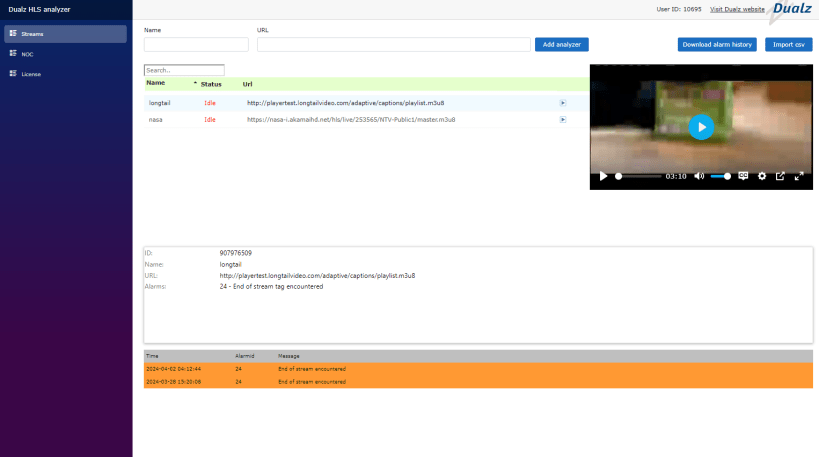
Introducing BRIGHT HLS Monitoring: Your Stream Quality Guardian!
Ensure all your streams are always top-notch with BRIGHT HLS Monitoring. Our tool diligently monitors your streams 24×7, notifying you of any hiccups that might affect quality.
We kick off by verifying your stream’s URL, verifying accessibility and timely updates. From the m3u8 playlist to individual chunks, we ensure everything downloads seamlessly, maintaining uninterrupted viewer experiences.
But we don’t just stop at accessibility. We delve deeper, checking for common issues like closed caption errors (CC) and missing Packet Identifiers (PIDs). If these problems arise, our system promptly alerts via our built-in web server, whether local or remote, so you can swiftly address them.
With BRIGHT HLS Monitoring, not only can you monitor your streams with ease, but you can also immerse yourself in the viewing experience directly through our intuitive web GUI. Simply select the stream you wish to view, and our user-friendly interface seamlessly transitions to playback mode.
Don’t compromise on stream quality. Choose BRIGHT HLS Monitoring and uphold the standard of excellence for your viewers, every stream, every time.
Connect to the BRIGHT HLS Analyzer on your system via: http://<ip_address_of_your_system>:5000
Contact us at info@dualz.com for licensing info, or check out https://dualz.com/hls-monitor#software
You are about to open
Do you wish to proceed?
Thank you for your report. Information you provided will help us investigate further.
There was an error while sending your report. Please try again later.
Snaps are applications packaged with all their dependencies to run on all popular Linux distributions from a single build. They update automatically and roll back gracefully.
Snaps are discoverable and installable from the Snap Store, an app store with an audience of millions.
If you’re running Ubuntu 16.04 LTS (Xenial Xerus) or later, including Ubuntu 18.04 LTS (Bionic Beaver) and Ubuntu 20.04 LTS (Focal Fossa), you don’t need to do anything. Snap is already installed and ready to go.
For versions of Ubuntu between 14.04 LTS (Trusty Tahr) and 15.10 (Wily Werewolf), as well as Ubuntu flavours that don’t include snap by default, snap can be installed from the Ubuntu Software Centre by searching for snapd.
Alternatively, snapd can be installed from the command line:
sudo apt update
sudo apt install snapd
Either log out and back in again, or restart your system, to ensure snap’s paths are updated correctly.
To install BRIGHT HLS Analyzer, simply use the following command:
sudo snap install bright
Browse and find snaps from the convenience of your desktop using the snap store snap.

Interested to find out more about snaps? Want to publish your own application? Visit snapcraft.io now.