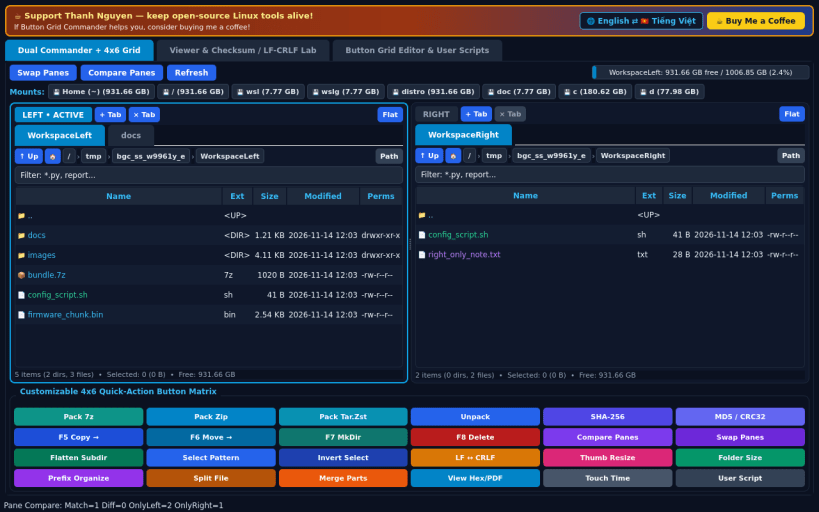
A lightweight Linux open-source alternative to Multi Commander featuring dual tabbed file panels, a customizable 4x6 color-coded quick-action button grid, checksum verification, and line-ending conversion tools. Independent open-source project, not affiliated with or endorsed by Mathias Svensson.
DUAL-PANE COMMANDER & 4x6 QUICK-ACTION MATRIX • Left and Right tabbed file panels with clickable Breadcrumb navigation, Quick Filter bar, Focus indicator, and live /proc/mounts drive capacity bar. • Bottom 4x6 colored Quick-Action Button Matrix executing real operations on active selections: Pack 7z/Zip/Tar-Zst, Unpack, SHA-256, MD5/CRC32, Copy, Move, MkDir, Delete, Compare Panes, Swap Panes, Flatten Subdir, Select by Pattern, Invert Selection, LF <-> CRLF Line Ending Convert, Image Thumbnail Resize, Folder Recursive Size, Prefix Organize, Split/Merge File, and Hex/PDF View.
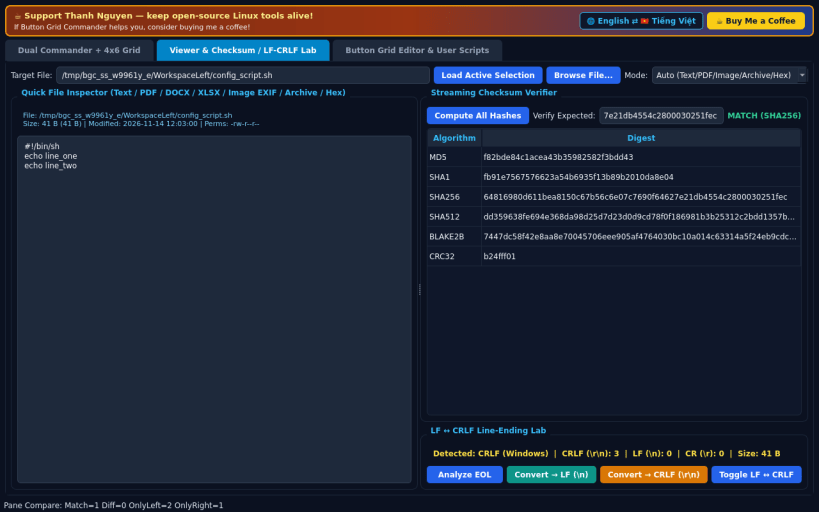
QUICK VIEWER & CHECKSUM / LF-CRLF LAB • Inline inspector for UTF-8 text, PDF, DOCX, XLSX, images with EXIF, archives, and 16-byte Hex dumps, paired with streaming SHA-256/CRC32/MD5/ BLAKE2b verification and real LF <-> CRLF line-ending analysis & conversion.
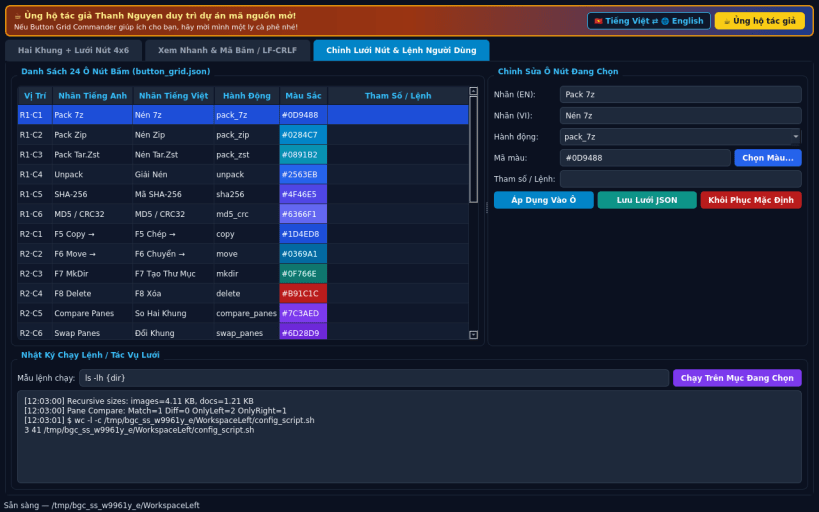
BUTTON GRID EDITOR & USER SCRIPTS • Customize button labels, colors, built-in actions, and user shell commands with {file}/{dir}/{opp} placeholders persisted as JSON.
SUPPORT & DONATE • Created by Thanh Nguyen — https://buymeacoffee.com/thanhnv128b
You are about to open
Do you wish to proceed?
Thank you for your report. Information you provided will help us investigate further.
There was an error while sending your report. Please try again later.
Snaps are applications packaged with all their dependencies to run on all popular Linux distributions from a single build. They update automatically and roll back gracefully.
Snaps are discoverable and installable from the Snap Store, an app store with an audience of millions.
If you’re running Kubuntu 16.04 LTS (Xenial Xerus) or later, including Kubuntu 18.04 LTS (Bionic Beaver) and Kubuntu 18.10 (Cosmic Cuttlefish), you don’t need to do anything. Snap is already installed and ready to go.
Versions of Kubuntu between 14.04 LTS (Trusty Tahr) and 15.10 (Wily Werewolf) don’t include snap by default, but snap can be installed from the command line as follows:
sudo apt update
sudo apt install snapd
To install Button Grid Commander, simply use the following command:
sudo snap install button-grid-commander
Browse and find snaps from the convenience of your desktop using the snap store snap.
Interested to find out more about snaps? Want to publish your own application? Visit snapcraft.io now.