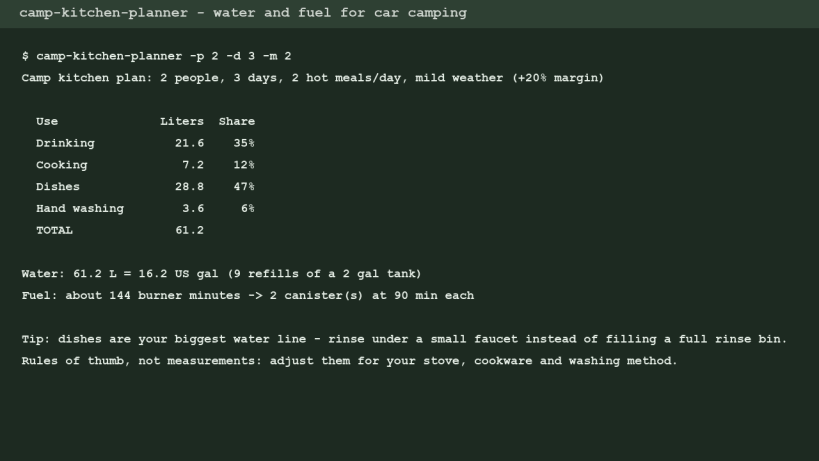
camp-kitchen-planner answers the two packing questions every car-camping trip starts with: how much water do we bring, and how many stove fuel canisters?
Give it the number of people, days and hot meals per day. It splits the water into four lines - drinking, cooking, dishes and hand washing - adds a safety margin, converts liters to US gallons, tells you how many refills of your water tank that means, and turns burner minutes into canisters.
camp-kitchen-planner -p 2 -d 3 -m 2 camp-kitchen-planner --people 4 --days 3 --weather hot --tank 5
Why dishes matter: in most plans the dish line is as large as drinking water, because a two-bin wash fills a full rinse tub. Rinsing under a small faucet instead of a full rinse bin is the easiest way to cut the water you haul. The tool prints that tip when dishes are your biggest line.
Every default (3 L drinking per person per day, 0.5 L cooking per person per meal, 4 L of dish water per hot meal, 20 burner minutes per meal, 90 minutes per canister, 20% margin) is a planning rule of thumb, not a measurement. Override any of them with flags to match your stove, cookware and washing method.
The tool is a single POSIX shell + awk script with no network access and no data collection. The same model runs as a web page in the Camp Kitchen Water & Fuel Planner. Field guides on setting up a camp kitchen, washing dishes at a campsite and planning water live at https://campkitchen.us/ (VOZ Camp Kitchen). Source and license: MIT, script included in the snap.
Written with AI assistance and reviewed by the publisher.
Thank you for your report. Information you provided will help us investigate further.
There was an error while sending your report. Please try again later.
Snaps are applications packaged with all their dependencies to run on all popular Linux distributions from a single build. They update automatically and roll back gracefully.
Snaps are discoverable and installable from the Snap Store, an app store with an audience of millions.
Snap can be installed on Fedora from the command line:
sudo dnf install snapd
Either log out and back in again, or restart your system, to ensure snap’s paths are updated correctly.
To enable classic snap support, enter the following to create a symbolic link between /var/lib/snapd/snap and /snap:
sudo ln -s /var/lib/snapd/snap /snap
To install Camp Kitchen Planner, simply use the following command:
sudo snap install camp-kitchen-planner
Browse and find snaps from the convenience of your desktop using the snap store snap.
Interested to find out more about snaps? Want to publish your own application? Visit snapcraft.io now.