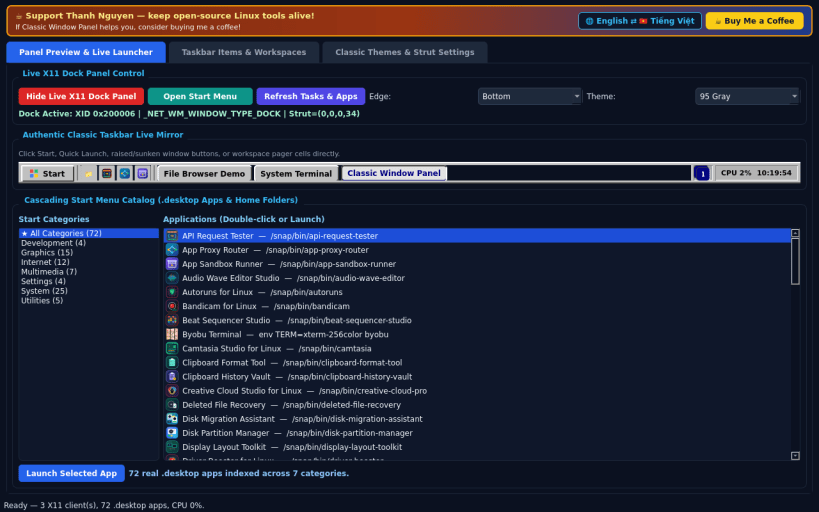
A Linux X11 alternative to OldTaskbar. Independent open-source project, not affiliated with or endorsed by OldTaskbar. EWMH dock struts, taskbar client enumeration, and workspace switching require an X11 window manager; Wayland sessions restrict external dock panels and global window management.
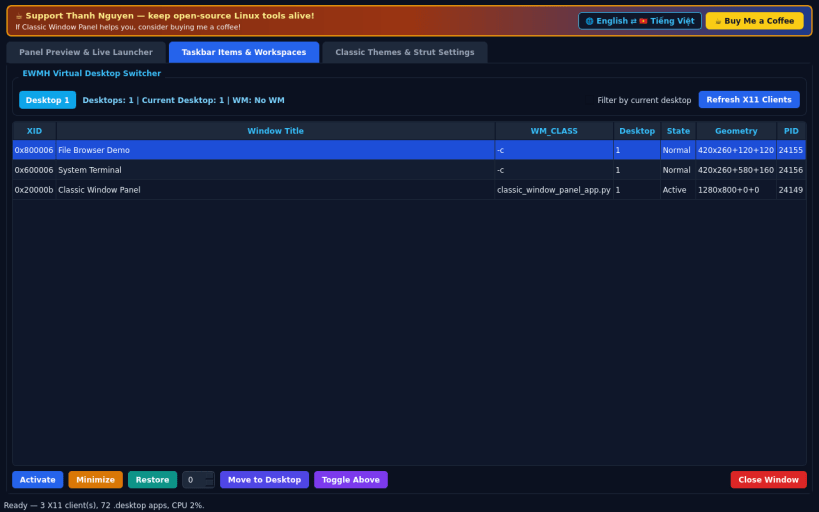
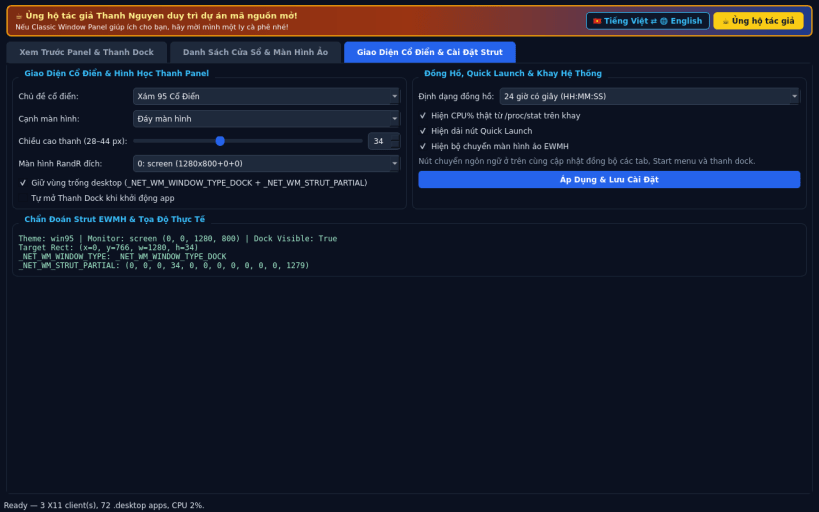
FEATURES • Classic X11 Dock Taskbar (_NET_WM_WINDOW_TYPE_DOCK + _NET_WM_STRUT_PARTIAL): full-width bottom or top beveled panel with cascading Start Menu populated from real .desktop apps, Quick Launch strip, raised/sunken X11 task buttons (click to activate or minimize/iconify), EWMH workspace pager, and real /proc/stat CPU% + clock tray. • Taskbar Items & Workspaces Inspector: live table of all X11 client windows (XID, WM_CLASS, Desktop, State, Geometry) with Activate, Minimize, Restore, Move Desktop, and Virtual Desktop Switcher controls. • Classic Themes & Strut Settings: switch between 95 Gray, 2000 Slate, XP Royale, and Dark Retro themes, adjust bar height (28-44px), clock format, target RandR monitor, and EN/VI interface language.
SUPPORT & DONATE • Created by Thanh Nguyen — https://buymeacoffee.com/thanhnv128b
You are about to open
Do you wish to proceed?
Thank you for your report. Information you provided will help us investigate further.
There was an error while sending your report. Please try again later.
Snaps are applications packaged with all their dependencies to run on all popular Linux distributions from a single build. They update automatically and roll back gracefully.
Snaps are discoverable and installable from the Snap Store, an app store with an audience of millions.
Snap is available for CentOS 7.6+, and Red Hat Enterprise Linux 7.6+, from the Extra Packages for Enterprise Linux (EPEL) repository. The EPEL repository can be added to your system with the following command:
sudo yum install epel-release
Snap can now be installed as follows:
sudo yum install snapd
Once installed, the systemd unit that manages the main snap communication socket needs to be enabled:
sudo systemctl enable --now snapd.socket
To enable classic snap support, enter the following to create a symbolic link between /var/lib/snapd/snap and /snap:
sudo ln -s /var/lib/snapd/snap /snap
Either log out and back in again, or restart your system, to ensure snap’s paths are updated correctly.
To install Classic Window Panel, simply use the following command:
sudo snap install classic-window-panel
Browse and find snaps from the convenience of your desktop using the snap store snap.
Interested to find out more about snaps? Want to publish your own application? Visit snapcraft.io now.