


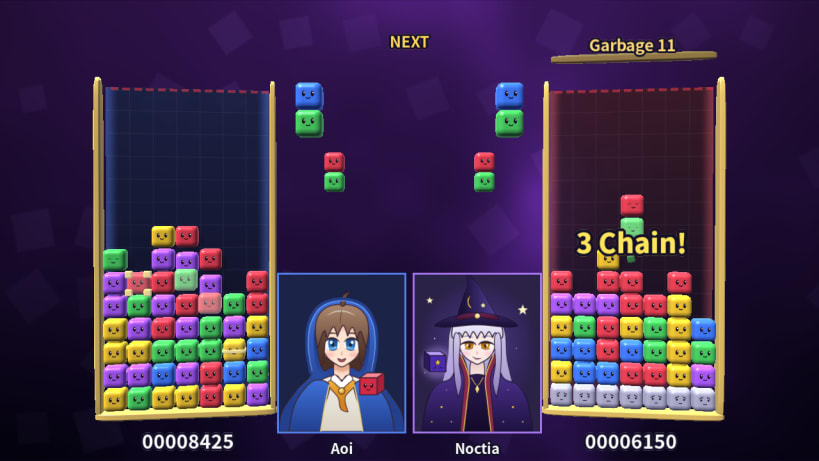
A 3D falling-cube versus puzzle against the computer. Connect five cubes of one color to clear them. Hold down as a pair lands and it drills into the stack, swapping places with the cubes below, so you can slot colors in at any depth to build chains. The shape you clear leaves a special cube (Line, Bomb, Cross or Prism), and chains send garbage to your opponent. Story mode pits you against three fantasy masters. Japanese and English.
四角いキューブたちを積んで、同じ色を5つつなげて消す3D対戦パズル。 ↓を押したまま着地すると、積んだキューブと入れ替わりながら下へ「もぐる」ことができ、 好きな深さに差し込んで連鎖を組み立てられます。 消した形でライン・ボム・クロス・プリズムの変身キューブが誕生。連鎖でおじゃまを送り込み、CPU と勝負しよう。 ストーリーモードでは森・炎・星の三人のマスターに順番に挑戦します。日本語と英語に対応。
Thank you for your report. Information you provided will help us investigate further.
There was an error while sending your report. Please try again later.
Snaps are applications packaged with all their dependencies to run on all popular Linux distributions from a single build. They update automatically and roll back gracefully.
Snaps are discoverable and installable from the Snap Store, an app store with an audience of millions.
Snap can be installed from the command line on openSUSE Leap 15.x and Tumbleweed.
You need first add the snappy repository from the terminal. Choose the appropriate command depending on your installed openSUSE flavor.
Tumbleweed:
sudo zypper addrepo --refresh https://download.opensuse.org/repositories/system:/snappy/openSUSE_Tumbleweed snappy
Leap 15.x:
sudo zypper addrepo --refresh https://download.opensuse.org/repositories/system:/snappy/openSUSE_Leap_15.6 snappy
If needed, Swap out openSUSE_Leap_15. for, openSUSE_Leap_16.0 if you’re using a different version of openSUSE.
With the repository added, import its GPG key:
sudo zypper --gpg-auto-import-keys refresh
Finally, upgrade the package cache to include the new snappy repository:
sudo zypper dup --from snappy
Snap can now be installed with the following:
sudo zypper install snapd
You then need to either reboot, logout/login or source /etc/profile to have /snap/bin added to PATH.
Additionally, enable and start both the snapd and the snapd.apparmor services with the following commands:
sudo systemctl enable --now snapd
sudo systemctl enable --now snapd.apparmor
To install Cube Masters, simply use the following command:
sudo snap install cube-masters
Browse and find snaps from the convenience of your desktop using the snap store snap.

Interested to find out more about snaps? Want to publish your own application? Visit snapcraft.io now.