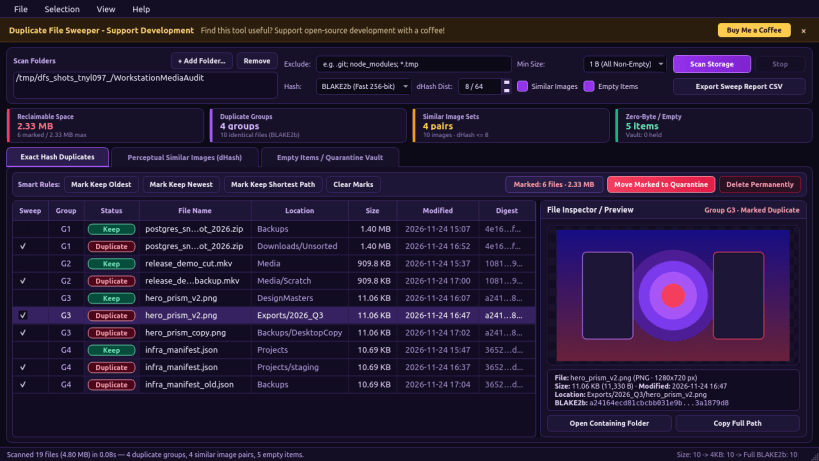
Duplicate File Sweeper is a fast, privacy-first desktop utility for Linux that helps you reclaim wasted drive capacity safely. Scan selected project folders, home directories, or external media with a multi-stage exact byte pipeline (Size -> 4 KB Partial Hash -> Full BLAKE2b or SHA-256) to locate true byte-identical copies with zero false positives.
Compare visually similar photos across re-compressed JPEGs, resized PNGs, and cropped variants using 64-bit perceptual difference hashing (dHash) with an adjustable Hamming distance threshold and side-by-side preview inspection. Smart selection rules (Keep Oldest, Keep Newest, Keep Shortest Path) preserve at least one protected original copy in every group, while the SQLite-backed Quarantine Vault lets you isolate flagged files and restore any item back to its original location with a single click.
You are about to open
Do you wish to proceed?
Thank you for your report. Information you provided will help us investigate further.
There was an error while sending your report. Please try again later.
Snaps are applications packaged with all their dependencies to run on all popular Linux distributions from a single build. They update automatically and roll back gracefully.
Snaps are discoverable and installable from the Snap Store, an app store with an audience of millions.
Snap can be installed on Fedora from the command line:
sudo dnf install snapd
Either log out and back in again, or restart your system, to ensure snap’s paths are updated correctly.
To enable classic snap support, enter the following to create a symbolic link between /var/lib/snapd/snap and /snap:
sudo ln -s /var/lib/snapd/snap /snap
To install Duplicate File Sweeper, simply use the following command:
sudo snap install duplicate-file-sweeper

Browse and find snaps from the convenience of your desktop using the snap store snap.

Interested to find out more about snaps? Want to publish your own application? Visit snapcraft.io now.