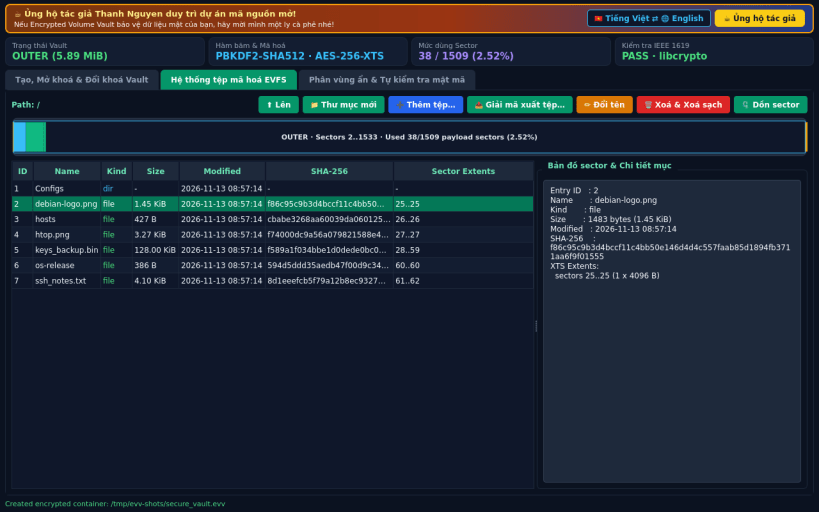
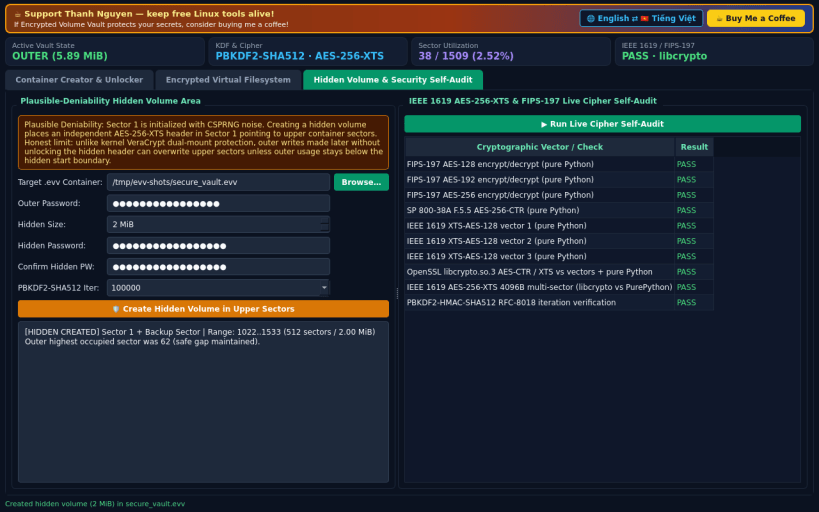
A Linux alternative to VeraCrypt. Disclaimer: Independent open-source project, not affiliated with or endorsed by IDRIX / Mounir Idrassi. Uses user-space encrypted container vaults rather than kernel FUSE/dm-crypt drive mounts.
FEATURES (100% real cryptography, zero mock data): • Encrypted Container Creator & Unlocker: creates binary .evv container files with 64-byte CSPRNG salt, PBKDF2-HMAC-SHA512 key derivation + optional keyfile(s) mixing, and 512-bit AES-256-XTS encrypting 4096-byte sectors (uint64 sector tweak). Includes Header Backup/Restore and instant Change Password (re-encrypts master key slot without re-encrypting payload data). • In-Container Encrypted Virtual Filesystem: once unlocked in memory, browse an encrypted allocation table inside container sectors, add files, extract decrypted files with SHA-256 verification, create folders, rename, delete with random sector wipe, compact extents, and inspect the live sector map. • Plausible-Deniability Hidden Volume Area & Security Self-Audit: optional secondary hidden header at Sector 1 encrypting an isolated upper sector range (honestly notes outer writes without mounting the hidden header can overwrite upper sectors unless kept below the boundary), plus built-in IEEE 1619 AES-256-XTS & NIST FIPS-197 live cipher self-verifier.
Support development: https://buymeacoffee.com/thanhnv128b
You are about to open
Do you wish to proceed?
Thank you for your report. Information you provided will help us investigate further.
There was an error while sending your report. Please try again later.
Snaps are applications packaged with all their dependencies to run on all popular Linux distributions from a single build. They update automatically and roll back gracefully.
Snaps are discoverable and installable from the Snap Store, an app store with an audience of millions.
Snapd can be installed from Manjaro’s Add/Remove Software application (Pamac), found in the launch menu. From the application, search for snapd, select the result, and click Apply.
Alternatively, snapd can be installed from the command line:
sudo pacman -S snapd
Once installed, the systemd unit that manages the main snap communication socket needs to be enabled:
sudo systemctl enable --now snapd.socket
To enable classic snap support, enter the following to create a symbolic link between /var/lib/snapd/snap and /snap:
sudo ln -s /var/lib/snapd/snap /snap
Either log out and back in again, or restart your system, to ensure snap’s paths are updated correctly.
To install Encrypted Volume Vault, simply use the following command:
sudo snap install encrypted-volume-vault
Browse and find snaps from the convenience of your desktop using the snap store snap.
Interested to find out more about snaps? Want to publish your own application? Visit snapcraft.io now.