

Graphs is a simple, yet powerful tool that allows you to plot and manipulate your data with ease. Import data from a wide variety of file types, including spreadsheets and SQLite databases, generate data from an equation, or plot equations directly over an infinite range. Data can be manipulated with operations such as selecting, cutting, translating, multiplying, centering and smoothing, as well as with custom transformations. Operations on equations are performed analytically, so the equation itself is updated as well.
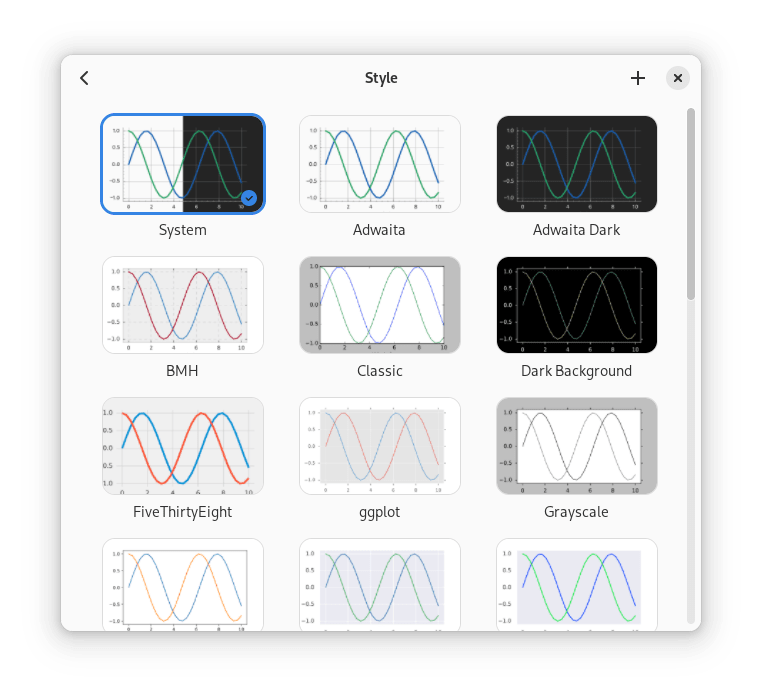
Graphs also supports curve fitting with confidence bands and residuals, and error bars on imported data- The look of your plots can be fully customized in the style editor with a live preview, and styles can be imported from matplotlib style files or exported to share.
Plots can be exported in a variety of formats suitable for publications and presentations, including vector formats for further editing in software like Inkscape. Graphs is designed for GNOME, but works well on any desktop environment and on mobile screen sizes
For any feedback, questions or general issues, please file an issue on the GitLab page.
You are about to open
Do you wish to proceed?
Thank you for your report. Information you provided will help us investigate further.
There was an error while sending your report. Please try again later.
Snaps are applications packaged with all their dependencies to run on all popular Linux distributions from a single build. They update automatically and roll back gracefully.
Snaps are discoverable and installable from the Snap Store, an app store with an audience of millions.
Snap can be installed from the command line on openSUSE Leap 15.x and Tumbleweed.
You need first add the snappy repository from the terminal. Choose the appropriate command depending on your installed openSUSE flavor.
Tumbleweed:
sudo zypper addrepo --refresh https://download.opensuse.org/repositories/system:/snappy/openSUSE_Tumbleweed snappy
Leap 15.x:
sudo zypper addrepo --refresh https://download.opensuse.org/repositories/system:/snappy/openSUSE_Leap_15.6 snappy
If needed, Swap out openSUSE_Leap_15. for, openSUSE_Leap_16.0 if you’re using a different version of openSUSE.
With the repository added, import its GPG key:
sudo zypper --gpg-auto-import-keys refresh
Finally, upgrade the package cache to include the new snappy repository:
sudo zypper dup --from snappy
Snap can now be installed with the following:
sudo zypper install snapd
You then need to either reboot, logout/login or source /etc/profile to have /snap/bin added to PATH.
Additionally, enable and start both the snapd and the snapd.apparmor services with the following commands:
sudo systemctl enable --now snapd
sudo systemctl enable --now snapd.apparmor
To install Graphs, simply use the following command:
sudo snap install graphs
Browse and find snaps from the convenience of your desktop using the snap store snap.

Interested to find out more about snaps? Want to publish your own application? Visit snapcraft.io now.