

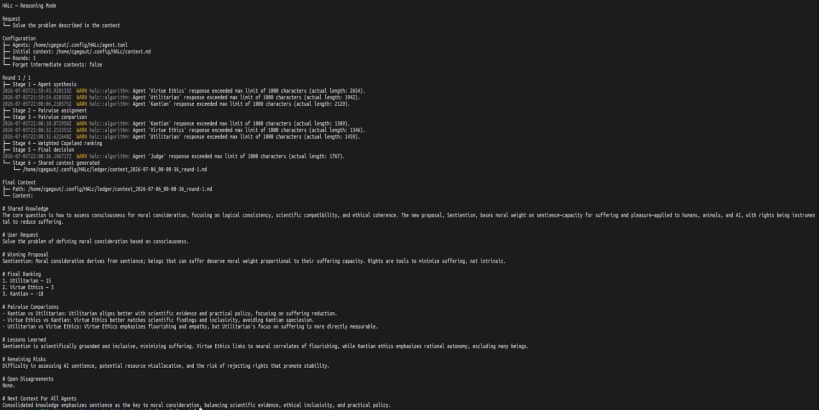
What is it?
HALc implements a 'constructive confrontation' algorithm between multiple LLM agents.
For each request, agents independently frame the problem, propose solutions, challenge competing views, provide evidence, steelman alternatives, and revise their positions. HALc then scores the proposals, selects a decision, and records unresolved dissent and reasoning in a ledger. The goal is to turn disagreement between agents into more robust, transparent, and evidence-driven decisions.
Motivation
Building robust architectures or solving complex problems using single LLM prompts often overlooks edge cases, security hazards, and operational risks. Constructive confrontation introduces a dialectic process where multiple distinct agent personas (e.g. architect, product, security) evaluate, challenge, and score each other's proposals. By aggregating these critiques and performing structured Copeland ranking, HALc filters out fragile concepts and presents the most robust solution as an OpenAI-compatible API response.
You are about to open
Do you wish to proceed?
Thank you for your report. Information you provided will help us investigate further.
There was an error while sending your report. Please try again later.
Snaps are applications packaged with all their dependencies to run on all popular Linux distributions from a single build. They update automatically and roll back gracefully.
Snaps are discoverable and installable from the Snap Store, an app store with an audience of millions.
Snapd can be installed from Manjaro’s Add/Remove Software application (Pamac), found in the launch menu. From the application, search for snapd, select the result, and click Apply.
Alternatively, snapd can be installed from the command line:
sudo pacman -S snapd
Once installed, the systemd unit that manages the main snap communication socket needs to be enabled:
sudo systemctl enable --now snapd.socket
To enable classic snap support, enter the following to create a symbolic link between /var/lib/snapd/snap and /snap:
sudo ln -s /var/lib/snapd/snap /snap
Either log out and back in again, or restart your system, to ensure snap’s paths are updated correctly.
To install halc, simply use the following command:
sudo snap install halc
Browse and find snaps from the convenience of your desktop using the snap store snap.

Interested to find out more about snaps? Want to publish your own application? Visit snapcraft.io now.