A lightweight Linux keyboard-first file & application quick launcher inspired by Everything and Listary workflows. Disclaimer: Independent open-source project, not affiliated with voidtools (Everything) or Listary / Biao Wang.
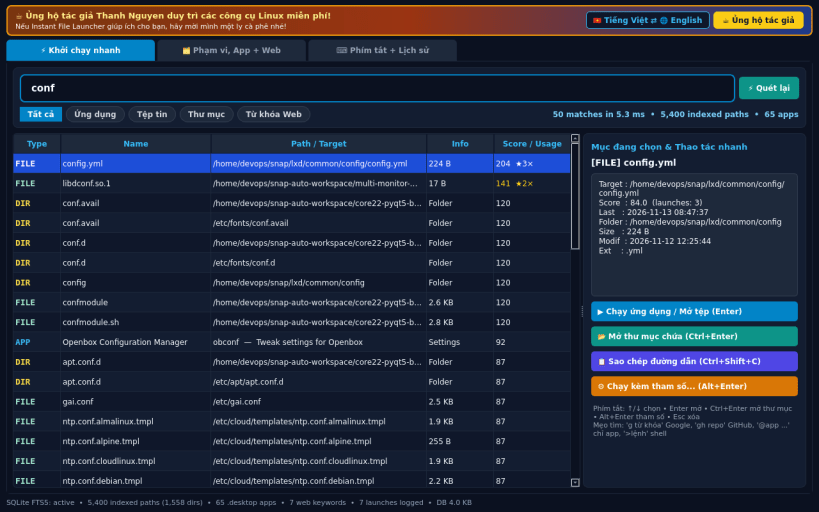
INSTANT PALETTE LAUNCHER • Keyboard-first search bar with Up/Down/Enter/Shortcuts over two real indexes: (1) SQLite FTS5 incremental file index tracking mtime + size under your selected folders and real home directory, and (2) FreeDesktop .desktop application scanner. • Ranked by fuzzy prefix, word-initial, substring, and subsequence matching combined with real SQLite usage frequency and recency boost. • Quick actions: Launch App / Open File (xdg-open), Open Containing Folder, Copy Path, Run File or Command with Custom Arguments in a working directory, plus Custom Web-Search Keywords (g, gh, wp, py, ddg, so, apt).
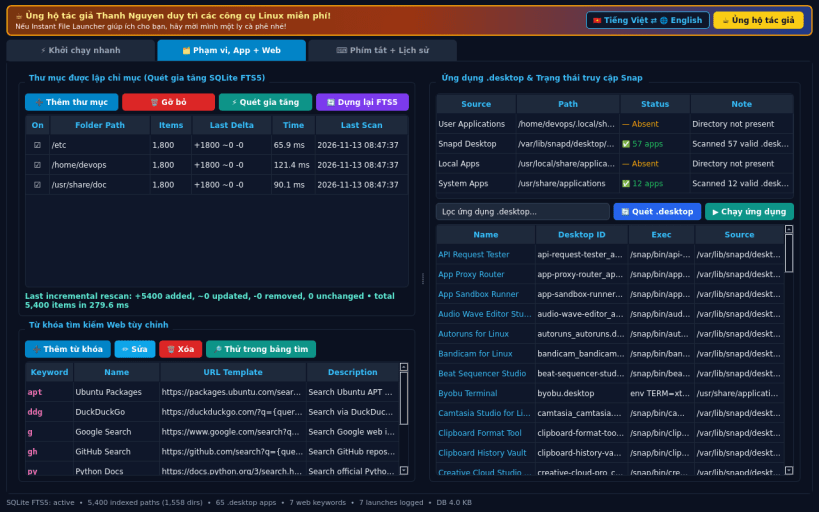
INDEX SCOPE, .DESKTOP APPS & WEB KEYWORDS • Add/remove indexed folders and run incremental rescans showing exact added/updated/removed file deltas and elapsed milliseconds. • Browse all discovered .desktop entries and inspect real strict-snap host access status; add, edit, or remove custom web-search keywords.
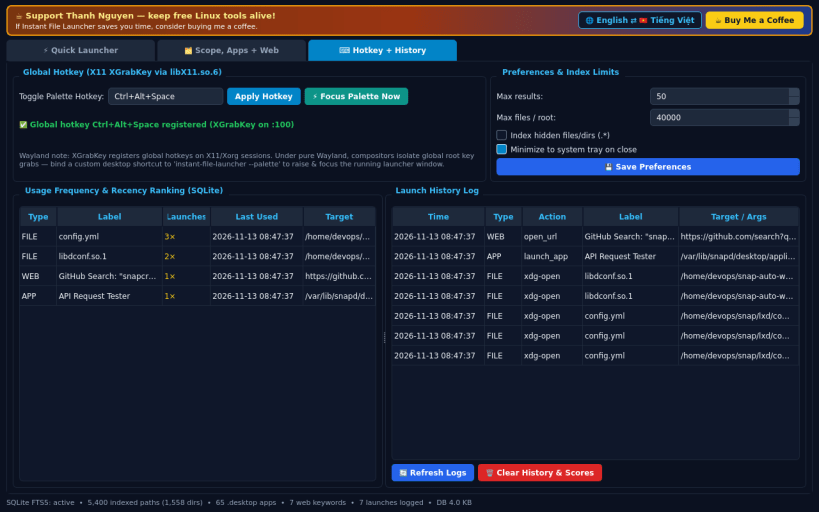
GLOBAL HOTKEY, LAUNCH HISTORY & PREFERENCES • Global X11 toggle hotkey via XGrabKey (libX11.so.6, default Ctrl+Alt+Space) to focus the quick launcher palette; includes Wayland shortcut fallback. • Inspect launch history, usage frequency scores, and configure search limits.
LIMITATIONS (honest)
• Global hotkey registration uses X11 XGrabKey; on pure Wayland sessions,
compositors block global root grabs — bind a desktop shortcut to
instant-file-launcher --palette instead.
• Host .desktop directories under /usr/share/applications require the
system-backup plug (sudo snap connect instant-file-launcher:system-backup).
SUPPORT & DONATE: https://buymeacoffee.com/thanhnv128b
You are about to open
Do you wish to proceed?
Thank you for your report. Information you provided will help us investigate further.
There was an error while sending your report. Please try again later.
Snaps are applications packaged with all their dependencies to run on all popular Linux distributions from a single build. They update automatically and roll back gracefully.
Snaps are discoverable and installable from the Snap Store, an app store with an audience of millions.
On Arch Linux, snap can be installed from the Arch User Repository (AUR). The manual build process is the Arch-supported install method for AUR packages, and you’ll need the prerequisites installed before you can install any AUR package. You can then install snap with the following:
git clone https://aur.archlinux.org/snapd.git
cd snapd
makepkg -si
Once installed, the systemd unit that manages the main snap communication socket needs to be enabled:
sudo systemctl enable --now snapd.socket
If AppArmor is enabled in your system, enable the service which loads AppArmor profiles for snaps:
sudo systemctl enable --now snapd.apparmor.service
To enable classic snap support, enter the following to create a symbolic link between /var/lib/snapd/snap and /snap:
sudo ln -s /var/lib/snapd/snap /snap
Either log out and back in again, or restart your system, to ensure snap’s paths are updated correctly.
To install Instant File Launcher, simply use the following command:
sudo snap install instant-file-launcher
Browse and find snaps from the convenience of your desktop using the snap store snap.
Interested to find out more about snaps? Want to publish your own application? Visit snapcraft.io now.