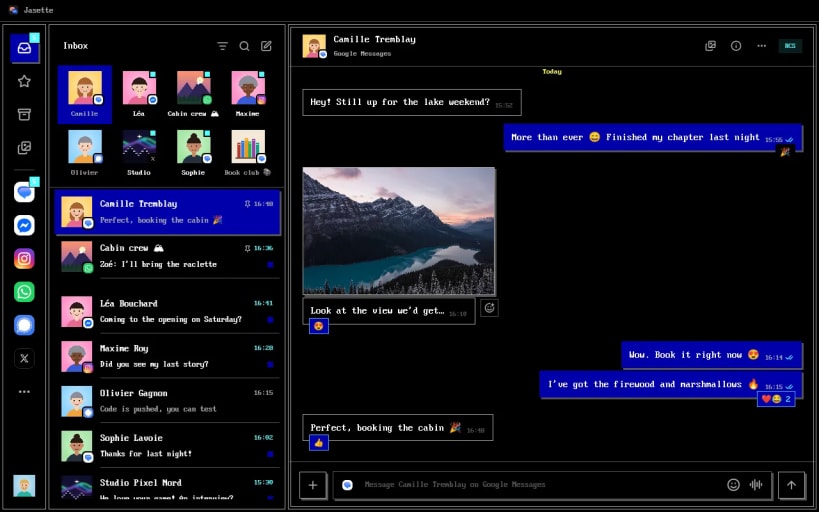
Jasette brings 20 messengers together in a single fast window: Google Messages (SMS and RCS), Messenger, Instagram, WhatsApp, Signal, X, Telegram, Bluesky, Discord, Reddit, LinkedIn, Slack, GroupMe, Snapchat (experimental), iMessage (through a Mac running the Jasette server), and the open protocols IRC, Matrix, XMPP, Mastodon and Zulip. One inbox, favorites, archives, groups and search across every service.
Jasette talks to each service directly from your computer: no third-party relay, no Jasette account. It can also connect to your own always-on Jasette server (the server itself is installed from the .deb or .tar.gz at jasette.net).
Features:
Recording voice messages needs the microphone: snap connect jasette:audio-record
Snapchat is experimental: it is an unofficial client, Snap's terms forbid it and the account can be limited, locked or banned. Jasette shows a warning first; use a test account.
Jasette is an independent project. It is not affiliated with, endorsed by or sponsored by Google, Meta, WhatsApp, Signal, X, Telegram, Bluesky, Discord, Reddit, LinkedIn, Apple, Slack, GroupMe, Snap, Zulip, Mastodon, the Matrix.org Foundation or any other service it connects to; their names belong to their owners. Some services are reached through unofficial protocols (the same ones their web or mobile apps use), which those services may change or restrict at any time; use them at your own risk and within each service's terms.
Thank you for your report. Information you provided will help us investigate further.
There was an error while sending your report. Please try again later.
Snaps are applications packaged with all their dependencies to run on all popular Linux distributions from a single build. They update automatically and roll back gracefully.
Snaps are discoverable and installable from the Snap Store, an app store with an audience of millions.
If you’re running Kubuntu 16.04 LTS (Xenial Xerus) or later, including Kubuntu 18.04 LTS (Bionic Beaver) and Kubuntu 18.10 (Cosmic Cuttlefish), you don’t need to do anything. Snap is already installed and ready to go.
Versions of Kubuntu between 14.04 LTS (Trusty Tahr) and 15.10 (Wily Werewolf) don’t include snap by default, but snap can be installed from the command line as follows:
sudo apt update
sudo apt install snapd
To install Jasette, simply use the following command:
sudo snap install jasette

Browse and find snaps from the convenience of your desktop using the snap store snap.

Interested to find out more about snaps? Want to publish your own application? Visit snapcraft.io now.