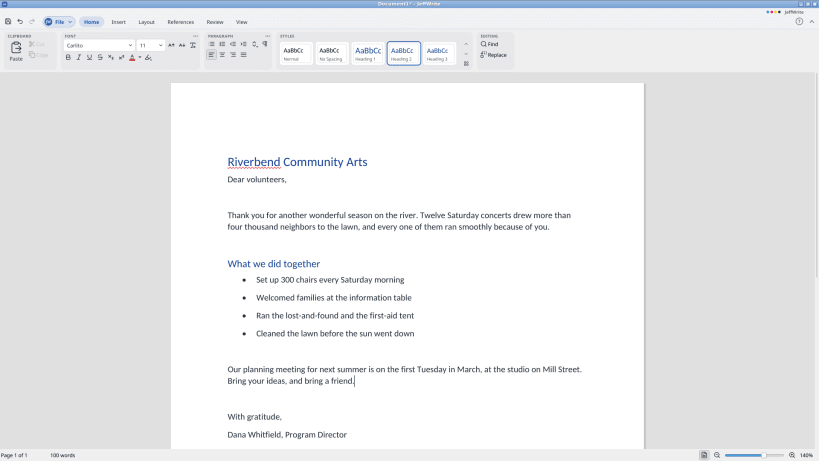
JeffOffice is a free, open-source office suite for Linux, Windows, and macOS. Its four apps open and save the file formats people already use: .docx, .xlsx, .pptx, .pub, and the OpenDocument formats. No account, no subscription, and no ads.
JeffWrite, the word processor (a beta), writes letters, reports, resumes, and other documents. It opens .docx, .doc, .rtf, and .odt files and saves .docx and .odt, with tables, headers and footers, footnotes and endnotes, tracked changes and comments, pictures and text boxes, styles, spelling, printing, and PDF export.
JeffCrunch, the spreadsheet (a beta), opens .xlsx, .xlsm, .xls, .ods, and .csv workbooks, including ones protected with a password, and saves .xlsx, .xls, and .ods. It works out formulas and functions, including formulas that spill into the cells beside them, and has sorting and filtering, pivot tables, charts, equations, and printing.
JeffDeck, for presentations, makes slides and runs slide shows. It opens .pptx, .ppt, and .odp presentations and saves .pptx and .odp, with transitions and animations, sound and video, charts, speaker notes, and PDF export.
JeffPub, for desktop publishing, lays out flyers, newsletters, brochures, business cards, certificates, and other print pieces, with templates, mail merge, charts, equations, comments, and PDF export. It opens and saves Publisher (.pub) files.
In every app: a ribbon and quick toolbar you can set up yourself, your own shortcut keys, an accessibility checker, PDF/A export, removing personal information when you save, and the interface in English, Spanish, French, German, Italian, Dutch, Portuguese, Russian, Indonesian, and Ukrainian.
The apps run as jeffoffice.jeffpub, jeffoffice.jeffdeck, jeffoffice.jeffwrite, and jeffoffice.jeffcrunch, and each has its own entry in the application menu.
Files in your home folder open directly. For files on a USB drive or another removable disk, allow access once with: sudo snap connect jeffoffice:removable-media Files elsewhere open through the file dialog. Printing goes through the system's print service (the cups interface). If printing doesn't work, run sudo snap connect jeffoffice:cups and try again; saving a PDF always works.
You are about to open
Do you wish to proceed?
Thank you for your report. Information you provided will help us investigate further.
There was an error while sending your report. Please try again later.
Snaps are applications packaged with all their dependencies to run on all popular Linux distributions from a single build. They update automatically and roll back gracefully.
Snaps are discoverable and installable from the Snap Store, an app store with an audience of millions.
Snap is available for CentOS 7.6+, and Red Hat Enterprise Linux 7.6+, from the Extra Packages for Enterprise Linux (EPEL) repository. The EPEL repository can be added to your system with the following command:
sudo yum install epel-release
Snap can now be installed as follows:
sudo yum install snapd
Once installed, the systemd unit that manages the main snap communication socket needs to be enabled:
sudo systemctl enable --now snapd.socket
To enable classic snap support, enter the following to create a symbolic link between /var/lib/snapd/snap and /snap:
sudo ln -s /var/lib/snapd/snap /snap
Either log out and back in again, or restart your system, to ensure snap’s paths are updated correctly.
To install JeffOffice, simply use the following command:
sudo snap install jeffoffice --beta

Browse and find snaps from the convenience of your desktop using the snap store snap.

Interested to find out more about snaps? Want to publish your own application? Visit snapcraft.io now.