
Markaz - The Centre of Your Deen!
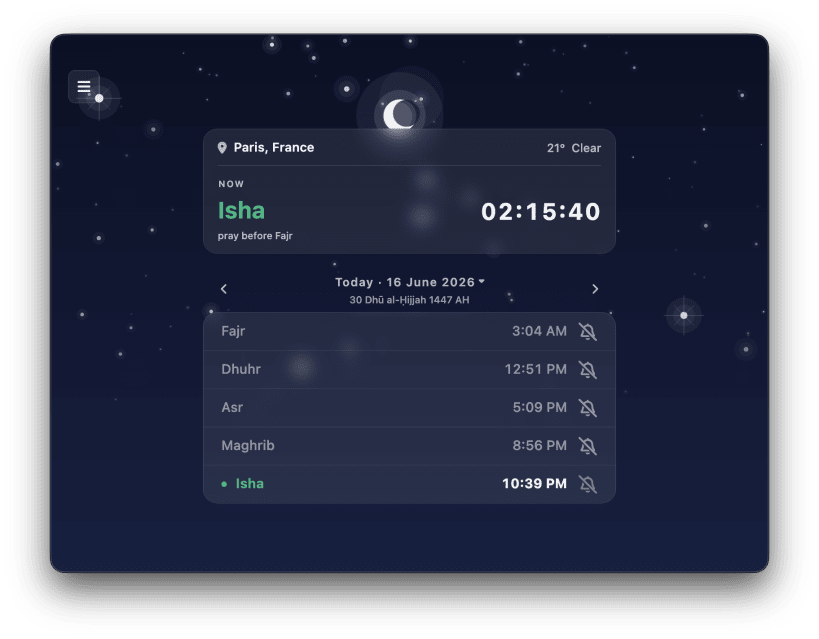
Never miss a prayer again. Markaz calculates accurate prayer times using proven astronomical formulas and works entirely offline to deliver reliable prayer times wherever you are.
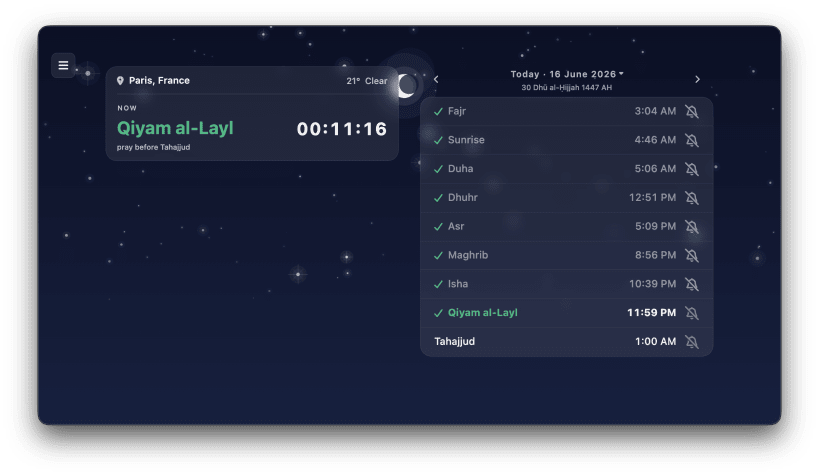
🕌 Precise Prayer Times • All five daily prayers plus Sunrise, Duha, Qiyam al-Layl and Tahajjud • Live countdown to the next prayer so you're always prepared • More than 20 internationally recognised calculation methods (Muslim World League, Umm Al-Qura, ISNA, Egyptian, and more), plus a fully customisable method for your own angles • Hanafi and Shafi'i juristic schools support • Browse past and future dates with a built-in date picker • Hijri (Islamic) calendar date display • 12-hour or 24-hour time format support
📖 The Holy Quran & Audio • Read the entire Quran with beautiful typography and translations • High-quality audio recitations with integrated media controls • Resume reading or listening exactly where you left off
📚 Learn How to Pray • Step-by-step interactive Salah walkthroughs with an animated 3D guide, synced Quran recitation, transliteration, and translation • A growing library of authentic guides covering Wudu & purification, congregational prayer, and the fundamentals of Salah
📿 Tasbih & Dhikr • A beautiful digital tasbih counter to track your daily dhikr and adhkar, wherever you are
💡 Daily Inspiration • Start your day with a brand new "Ayah of the Day" • Beautiful "Daily Dawah" (Authentic Hadiths and Islamic quotes) dynamically updated every day
🧭 Qibla Compass • Built-in compass shows the precise direction to the Kaaba from your location • Real-time bearing readout in degrees
🗺️ Find Places • Easily discover nearby halal restaurants and masjids on a beautiful, interactive map • Stay informed with real-time updates, special offers, and announcements posted directly by place owners • Claim and manage your own business, share updates, and connect with the community
📍 Flexible Location • Automatic GPS detection • Search for any city worldwide • Enter coordinates manually for maximum precision and privacy
🐧 Native Linux Experience • System Tray Integration: Keep Markaz running quietly in the background via your desktop's System Tray (AppIndicator support) for instant access without cluttering your dock • Seamless Media Controls: Control Quran audio playback natively using your keyboard's media keys or your desktop environment's sound menu via MPRIS integration • Beautiful Desktop UI: A fully responsive, beautifully crafted desktop interface that adapts perfectly to your monitor size and supports native GTK/Linux dark modes
🔔 Prayer Notifications • Get notified for each prayer with beautiful adhan sounds from Makkah, Madinah, Al-Aqsa, and many more • Customise notification mode per prayer - sound, vibration, or silent
🎨 Beautiful & Adaptive Design • Dynamic animated weather backgrounds that reflect real conditions • Dark, Light, or System-matched theme • Fully supports multiple languages, including Right-to-Left language support • Cloud sync your preferences seamlessly across devices • Choose which prayers to show or hide on your dashboard
You are about to open
Do you wish to proceed?
Thank you for your report. Information you provided will help us investigate further.
There was an error while sending your report. Please try again later.
Snaps are applications packaged with all their dependencies to run on all popular Linux distributions from a single build. They update automatically and roll back gracefully.
Snaps are discoverable and installable from the Snap Store, an app store with an audience of millions.
Snapd can be installed from Manjaro’s Add/Remove Software application (Pamac), found in the launch menu. From the application, search for snapd, select the result, and click Apply.
Alternatively, snapd can be installed from the command line:
sudo pacman -S snapd
Once installed, the systemd unit that manages the main snap communication socket needs to be enabled:
sudo systemctl enable --now snapd.socket
To enable classic snap support, enter the following to create a symbolic link between /var/lib/snapd/snap and /snap:
sudo ln -s /var/lib/snapd/snap /snap
Either log out and back in again, or restart your system, to ensure snap’s paths are updated correctly.
To install Markaz, simply use the following command:
sudo snap install markaz
Browse and find snaps from the convenience of your desktop using the snap store snap.

Interested to find out more about snaps? Want to publish your own application? Visit snapcraft.io now.