See a Marketo lead's whole story on one screen, and why they MQL'd.
mkto is a read-only command-line client for Marketo Engage, made for SDRs, RevOps and Marketing Ops.
What you can do
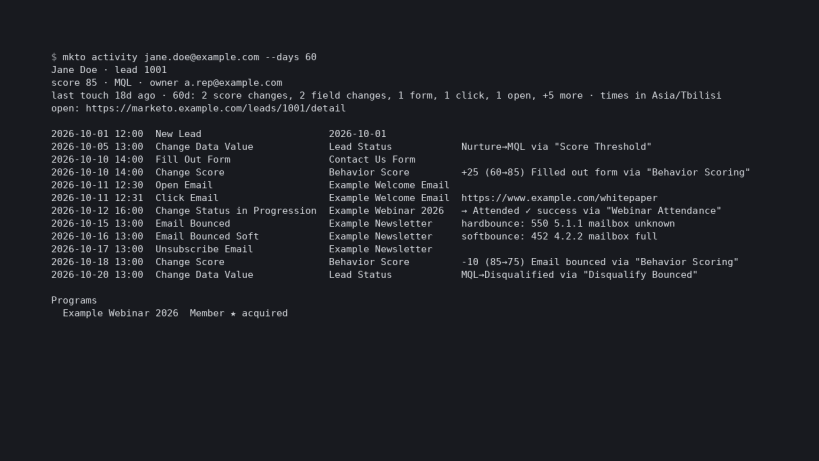
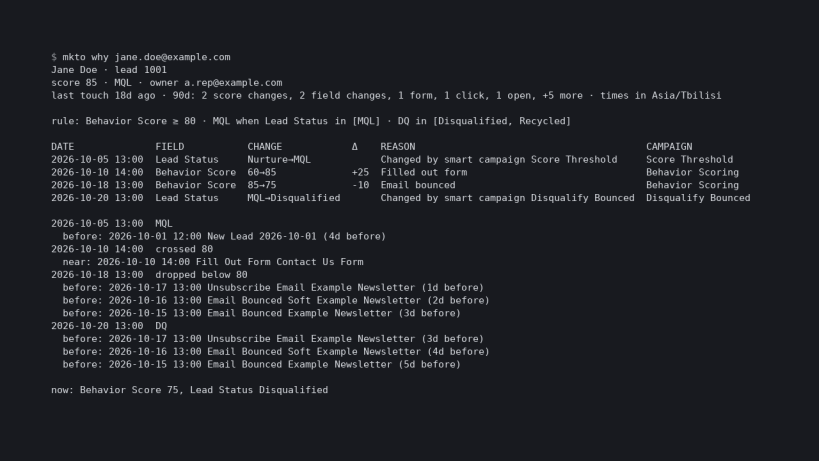
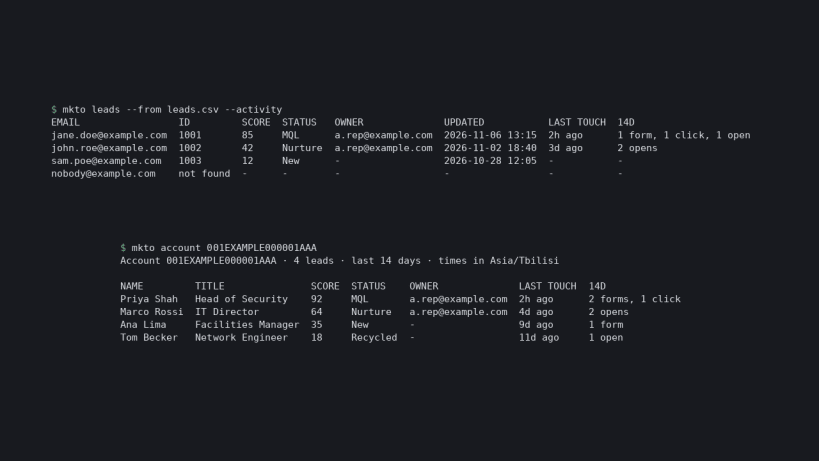
mkto activity <email> shows a call card (score, status, owner, last touch) and a timeline where every change says what changed: +25 (60→85) Filled out form, Nurture→MQL, the program status, and the smart campaign behind it.mkto why <email> lists every score and status change with its reason and campaign, where the score crossed your threshold, and what the lead did just before.mkto leads --from leads.csv looks up hundreds of emails in a few API calls, with CSV output.mkto account <sfdcAccountId> lists everyone at a Salesforce account, highest score first.mkto fields and mkto types show your instance's real field and activity names.mkto doctor tests credentials, API permissions and your config.mkto quota --by-user shows usage per API user.Safe by design
mkto brief) are off by default and send only redacted data.Get started
sudo snap install mkto --edge
mkto init # then add your Marketo API credentials
mkto doctor
Full guide: https://github.com/canonical/snap-mkto
You are about to open
Do you wish to proceed?
Thank you for your report. Information you provided will help us investigate further.
There was an error while sending your report. Please try again later.
Snaps are applications packaged with all their dependencies to run on all popular Linux distributions from a single build. They update automatically and roll back gracefully.
Snaps are discoverable and installable from the Snap Store, an app store with an audience of millions.
If you’re running Ubuntu 16.04 LTS (Xenial Xerus) or later, including Ubuntu 18.04 LTS (Bionic Beaver) and Ubuntu 20.04 LTS (Focal Fossa), you don’t need to do anything. Snap is already installed and ready to go.
For versions of Ubuntu between 14.04 LTS (Trusty Tahr) and 15.10 (Wily Werewolf), as well as Ubuntu flavours that don’t include snap by default, snap can be installed from the Ubuntu Software Centre by searching for snapd.
Alternatively, snapd can be installed from the command line:
sudo apt update
sudo apt install snapd
Either log out and back in again, or restart your system, to ensure snap’s paths are updated correctly.
To install mkto, simply use the following command:
sudo snap install mkto --beta
Browse and find snaps from the convenience of your desktop using the snap store snap.
Interested to find out more about snaps? Want to publish your own application? Visit snapcraft.io now.