A Linux alternative to Files App. Independent open-source project, not affiliated with or endorsed by Files Community.
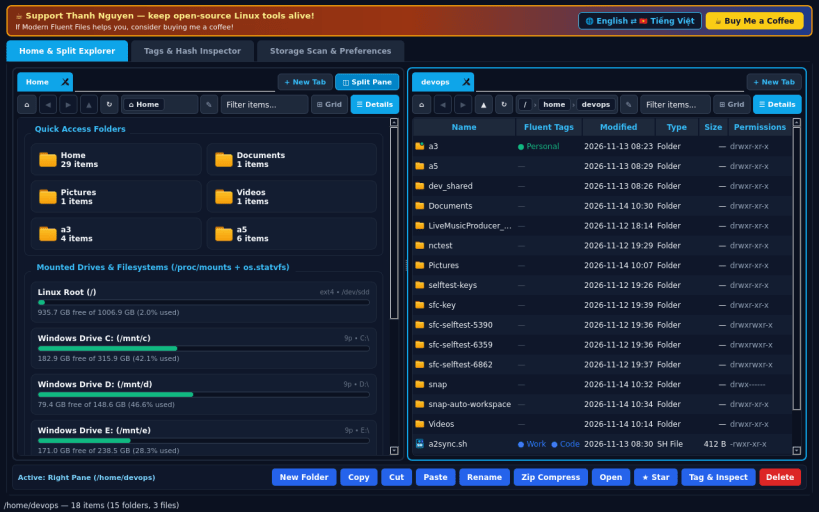
MODERN HOME DASHBOARD & TABBED SPLIT BROWSER • Multi-tab file browsing (+ New Tab) with Back, Forward, Up, Refresh, clickable interactive breadcrumbs, editable path bar, and instant filter. • Switch seamlessly between Fluent Grid Cards View and Details Table View, or toggle Dual Split-Pane mode to manage and copy files side by side. • Home Overview presents Quick Access folders, real mounted filesystems and drives with colored usage capacity bars (os.statvfs + /proc/mounts), plus starred items and recent files from your real home directory. • Real file operations: New Folder, Cut/Copy/Paste, Rename, Delete, Zip Compress (DEFLATE), Star/Pin, and Open via xdg-open.
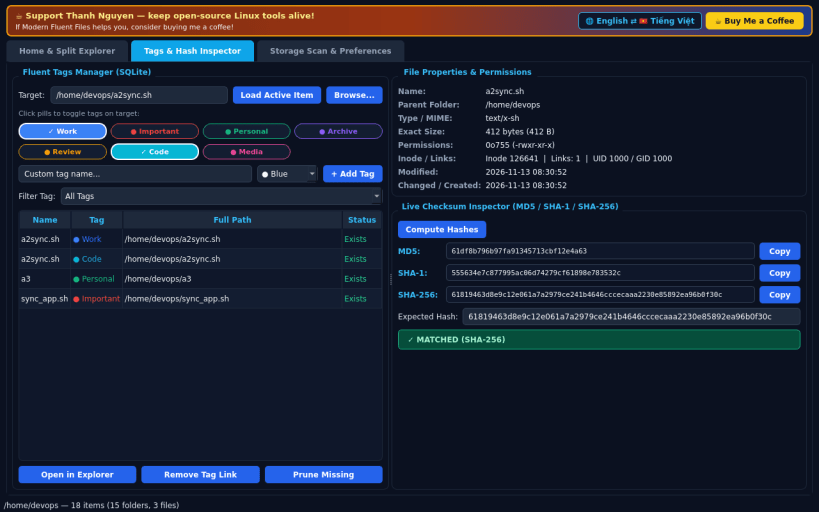
FLUENT TAGS MANAGER & CHECKSUM INSPECTOR • Organize any file or folder with colorful Fluent pill tags stored locally in SQLite, filter tagged items, and jump straight to their location. • Inspect real file metadata: exact size in bytes, octal & rwx permissions, inode, link count, timestamps, and MIME guess. • Compute live MD5, SHA-1, and SHA-256 hashes and verify against an expected checksum with instant match/mismatch status.
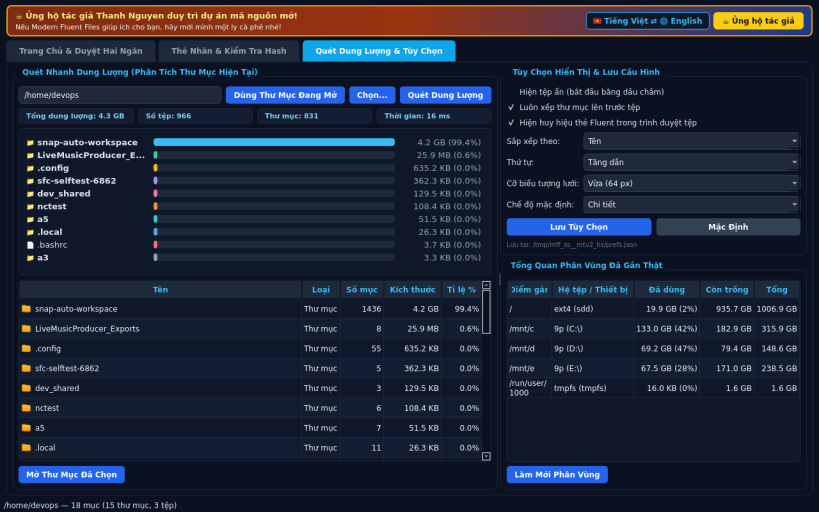
STORAGE QUICK SCAN & VIEW PREFERENCES • Fast recursive breakdown bar chart of subfolder and file sizes inside any active directory, plus quick navigation into top space consumers. • Persistent view preferences saved locally: hidden dotfiles toggle, folders-first sorting, sort column/order, and grid card icon sizes. • Default English UI with optional full Vietnamese language toggle.
LIMITATIONS (honest) • Under strict Snap confinement, browsing is scoped to your real home directory, mounted media under /media or /mnt, and system paths permitted by Snap interfaces.
SUPPORT & DONATE • Created by Thanh Nguyen — https://buymeacoffee.com/thanhnv128b
You are about to open
Do you wish to proceed?
Thank you for your report. Information you provided will help us investigate further.
There was an error while sending your report. Please try again later.
Snaps are applications packaged with all their dependencies to run on all popular Linux distributions from a single build. They update automatically and roll back gracefully.
Snaps are discoverable and installable from the Snap Store, an app store with an audience of millions.
Snap can be installed from the command line on openSUSE Leap 15.x and Tumbleweed.
You need first add the snappy repository from the terminal. Choose the appropriate command depending on your installed openSUSE flavor.
Tumbleweed:
sudo zypper addrepo --refresh https://download.opensuse.org/repositories/system:/snappy/openSUSE_Tumbleweed snappy
Leap 15.x:
sudo zypper addrepo --refresh https://download.opensuse.org/repositories/system:/snappy/openSUSE_Leap_15.6 snappy
If needed, Swap out openSUSE_Leap_15. for, openSUSE_Leap_16.0 if you’re using a different version of openSUSE.
With the repository added, import its GPG key:
sudo zypper --gpg-auto-import-keys refresh
Finally, upgrade the package cache to include the new snappy repository:
sudo zypper dup --from snappy
Snap can now be installed with the following:
sudo zypper install snapd
You then need to either reboot, logout/login or source /etc/profile to have /snap/bin added to PATH.
Additionally, enable and start both the snapd and the snapd.apparmor services with the following commands:
sudo systemctl enable --now snapd
sudo systemctl enable --now snapd.apparmor
To install Modern Fluent Files, simply use the following command:
sudo snap install modern-fluent-files
Browse and find snaps from the convenience of your desktop using the snap store snap.
Interested to find out more about snaps? Want to publish your own application? Visit snapcraft.io now.