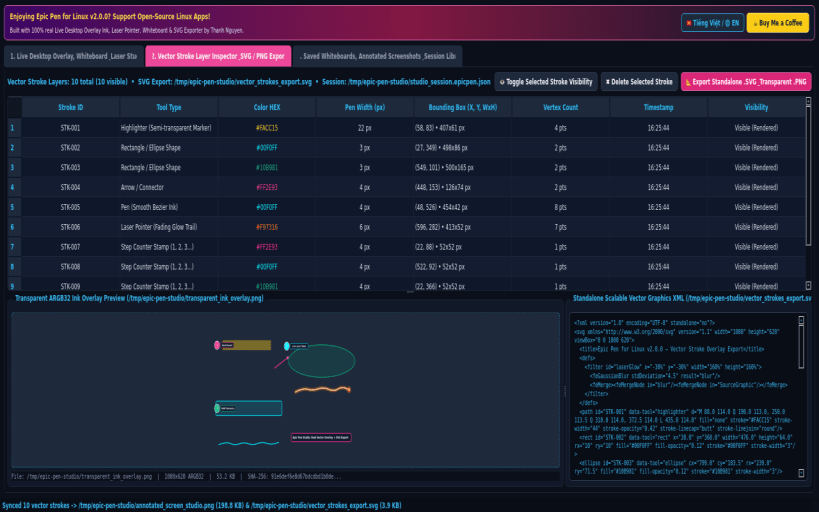
Epic Pen for Linux v2.0.0 is a desktop screen overlay drawing tool, interactive whiteboard/chalkboard studio, laser pointer, and vector SVG annotation exporter built natively with Python 3 and PyQt5 for Linux desktops.
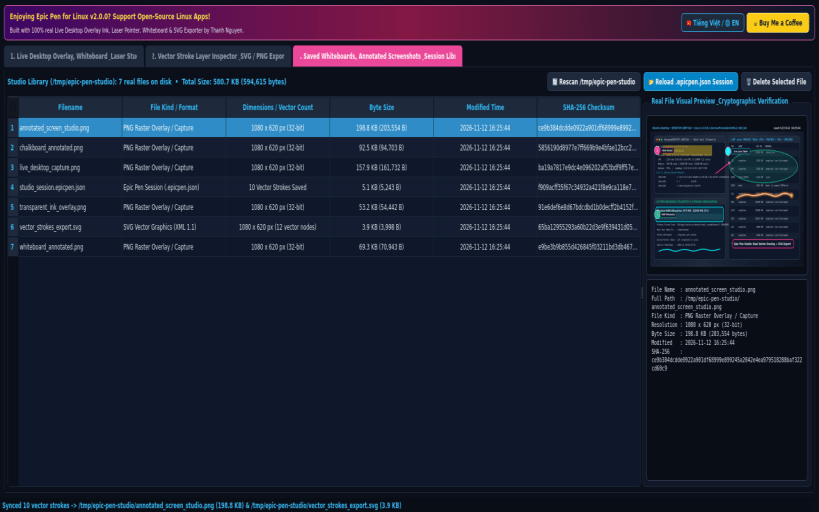
KEY FEATURES: • Real Live Desktop Screen Overlay, Chalkboard & Whiteboard Ink Studio: Captures the live desktop screen via X11/Wayland (QGuiApplication.primaryScreen().grabWindow(0)) or switches to Dark Grid Chalkboard and Pure Whiteboard canvases with 12 vivid neon ink colors and 2px..32px brush widths. • 8 Interactive Vector Drawing Tools: Smooth Bezier Pen Ink, Semi-Transparent Highlighter Marker, Fading Glow Laser Pointer Trail, Arrow/Connector, Rectangle/Ellipse Shapes, Numbered Step Counter Stamps (1, 2, 3...), Callout Text Annotations, and Interactive Stroke Eraser with full Undo/Redo stack. • Vector Stroke Layer Inspector & Standalone SVG / Transparent PNG Exporter: Inspects every vector stroke object (Stroke ID, Tool Type, HEX Color, Width, Bounding Box WxH, Vertex Count, Timestamp), toggles visibility or deletes individual layers, and exports standard XML .svg, Transparent Overlay .png, and .epicpen.json session files to /tmp/epic-pen-studio.
SUPPORT & DONATE: • Created by Thanh Nguyen — Support ongoing development: https://buymeacoffee.com/thanhnv128b
You are about to open
Do you wish to proceed?
Thank you for your report. Information you provided will help us investigate further.
There was an error while sending your report. Please try again later.
Snaps are applications packaged with all their dependencies to run on all popular Linux distributions from a single build. They update automatically and roll back gracefully.
Snaps are discoverable and installable from the Snap Store, an app store with an audience of millions.
Snap can be installed on elementary OS from the command line. Open Terminal from the Applications launcher and type the following:
sudo apt update
sudo apt install snapd
Either log out and back in again, or restart your system, to ensure snap’s paths are updated correctly.
To install Epic Pen for Linux, simply use the following command:
sudo snap install open-epic-pen
Browse and find snaps from the convenience of your desktop using the snap store snap.
Interested to find out more about snaps? Want to publish your own application? Visit snapcraft.io now.