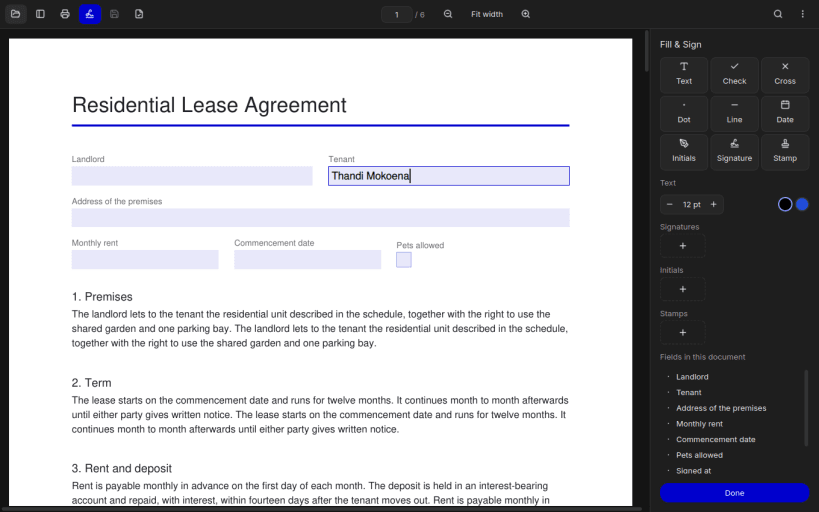

PDR Sign is a free PDF reader for the Linux desktop. Documents open in a continuous, smoothly scrolling view with thumbnails, the outline, full-text search, text selection and printing, and it follows your light or dark theme.
Fill & Sign lets you complete forms without leaving the reader: type into form fields, add text, ticks, crosses, dots, lines and dates anywhere on the page, and place your signature, initials or a company stamp. Draw a signature with a touchpad or mouse, type it in a handwriting font, or clean up a phone photo of it on paper. Saved signatures and stamps stay on your computer.
Save keeps your entries editable in PDR Sign and visible in every PDF reader. Save signed copy writes a new file next to the original with everything locked into the pages, while the original stays unchanged for corrections.
PDR Sign is free and open source, with no ads, subscriptions or paywalled features. It is supported by donations.
Thank you for your report. Information you provided will help us investigate further.
There was an error while sending your report. Please try again later.
Snaps are applications packaged with all their dependencies to run on all popular Linux distributions from a single build. They update automatically and roll back gracefully.
Snaps are discoverable and installable from the Snap Store, an app store with an audience of millions.
If you’re running Ubuntu 16.04 LTS (Xenial Xerus) or later, including Ubuntu 18.04 LTS (Bionic Beaver) and Ubuntu 20.04 LTS (Focal Fossa), you don’t need to do anything. Snap is already installed and ready to go.
For versions of Ubuntu between 14.04 LTS (Trusty Tahr) and 15.10 (Wily Werewolf), as well as Ubuntu flavours that don’t include snap by default, snap can be installed from the Ubuntu Software Centre by searching for snapd.
Alternatively, snapd can be installed from the command line:
sudo apt update
sudo apt install snapd
Either log out and back in again, or restart your system, to ensure snap’s paths are updated correctly.
To install PDR Sign, simply use the following command:
sudo snap install pdr-sign --edge
Browse and find snaps from the convenience of your desktop using the snap store snap.

Interested to find out more about snaps? Want to publish your own application? Visit snapcraft.io now.