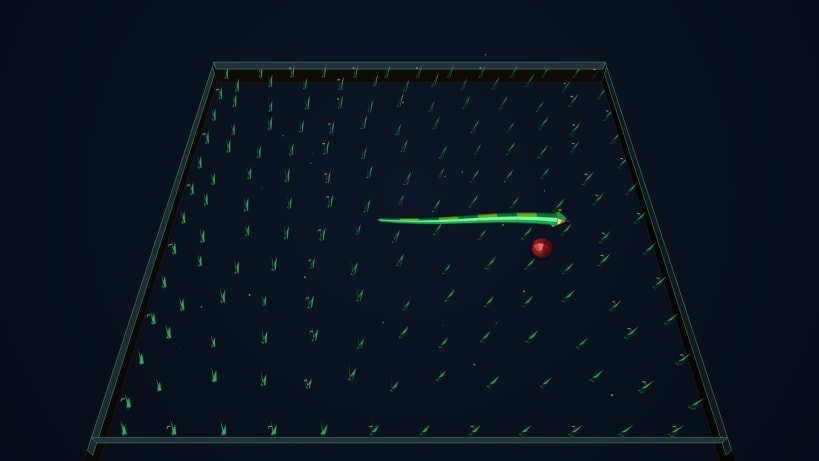
Relive the timeless arcade classic reimagined in breathtaking 3D!
Snake 3D: Slither Arena elevates the legendary retro snake experience into a high-fidelity 3D meadow world powered by modern .NET 10 and real-time GPU lighting. Slither, hunt, and weave through lush grass fields, capturing shiny red apples and racing against the clock for glowing Golden Apples while dodging stone walls and your own serpentine body!
🌟 WHY YOU'LL LOVE SNAKE 3D: SLITHER ARENA
🐍 Realistic Serpentine Physics & Movement Watch your snake move with genuine lateral wave kinematics, progressive anatomical muscle tapering from head to tail, and a live digestion bulge animation that realistically travels down the spine whenever you eat an apple!
🌿 Rich 3D Nature Arena Play across an expansive 24x24 meadow enclosed by weathered stone walls. Features dense 3D grass tufts swaying dynamically in the wind, blooming meadow daisies, soft ambient floor drop shadows, and floating 3D fireflies.
⚡ 3 Customizable Speed Modes Tailor the challenge to your reflex speed: • 🐢 Relaxed: Perfect for a calm, relaxing, casual slither session. • 🎯 Normal: The balanced, classic retro arcade challenge. • ⚡ Fast: High-octane reflex test for seasoned snake masters!
🍎 Juicy Apples & Rare Golden Bonuses Eat standard apples (+10 pts) to grow your snake, and watch for rare Golden Apples (+30 pts) that spawn with a 10-second countdown timer accompanied by sparkling particle explosions!
🏆 High Score & Offline Persistence Track your personal best and compete against your previous records. Scores and speed preferences save locally and persist across game restarts.
🎮 Precision Controls Zero input lag with buffered direction inputs preventing accidental 180° self-collisions. Supports Arrow Keys, WASD, and Spacebar pause.
💻 Lightweight, Fast & Modern Engineered on modern .NET 10 with direct hardware-accelerated SkiaSharp rendering, providing ultra-smooth 60+ FPS gameplay with low battery and CPU consumption.
Ready to claim the high score? Download Snake 3D: Slither Arena today and experience the classic snake game like never before!
You are about to open
Do you wish to proceed?
Thank you for your report. Information you provided will help us investigate further.
There was an error while sending your report. Please try again later.
Snaps are applications packaged with all their dependencies to run on all popular Linux distributions from a single build. They update automatically and roll back gracefully.
Snaps are discoverable and installable from the Snap Store, an app store with an audience of millions.
Snap is available for Red Hat Enterprise Linux (RHEL) 8 and RHEL 7, from the 7.6 release onward.
The packages for RHEL 7, RHEL 8, and RHEL 9 are in each distribution’s respective Extra Packages for Enterprise Linux (EPEL) repository. The instructions for adding this repository diverge slightly between RHEL 7, RHEL 8 and RHEL 9, which is why they’re listed separately below.
The EPEL repository can be added to RHEL 9 with the following command:
sudo dnf install https://dl.fedoraproject.org/pub/epel/epel-release-latest-9.noarch.rpm
sudo dnf upgrade
The EPEL repository can be added to RHEL 8 with the following command:
sudo dnf install https://dl.fedoraproject.org/pub/epel/epel-release-latest-8.noarch.rpm
sudo dnf upgrade
The EPEL repository can be added to RHEL 7 with the following command:
sudo rpm -ivh https://dl.fedoraproject.org/pub/epel/epel-release-latest-7.noarch.rpm
Adding the optional and extras repositories is also recommended:
sudo subscription-manager repos --enable "rhel-*-optional-rpms" --enable "rhel-*-extras-rpms"
sudo yum update
Snap can now be installed as follows:
sudo yum install snapd
Once installed, the systemd unit that manages the main snap communication socket needs to be enabled:
sudo systemctl enable --now snapd.socket
To enable classic snap support, enter the following to create a symbolic link between /var/lib/snapd/snap and /snap:
sudo ln -s /var/lib/snapd/snap /snap
Either log out and back in again or restart your system to ensure snap’s paths are updated correctly.
To install Snake 3D: Slither Arena, simply use the following command:
sudo snap install snake-3d

Browse and find snaps from the convenience of your desktop using the snap store snap.

Interested to find out more about snaps? Want to publish your own application? Visit snapcraft.io now.