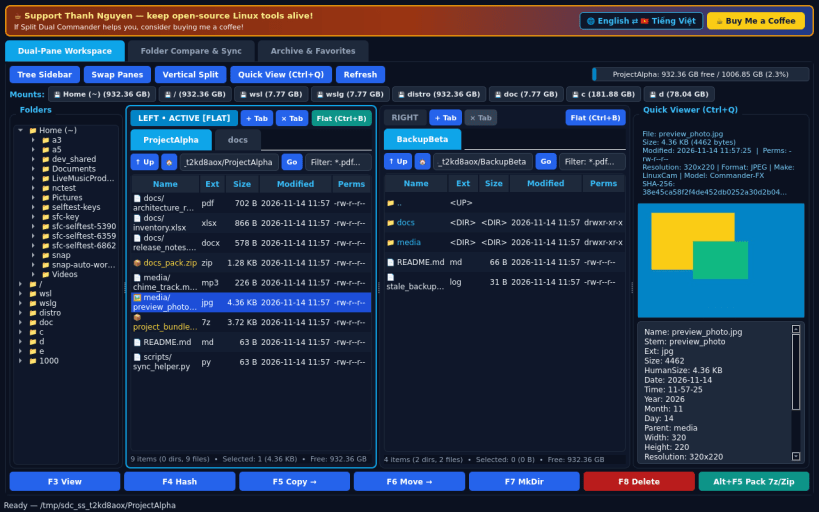
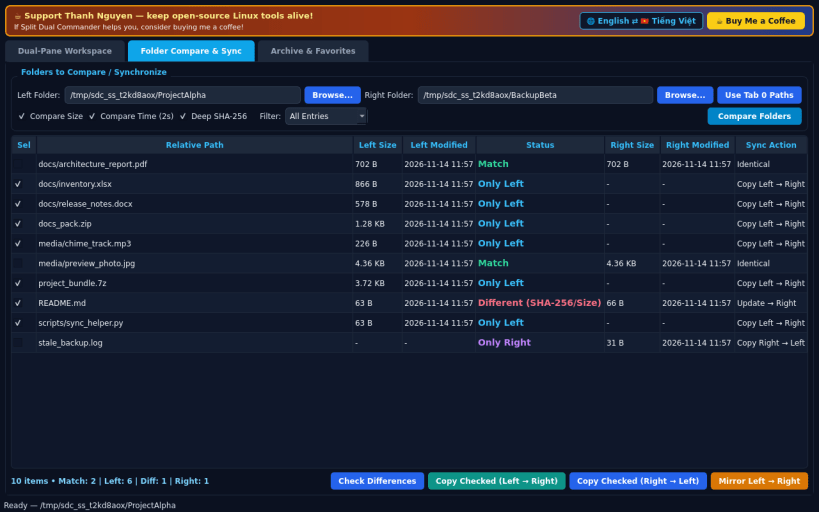
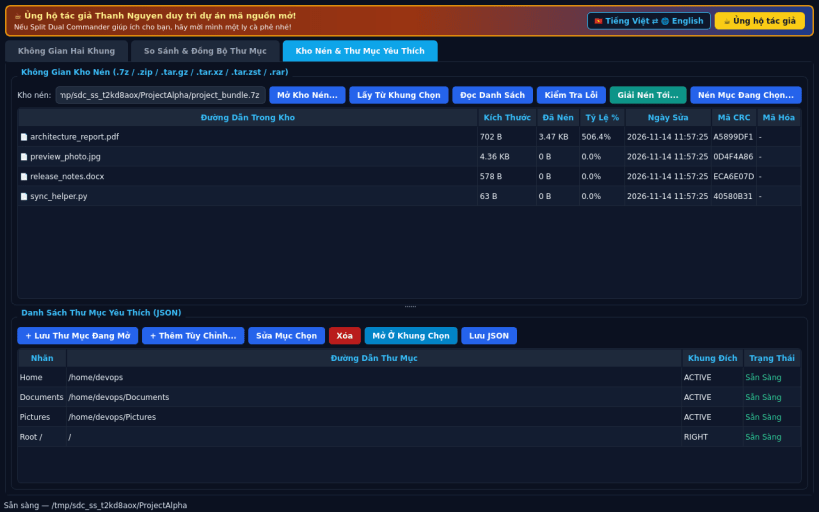
A lightweight Linux open-source alternative to FreeCommander for dual-pane tabbed file management, directory synchronization, and archive handling. Independent open-source project, not affiliated with or endorsed by Marek Jasinski.
DUAL-PANE TABBED WORKSPACE • Left and Right tabbed panels with + New Tab, Close Tab, Swap Panes, and instant Horizontal vs Vertical Split orientation toggle. • Live Quick Filter box per pane (substring & glob patterns) and Flat / Plain Branch View (Ctrl+B) flattening all subfolders into one sortable table. • Optional toggleable Left Directory Tree sidebar and Quick Viewer panel (Ctrl+Q) rendering images with EXIF, extracted PDF/DOCX/XLSX/text, archive contents, and 16-byte Hex dumps. • Real mount capacity bar reading /proc/mounts and os.statvfs, plus real F3 View, F4 Hash, F5 Copy, F6 Move, F7 MkDir, F8 Delete, and Alt+F5 Pack.
FOLDER COMPARE & SYNCHRONIZE • Recursively compare Left vs Right folders by Size, Modified Time, or streaming SHA-256 hash into Only Left, Different, Match, and Only Right. • Selectively copy or mirror differences across folders with real progress.
ARCHIVE WORKSPACE & FAVORITE FOLDERS • Browse, verify, extract, and create .7z, .zip, .tar.gz, .tar.xz, .tar.zst, and .rar archives, plus editable JSON Favorite Folders bookmarks.
SUPPORT & DONATE • Created by Thanh Nguyen — https://buymeacoffee.com/thanhnv128b
You are about to open
Do you wish to proceed?
Thank you for your report. Information you provided will help us investigate further.
There was an error while sending your report. Please try again later.
Snaps are applications packaged with all their dependencies to run on all popular Linux distributions from a single build. They update automatically and roll back gracefully.
Snaps are discoverable and installable from the Snap Store, an app store with an audience of millions.
Snap is available for CentOS 7.6+, and Red Hat Enterprise Linux 7.6+, from the Extra Packages for Enterprise Linux (EPEL) repository. The EPEL repository can be added to your system with the following command:
sudo yum install epel-release
Snap can now be installed as follows:
sudo yum install snapd
Once installed, the systemd unit that manages the main snap communication socket needs to be enabled:
sudo systemctl enable --now snapd.socket
To enable classic snap support, enter the following to create a symbolic link between /var/lib/snapd/snap and /snap:
sudo ln -s /var/lib/snapd/snap /snap
Either log out and back in again, or restart your system, to ensure snap’s paths are updated correctly.
To install Split Dual Commander, simply use the following command:
sudo snap install split-dual-commander
Browse and find snaps from the convenience of your desktop using the snap store snap.
Interested to find out more about snaps? Want to publish your own application? Visit snapcraft.io now.