SSH Host Vault is a Linux alternative to Termius for organising SSH hosts. Disclaimer: This project is an independent open-source tool and is not affiliated with, sponsored by, or endorsed by Termius Corporation.
What it really does:
• Encrypted vault: hosts, passwords/key passphrases, snippets and port-forward
rules are stored in one file encrypted with ChaCha20-Poly1305 (RFC 8439,
pure-Python implementation verified against the RFC test vectors); the key is
derived from your master password with scrypt (N=2^15, r=8, p=1).
Encrypted export / import with a separate password.
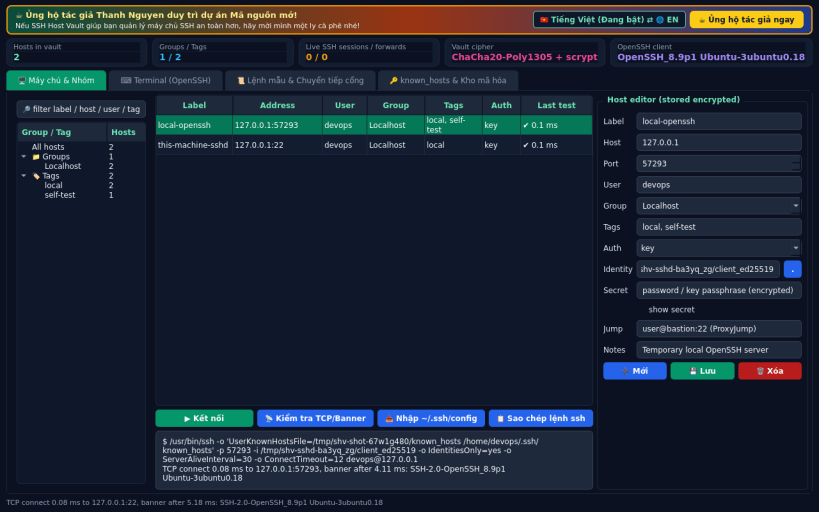
• Host groups and tags, search, TCP/banner reachability test with measured ms.
• Import concrete Host entries (incl. Include, LocalForward/DynamicForward)
from your real ~/.ssh/config.
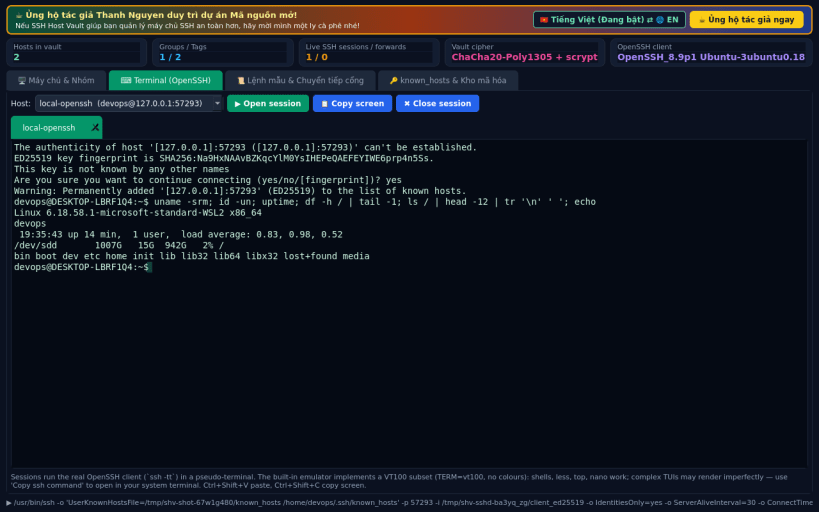
• Connect: launches the real OpenSSH ssh client in a pseudo-terminal shown
in a built-in VT100 terminal (basic, no colours). Stored passwords /
passphrases are typed automatically at the prompt.
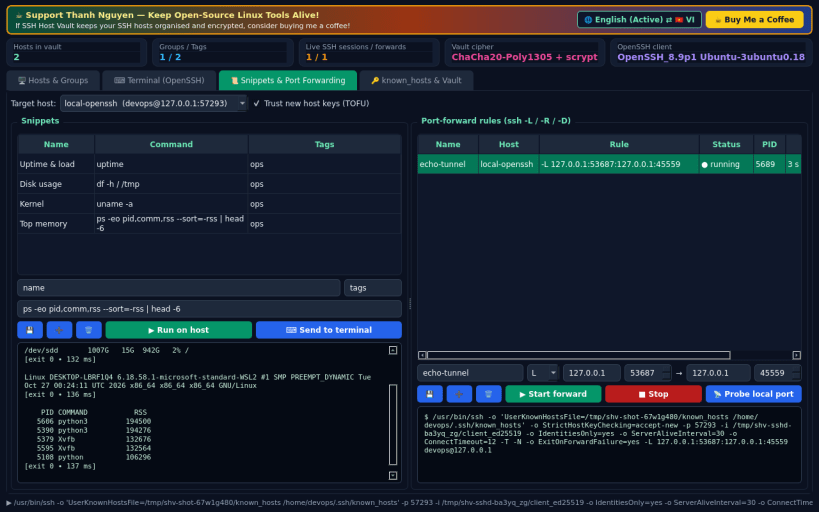
• Snippets: run commands on a host over ssh and see the output.
• Port forwarding rules (-L / -R / -D) started as real ssh processes.
• known_hosts viewer for ~/.ssh/known_hosts with SHA256 fingerprints,
hashed-entry lookup, ssh-keyscan and trust-on-confirm.
Snap notes: reading ~/.ssh (config, keys, known_hosts) needs the ssh-keys
interface: sudo snap connect ssh-host-vault:ssh-keys. Inside the snap ~/.ssh
is read-only, so newly accepted host keys are written to the app's own
known_hosts file. The built-in terminal is a VT100 subset; complex full-screen
programs may render imperfectly (use "Copy ssh command" for your terminal).
Support development: https://buymeacoffee.com/thanhnv128b
You are about to open
Do you wish to proceed?
Thank you for your report. Information you provided will help us investigate further.
There was an error while sending your report. Please try again later.
Snaps are applications packaged with all their dependencies to run on all popular Linux distributions from a single build. They update automatically and roll back gracefully.
Snaps are discoverable and installable from the Snap Store, an app store with an audience of millions.
Snap can be installed on elementary OS from the command line. Open Terminal from the Applications launcher and type the following:
sudo apt update
sudo apt install snapd
Either log out and back in again, or restart your system, to ensure snap’s paths are updated correctly.
To install SSH Host Vault, simply use the following command:
sudo snap install ssh-host-vault
Browse and find snaps from the convenience of your desktop using the snap store snap.
Interested to find out more about snaps? Want to publish your own application? Visit snapcraft.io now.