
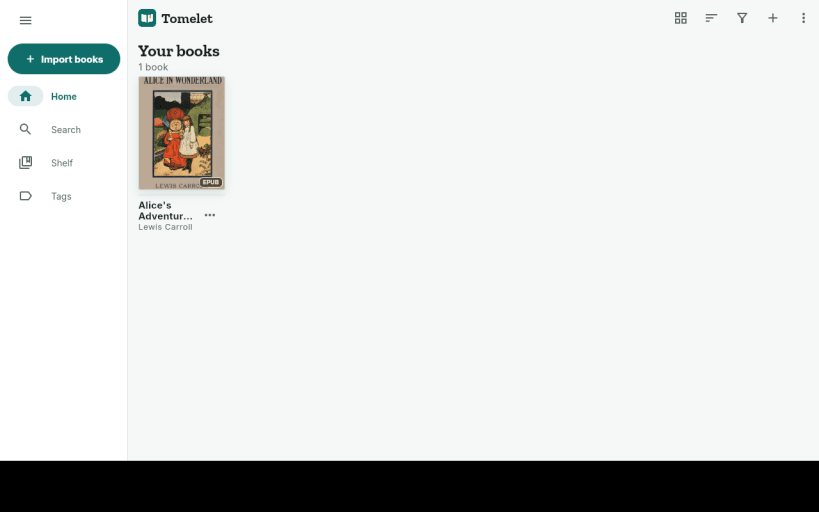
Read the book the way it was printed. Tomelet keeps the publisher's fonts, spacing and images, and lets you work on top of them: highlight, add notes and bookmarks, or draw on the page. It has its own typesetting engine and reads EPUB, PDF and many more formats.
Books locked with DRM are recognised and explained; Tomelet doesn't remove protection.
The reader is free and complete: it works offline, needs no account and shows no third-party ads. Tomelet Sync, an optional subscription, keeps your books, reading positions, highlights, notes and drawings in step across your devices. Everything is encrypted on your device before it is uploaded.
Tomelet Sync costs USD 9.99 a month or USD 99.99 a year and needs a Tomelet account. You subscribe through Tomelet's web checkout, which opens in your browser.
You are about to open
Do you wish to proceed?
Thank you for your report. Information you provided will help us investigate further.
There was an error while sending your report. Please try again later.
Snaps are applications packaged with all their dependencies to run on all popular Linux distributions from a single build. They update automatically and roll back gracefully.
Snaps are discoverable and installable from the Snap Store, an app store with an audience of millions.
On Arch Linux, snap can be installed from the Arch User Repository (AUR). The manual build process is the Arch-supported install method for AUR packages, and you’ll need the prerequisites installed before you can install any AUR package. You can then install snap with the following:
git clone https://aur.archlinux.org/snapd.git
cd snapd
makepkg -si
Once installed, the systemd unit that manages the main snap communication socket needs to be enabled:
sudo systemctl enable --now snapd.socket
If AppArmor is enabled in your system, enable the service which loads AppArmor profiles for snaps:
sudo systemctl enable --now snapd.apparmor.service
To enable classic snap support, enter the following to create a symbolic link between /var/lib/snapd/snap and /snap:
sudo ln -s /var/lib/snapd/snap /snap
Either log out and back in again, or restart your system, to ensure snap’s paths are updated correctly.
To install Tomelet, simply use the following command:
sudo snap install tomelet --edge
Browse and find snaps from the convenience of your desktop using the snap store snap.

Interested to find out more about snaps? Want to publish your own application? Visit snapcraft.io now.


