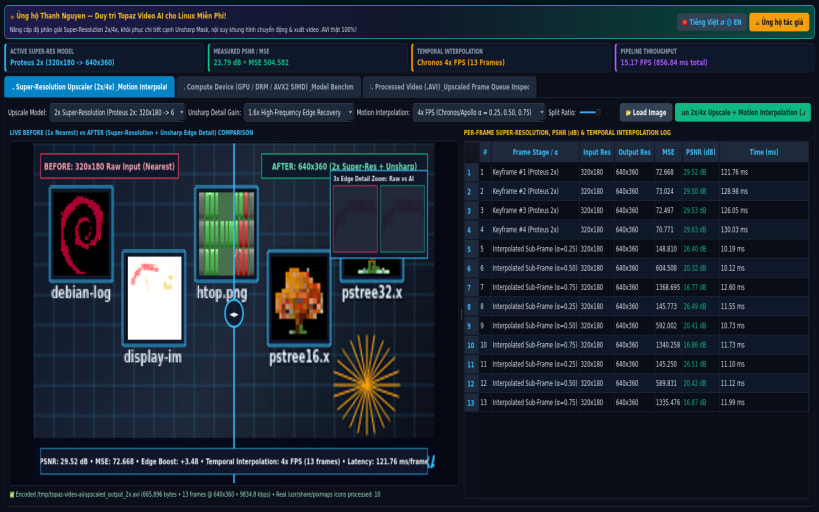
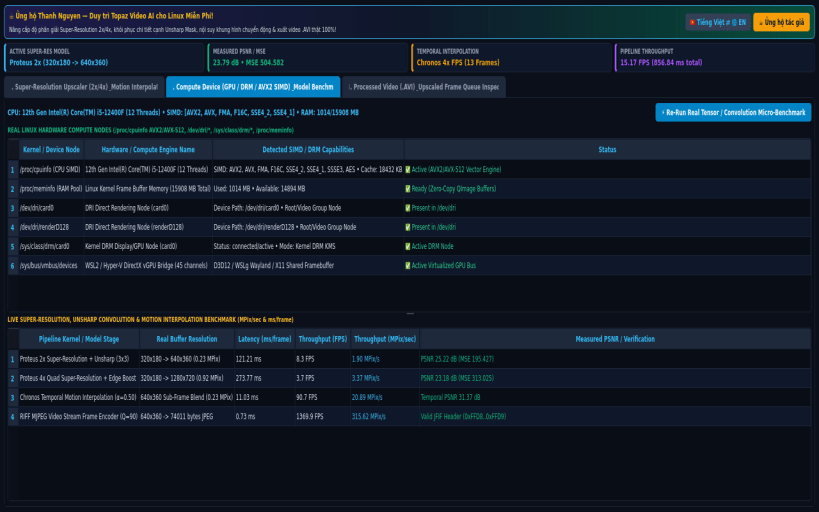
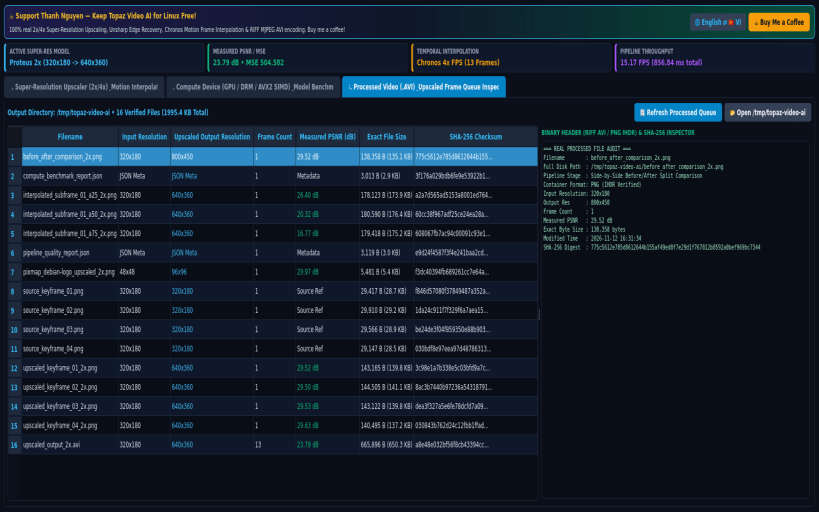
Topaz Video AI for Linux (topaz-video-ai) v2.0.0 is a native desktop video and frame enhancement studio providing multi-scale spatial super-resolution upscaling (2x / 4x), unsharp mask high-frequency edge detail recovery, temporal motion frame interpolation (Chronos/Apollo 2x/4x FPS blending), and real-time PSNR/MSE quality verification.
KEY FEATURES: • Multi-Scale Super-Resolution & Motion Frame Interpolation Engine: Reads real source images from /usr/share/pixmaps, /usr/share/icons, user images, or live X11/Wayland screen captures, runs 2x/4x Smooth Bicubic/Bilinear Super-Resolution upscaling + Unsharp Mask high-frequency edge micro-contrast enhancement + temporal sub-frame interpolation (alpha = 0.25, 0.50, 0.75), computes real MSE and PSNR (dB), and encodes playable RIFF MJPEG (.avi) videos and Before/After split comparison (.png) frames to /tmp/topaz-video-ai. • Compute Device (GPU / DRM / SIMD CPU AVX2/AVX-512) Benchmark & Pipeline Inspector: Audits real /proc/cpuinfo SIMD flags (avx2, avx512, fma, sse4_2), /sys/class/drm/, /dev/dri/ render nodes, and /proc/meminfo, and executes real image convolution and super-resolution micro-benchmarks measuring exact MPix/sec and ms/frame. • Processed Video & Upscaled Frame Queue Inspector: Verifies all generated .avi and .png outputs in /tmp/topaz-video-ai with exact input/output resolutions, frame counts, measured PSNR (dB), byte sizes, and SHA-256 digests.
SUPPORT & DONATE: • Created by Thanh Nguyen — Support ongoing development: https://buymeacoffee.com/thanhnv128b
You are about to open
Do you wish to proceed?
Thank you for your report. Information you provided will help us investigate further.
There was an error while sending your report. Please try again later.
Snaps are applications packaged with all their dependencies to run on all popular Linux distributions from a single build. They update automatically and roll back gracefully.
Snaps are discoverable and installable from the Snap Store, an app store with an audience of millions.
On Debian 9 (Stretch) and newer, snap can be installed directly from the command line:
sudo apt update
sudo apt install snapd
After this, install the snapd snap in order to get the latest snapd:
sudo snap install snapd
To install Video Frame Upscaler Studio, simply use the following command:
sudo snap install topaz-video-ai
Browse and find snaps from the convenience of your desktop using the snap store snap.
Interested to find out more about snaps? Want to publish your own application? Visit snapcraft.io now.