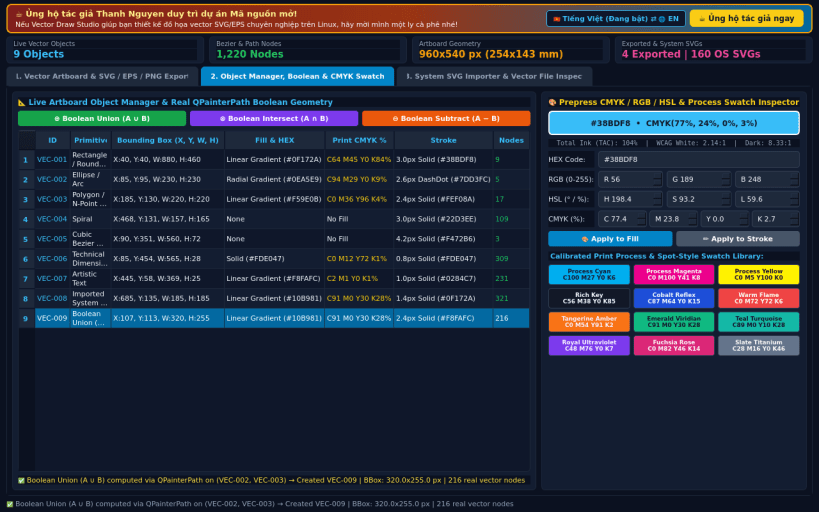
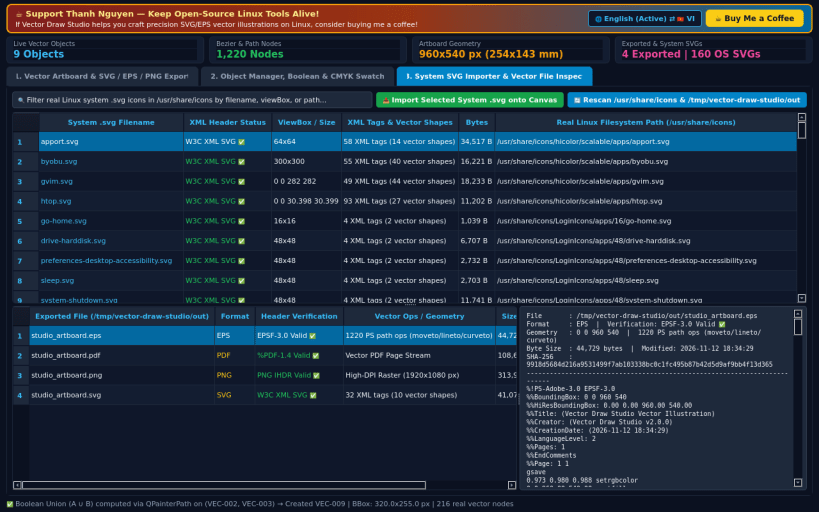
A lightweight Linux alternative to CorelDRAW for precision vector illustration, Bezier node editing, CMYK/RGB palette management, and W3C SVG/EPS/PNG export. Disclaimer: Independent open-source project, not affiliated with or endorsed by Corel Corporation / Alludo.
KEY FEATURES: • Interactive Vector Illustration Canvas & Rulers: Create and edit Cubic Bezier Curves, Rectangles / Rounded Boxes, Ellipses / Arcs, Polygons / N-Point Stars, Spirals, Technical Dimension Lines, and Artistic Vector Text on A4, 1920x1080, 1080x1080, or custom mm/px artboards with snap-to-grid, zoom, gradients, dash styles, opacity, and z-order controls. • Standards-Compliant Vector & Prepress Exporters: Export real W3C SVG 1.1 XML (.svg), Encapsulated PostScript 3.0 (.eps with moveto/lineto/curveto/setrgbcolor), vector PDF (.pdf), and high-DPI PNG (.png) files, plus parse and import real system .svg vector icons via xml.etree.ElementTree. • Object Manager, Boolean Geometry & Print CMYK Inspector: Inspect live artboard objects, perform real QPainterPath Union, Intersect, and Subtract boolean path operations, convert colors across HEX, RGB, HSL, and print CMYK %, and audit system/exported vector files with SHA-256 verification.
SUPPORT & DONATE: • Created by Thanh Nguyen — Support ongoing development: https://buymeacoffee.com/thanhnv128b
You are about to open
Do you wish to proceed?
Thank you for your report. Information you provided will help us investigate further.
There was an error while sending your report. Please try again later.
Snaps are applications packaged with all their dependencies to run on all popular Linux distributions from a single build. They update automatically and roll back gracefully.
Snaps are discoverable and installable from the Snap Store, an app store with an audience of millions.
Snap is available for CentOS 7.6+, and Red Hat Enterprise Linux 7.6+, from the Extra Packages for Enterprise Linux (EPEL) repository. The EPEL repository can be added to your system with the following command:
sudo yum install epel-release
Snap can now be installed as follows:
sudo yum install snapd
Once installed, the systemd unit that manages the main snap communication socket needs to be enabled:
sudo systemctl enable --now snapd.socket
To enable classic snap support, enter the following to create a symbolic link between /var/lib/snapd/snap and /snap:
sudo ln -s /var/lib/snapd/snap /snap
Either log out and back in again, or restart your system, to ensure snap’s paths are updated correctly.
To install Vector Draw Studio, simply use the following command:
sudo snap install vector-draw-studio
Browse and find snaps from the convenience of your desktop using the snap store snap.
Interested to find out more about snaps? Want to publish your own application? Visit snapcraft.io now.