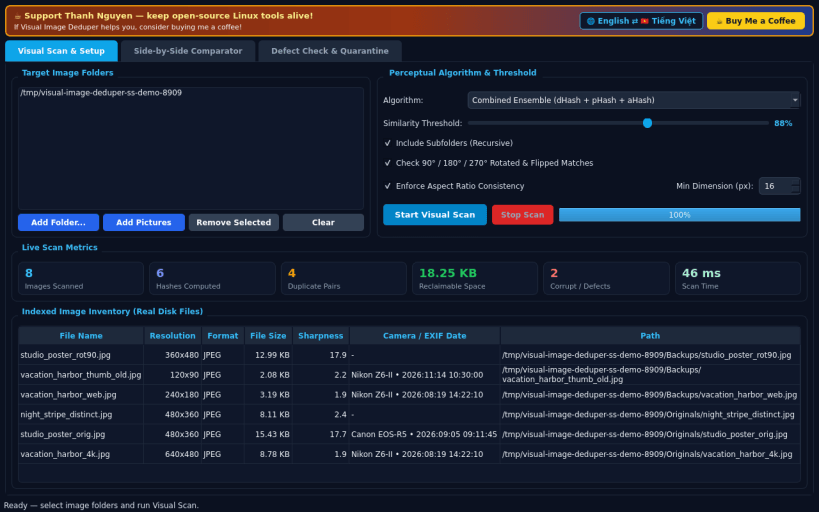
A lightweight Linux desktop utility inspired by classic AntiDupl visual image comparison workflows. Independent open-source project, not affiliated with or endorsed by third-party vendors.
VISUAL SCAN & PERCEPTUAL ALGORITHMS • Scan local folders and mounted drives for visually duplicate and near-similar photos across JPG, PNG, BMP, GIF, and other standard image formats. • Choose between Combined Ensemble, dHash Gradient, pHash DCT Frequency, and aHash Mean Luminance 64-bit perceptual algorithms with an adjustable 70-100% similarity threshold slider. • Optional 90/180/270-degree rotated and horizontally mirrored duplicate match detection plus aspect-ratio verification and live scan metrics.
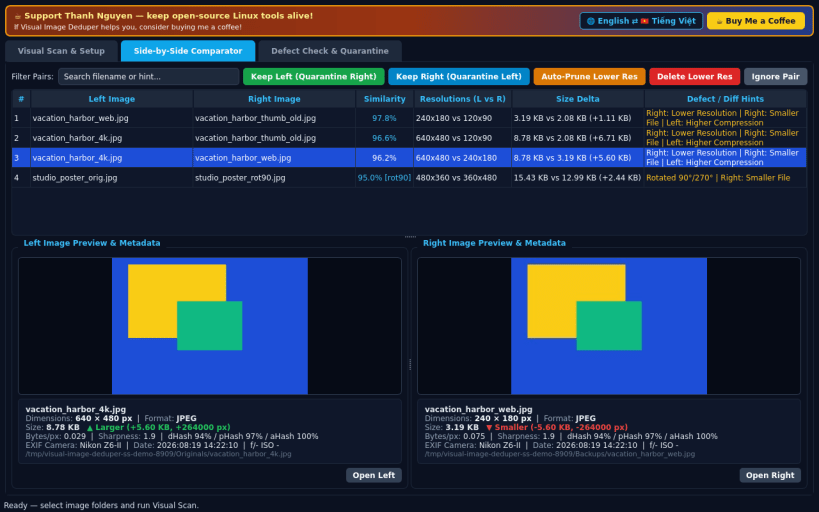
SIDE-BY-SIDE IMAGE COMPARATOR • Inspect matched pairs in a split Left vs Right live image canvas showing real pixel dimensions, image format, file size delta highlighted green/red, byte-per-pixel compression ratio, edge sharpness score, and EXIF camera/date. • One-click Keep Left, Keep Right, or Auto-Prune Lower Resolution actions with safe quarantine or confirmed permanent deletion.
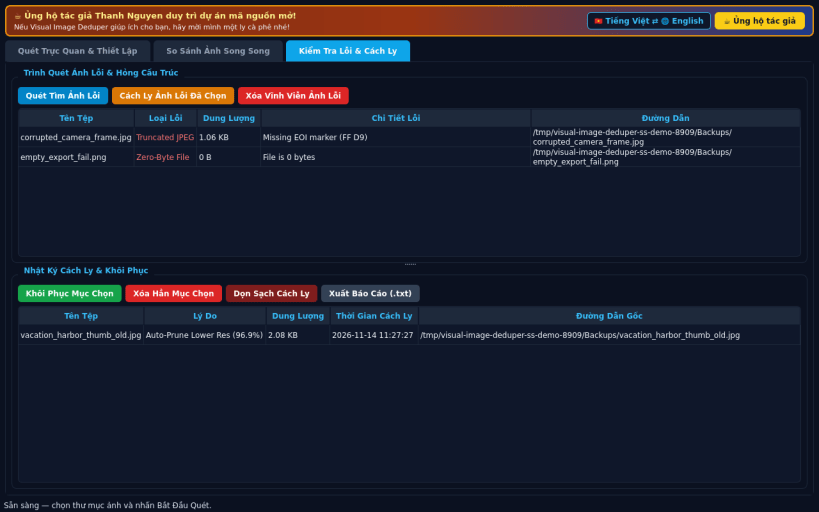
DEFECT CHECK & QUARANTINE RESTORE LOG • Scan folders for zero-byte, invalid header, truncated, or unreadable image files and manage safe quarantine with full Restore and plain-text audit log. • English default interface with instant Vietnamese language toggle.
SUPPORT & DONATE • Created by Thanh Nguyen — https://buymeacoffee.com/thanhnv128b
You are about to open
Do you wish to proceed?
Thank you for your report. Information you provided will help us investigate further.
There was an error while sending your report. Please try again later.
Snaps are applications packaged with all their dependencies to run on all popular Linux distributions from a single build. They update automatically and roll back gracefully.
Snaps are discoverable and installable from the Snap Store, an app store with an audience of millions.
Snap can be installed on Pop!_OS from the command line. Open Terminal from the Applications launcher and type the following:
sudo apt update
sudo apt install snapd
Either log out and back in again, or restart your system, to ensure snap’s paths are updated correctly.
To install Visual Image Deduper, simply use the following command:
sudo snap install visual-image-deduper
Browse and find snaps from the convenience of your desktop using the snap store snap.
Interested to find out more about snaps? Want to publish your own application? Visit snapcraft.io now.