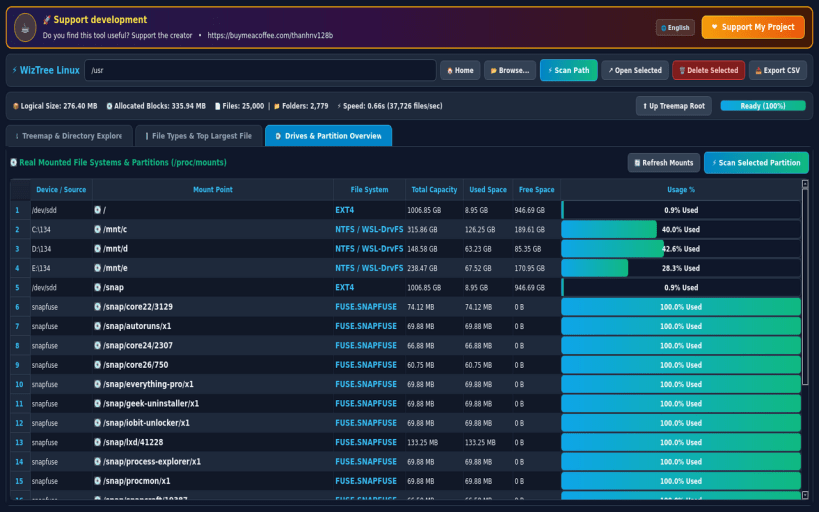
WizTree for Linux is a blazingly fast, modern disk space analyzer and interactive visual treemap block map inspired by WizTree and WinDirStat — engineered for Linux desktops and workstations (Ext4, NTFS, Btrfs, ZFS, XFS, and WSL mounts).
Instantly discover what is consuming your storage with a hardware-accelerated Squarified Cushion Treemap, multi-threaded inode/block scanner, file extension breakdown, and a real-time Top 100 Largest Files finder.
KEY FEATURES: • Ultra-Fast Block & Inode Scanner: Calculates both logical file size and physical allocated disk blocks at thousands of files per second. • Interactive Visual Treemap: Color-coded cushion block map grouped by directory and file category with hover inspection and click-to-zoom. • File Extension Breakdown: Instantly see how much storage is used by video/media (.mp4, .mkv), VM/container images (.qcow2, .iso, .vmdk, .snap), archives (.zst, .tar.gz, .7z), databases (.db, .parquet), and source code. • Top 100 Largest Files: Pinpoint massive files across your drive in a single click and export detailed reports to CSV. • Multi-Filesystem Partition Overview: Inspect all mounted partitions (Ext4, NTFS, Btrfs, ZFS, WSL DrvFS) with live capacity bars.
SUPPORT & DONATE: • Created by Thanh Nguyen — Support ongoing development: https://buymeacoffee.com/thanhnv128b
You are about to open
Do you wish to proceed?
Thank you for your report. Information you provided will help us investigate further.
There was an error while sending your report. Please try again later.
Snaps are applications packaged with all their dependencies to run on all popular Linux distributions from a single build. They update automatically and roll back gracefully.
Snaps are discoverable and installable from the Snap Store, an app store with an audience of millions.
Snap is available for CentOS 7.6+, and Red Hat Enterprise Linux 7.6+, from the Extra Packages for Enterprise Linux (EPEL) repository. The EPEL repository can be added to your system with the following command:
sudo yum install epel-release
Snap can now be installed as follows:
sudo yum install snapd
Once installed, the systemd unit that manages the main snap communication socket needs to be enabled:
sudo systemctl enable --now snapd.socket
To enable classic snap support, enter the following to create a symbolic link between /var/lib/snapd/snap and /snap:
sudo ln -s /var/lib/snapd/snap /snap
Either log out and back in again, or restart your system, to ensure snap’s paths are updated correctly.
To install WizTree Disk Space Analyzer, simply use the following command:
sudo snap install wiztree
Browse and find snaps from the convenience of your desktop using the snap store snap.
Interested to find out more about snaps? Want to publish your own application? Visit snapcraft.io now.