

CW Trainer by Wisco Radio Labs — learn Morse code (CW) the way hams actually use it, from your first two characters to a full on-air contact. Fully offline. No account, no network, no ads.
• Koch-method lessons — every character at full speed from lesson one, with Farnsworth spacing; a new character unlocks at 90% accuracy.
• An eight-rung copy ladder — single characters, two-character groups, random letter groups, common words, a wider vocabulary, ham words, callsigns, and full QSO phrases.
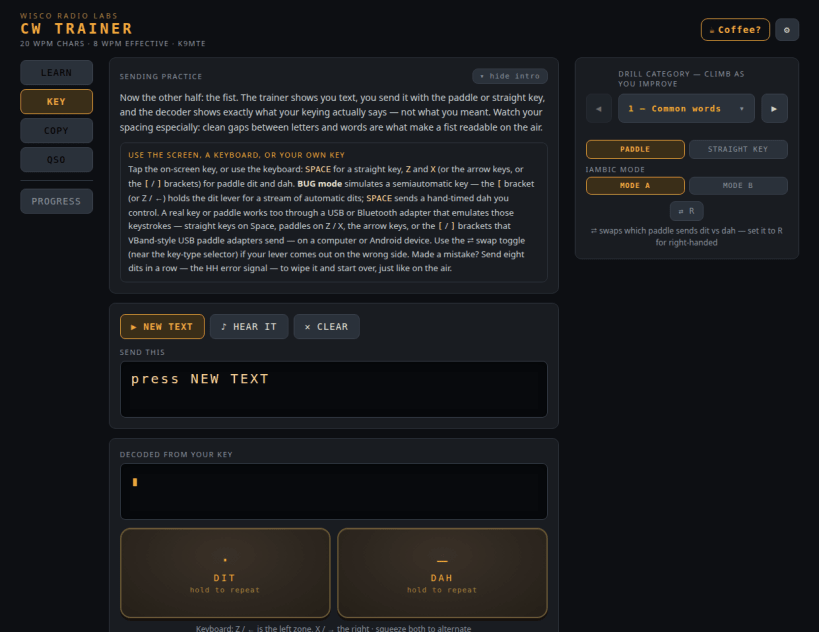
• Sending practice with a built-in decoder that shows exactly what your fist sends — plus fist feedback that scores your estimated speed, dit/dah weighting, and element, character, and word spacing against the standard. Fourteen drill categories climb from common words through Q-codes, prosigns, numbers, RST exchanges, calling CQ, full QSO lines and callsigns, all the way up to DX callsigns, DX exchanges, contest fragments, and split/pileup work. Key with an iambic paddle (Mode A or Mode B), a straight key, the on-screen key, the keyboard, or your own key through a USB adapter (VBand-compatible — the [ and ] keys). Send the HH "start over" prosign just like on the air.
• A QSO simulator with six kinds of contact — ragchew, POTA, SOTA, IOTA, working DX, and contest — each with its own roles (activator, hunter, chaser, call or answer CQ, call CQ DX or hunt the DX, running or search-and-pounce), plus on-air break-in fills, honest signal reports, varied CQ calls, and a 5-second "get ready" countdown before the code starts.
• International and DX operating — a bundled DXCC entity dataset drives realistic foreign callsigns, prefixes, and exchanges, with a DX walkthrough in the on-air guide so the conventions make sense before you work them.
• Cross-session progress tracking — your lessons, sending, copy, and QSO accuracy (both how you copy and how you send) are saved and shown as color-coded bar charts with a 90% mastery line and dates, so you can see whether today beat last week.
• A responsive layout that spreads across a desktop screen and collapses to a clean single column on a small one, with compact option menus that keep the on-screen key reachable without scrolling.
• Realistic band conditions — selectable receiver filtering (wide / CW 500 Hz / APF), QSB fading, and AGC.
• Reference guides on CW lingo, on-air procedure, and the history of the code.
What's new in 2.4.1 — from K9MTE:
• Easier to read. The gray used for instructions, hints, and the small captions on toggle buttons was too dark against some of the app's backgrounds — worst on an unselected toggle, where it measured 4.17:1 against the 4.5:1 that the WCAG AA contrast standard asks for. It is now a lighter gray that clears AA on every background it lands on. Nothing moved and nothing behaves differently; the small print is simply easier to read — which matters most when your eyes are tired or the screen is bright.
Before that, in 2.4.0: international and DX operating — a bundled DXCC entity dataset, the Work DX and Contest QSO activities, five new sending drills at the hard end of the ladder, and a DX walkthrough in the on-air guide; two more copy rungs drawn from a frequency-ranked word list; QSO sending graded on the elements you actually convey rather than on matching one scripted wording; and compact option menus that keep the on-screen key reachable without scrolling.
Also building for arm64: an aarch64 build is produced and tested natively on every release, but it is not yet published to stable, pending validation on real ARM hardware. ARM users can install it from the .snap asset on the GitHub release page (github.com/wiscoradio-k9mte/CW-Trainer/releases) — reports from real ARM hardware are very welcome, and are what will get arm64 onto stable.
This is actively developed — I'm a ham building the trainer I always wanted, and there's more on the way. 73, K9MTE.
Made in the Driftless by Wisco Radio Labs (K9MTE). GPL-3.0 · open source · fully offline.
You are about to open
Do you wish to proceed?
Thank you for your report. Information you provided will help us investigate further.
There was an error while sending your report. Please try again later.
Snaps are applications packaged with all their dependencies to run on all popular Linux distributions from a single build. They update automatically and roll back gracefully.
Snaps are discoverable and installable from the Snap Store, an app store with an audience of millions.
If you’re running Kubuntu 16.04 LTS (Xenial Xerus) or later, including Kubuntu 18.04 LTS (Bionic Beaver) and Kubuntu 18.10 (Cosmic Cuttlefish), you don’t need to do anything. Snap is already installed and ready to go.
Versions of Kubuntu between 14.04 LTS (Trusty Tahr) and 15.10 (Wily Werewolf) don’t include snap by default, but snap can be installed from the command line as follows:
sudo apt update
sudo apt install snapd
To install CW Trainer, simply use the following command:
sudo snap install wr-cw-trainer
Browse and find snaps from the convenience of your desktop using the snap store snap.

Interested to find out more about snaps? Want to publish your own application? Visit snapcraft.io now.