
Wuniq is now called KaKeKiKoKu Studio.
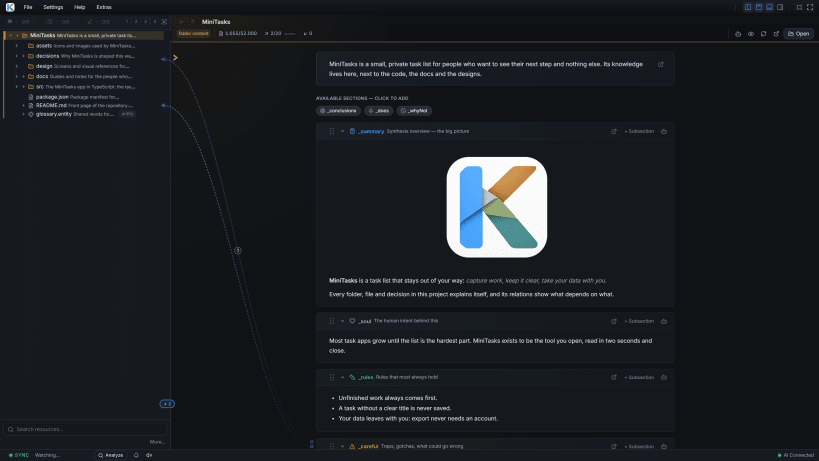
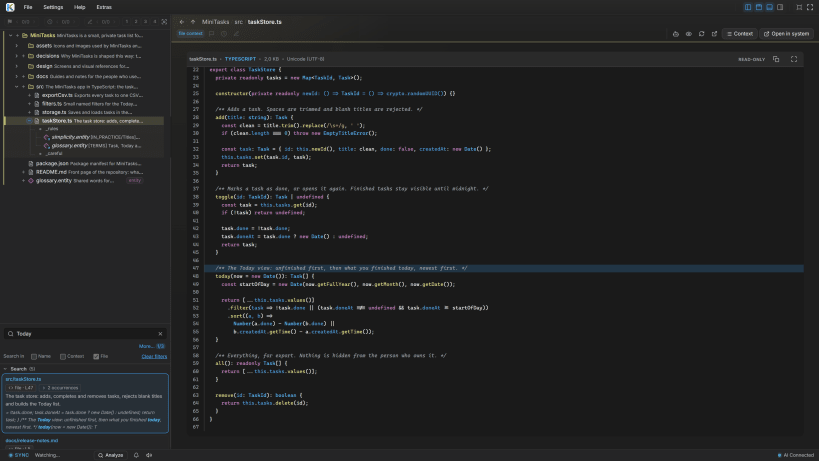
KaKeKiKoKu Studio is a knowledge system for creating with AI.
When you develop software, design a system, prepare research or document a complex product, you keep making decisions that shape the project: what you want to achieve, why you chose one path, which conditions you must respect, what you have tried and what you have learned.
With AI, the work moves fast, but that knowledge gets scattered across conversations and falls out of date when the files change.
KaKeKiKoKu Studio lets you build, organize and work with that knowledge together with your AI. It keeps it structured, connected and linked to your project's files, available for the next tasks and for any compatible AI you choose to use. When your files change, it detects what fell behind and tells your AI exactly what to update.
You lead the work and decide what makes sense. The AI brings intelligence and the ability to get things done.
✓ 100% local ✓ No accounts ✓ No telemetry ✓ Free core, forever
▸ THE KNOWLEDGE BELONGS TO YOU
You can work with different AIs on the same project: one to explore ideas, another to build a solution and another to review it. All of them read and update the same knowledge base. Changing model or client does not mean rebuilding the project's decisions: the knowledge lives next to your files and stays with you when your tools change. It works alongside your AI client's instruction files, skills and memory.
▸ KNOWLEDGE YOU CAN WALK THROUGH
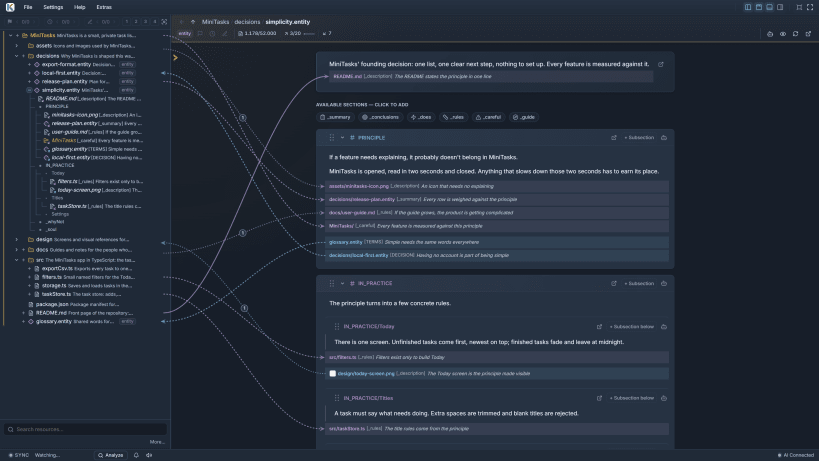
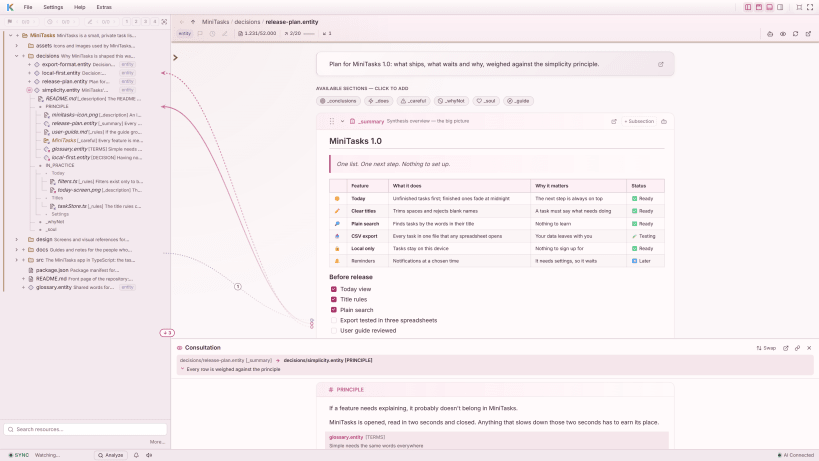
KaKeKiKoKu organizes information in bounded blocks, each with its own identity and explicit relations. Attach knowledge to a file, set criteria for a folder or gather decisions that affect the whole project. The knowledge tree and the project map let you follow those connections to the block that explains each one. Your AI receives a map and reads only the resources and blocks it needs, so it can find both a decision and the reason behind it.
▸ WHEN THE PROJECT CHANGES, YOU CAN SEE WHAT NEEDS ATTENTION
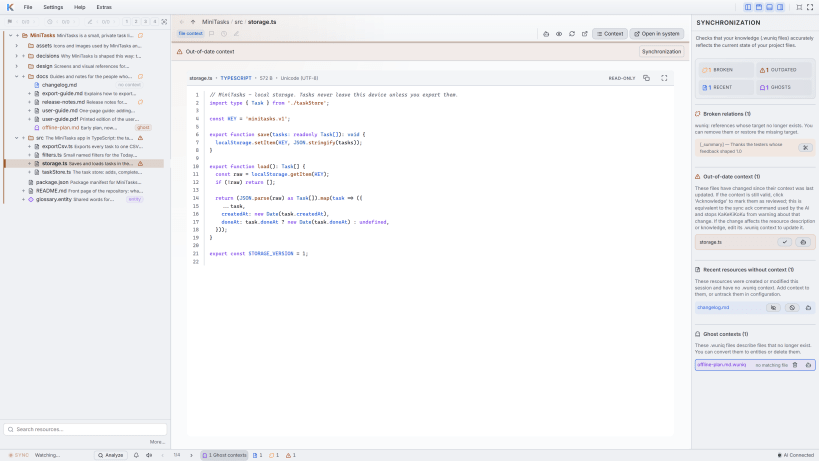
KaKeKiKoKu detects changes in files, context waiting for review and broken references, and gathers them in its sync panel so that you can resolve them with your AI. Detection points out where to look; you and the AI judge what still holds and what needs updating.
▸ TOOLS TO WORK WITH THAT KNOWLEDGE
✓ Block editor with Markdown and visual relations between resources ✓ Search across knowledge, names and file contents ✓ Viewers for code, images and documents, including PDF, DOCX and ODT ✓ Important, draft and pending flags, and several projects at once ✓ Reports you can expand with your AI, automatic backups and Markdown export
▸ LOCAL, OPEN AND UNDER YOUR CONTROL
KaKeKiKoKu runs on your computer, with no accounts, ads, telemetry or analytics, and does not send the content of your projects to KaKeKiKoKu servers. Knowledge is stored in .wuniq files: readable text in an open, documented format that works with Git and exports to Markdown.
Start with a small project: the Learning Lab inside the application teaches you with a real project. The quick start guide and the manual are at kakekikoku.com.
Requirements: a compatible AI client through MCP or local HTTP tools, and a model that can reason and use tools reliably. It uses your existing AI subscription; no separate paid API is needed.
Status: Beta, in active development. KaKeKiKoKu Studio is an independent product, with no commercial affiliation with AI providers.
You are about to open
Do you wish to proceed?
Thank you for your report. Information you provided will help us investigate further.
There was an error while sending your report. Please try again later.
Snaps are applications packaged with all their dependencies to run on all popular Linux distributions from a single build. They update automatically and roll back gracefully.
Snaps are discoverable and installable from the Snap Store, an app store with an audience of millions.
If you’re running Ubuntu 16.04 LTS (Xenial Xerus) or later, including Ubuntu 18.04 LTS (Bionic Beaver) and Ubuntu 20.04 LTS (Focal Fossa), you don’t need to do anything. Snap is already installed and ready to go.
For versions of Ubuntu between 14.04 LTS (Trusty Tahr) and 15.10 (Wily Werewolf), as well as Ubuntu flavours that don’t include snap by default, snap can be installed from the Ubuntu Software Centre by searching for snapd.
Alternatively, snapd can be installed from the command line:
sudo apt update
sudo apt install snapd
Either log out and back in again, or restart your system, to ensure snap’s paths are updated correctly.
To install KaKeKiKoKu Studio, simply use the following command:
sudo snap install wuniq
Browse and find snaps from the convenience of your desktop using the snap store snap.

Interested to find out more about snaps? Want to publish your own application? Visit snapcraft.io now.