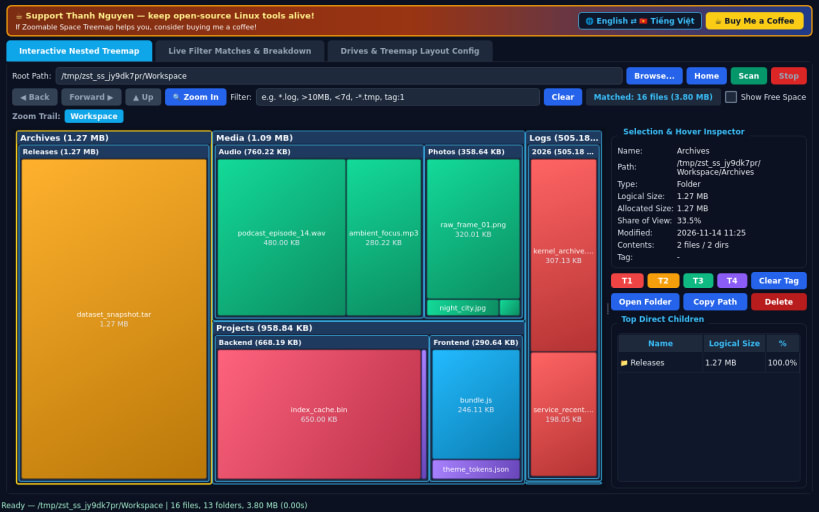
A lightweight Linux alternative to SpaceSniffer for interactive disk space visualization. Independent open-source Linux tool, not affiliated with, sponsored by, or endorsed by Uderzo Software.
INTERACTIVE NESTED SQUARIFIED TREEMAP • Scans real local and mounted directories using POSIX os.scandir and displays nested labeled folder frames wrapping colored file sub-blocks. • Double-click any folder block to zoom smoothly into its subtree; click the breadcrumb zoom trail or Back/Forward/Up buttons to navigate. • Single-click or hover any block for real logical size, allocated disk blocks, share percentage, modification timestamp, and child breakdown.
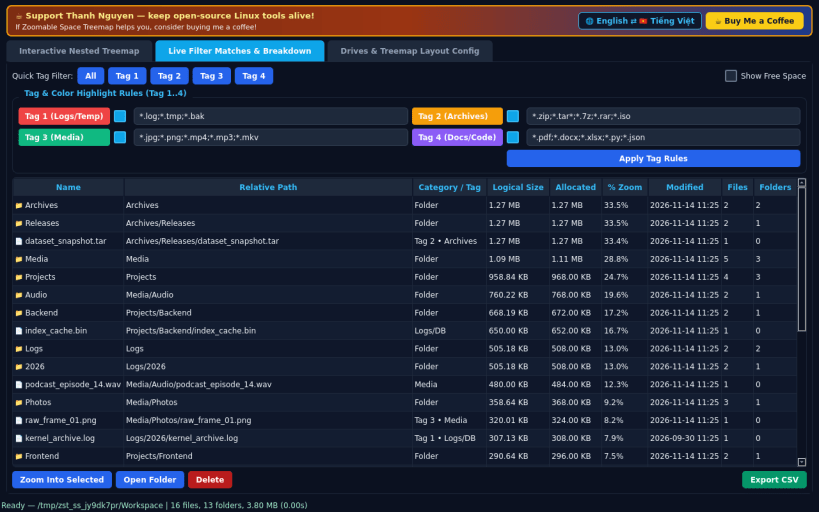
LIVE QUERY FILTER & TAG COLOR RULES • Filter the scanned tree in real time with expressions such as .log, >10MB, <7d, -.tmp, or tag:1, recomputing matching subtree totals live. • Customize four color highlight rules (Tag 1..4) or assign manual tags directly to files and folders, plus toggle free-space block overlay.
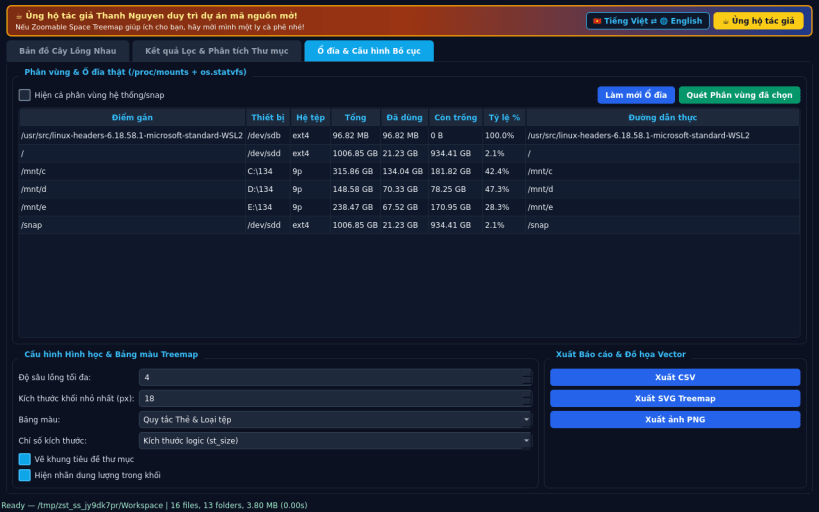
DRIVES PANEL, LAYOUT CONFIG & EXPORTS • Inspect real mounted filesystems from /proc/mounts and os.statvfs, customize nesting depth, minimum block size, and color palettes, and export CSV breakdowns, vector SVG treemaps, or PNG snapshots.
SUPPORT & DONATE • Created by Thanh Nguyen
You are about to open
Do you wish to proceed?
Thank you for your report. Information you provided will help us investigate further.
There was an error while sending your report. Please try again later.
Snaps are applications packaged with all their dependencies to run on all popular Linux distributions from a single build. They update automatically and roll back gracefully.
Snaps are discoverable and installable from the Snap Store, an app store with an audience of millions.
Snap is available for CentOS 7.6+, and Red Hat Enterprise Linux 7.6+, from the Extra Packages for Enterprise Linux (EPEL) repository. The EPEL repository can be added to your system with the following command:
sudo yum install epel-release
Snap can now be installed as follows:
sudo yum install snapd
Once installed, the systemd unit that manages the main snap communication socket needs to be enabled:
sudo systemctl enable --now snapd.socket
To enable classic snap support, enter the following to create a symbolic link between /var/lib/snapd/snap and /snap:
sudo ln -s /var/lib/snapd/snap /snap
Either log out and back in again, or restart your system, to ensure snap’s paths are updated correctly.
To install Zoomable Space Treemap, simply use the following command:
sudo snap install zoomable-space-treemap
Browse and find snaps from the convenience of your desktop using the snap store snap.
Interested to find out more about snaps? Want to publish your own application? Visit snapcraft.io now.