

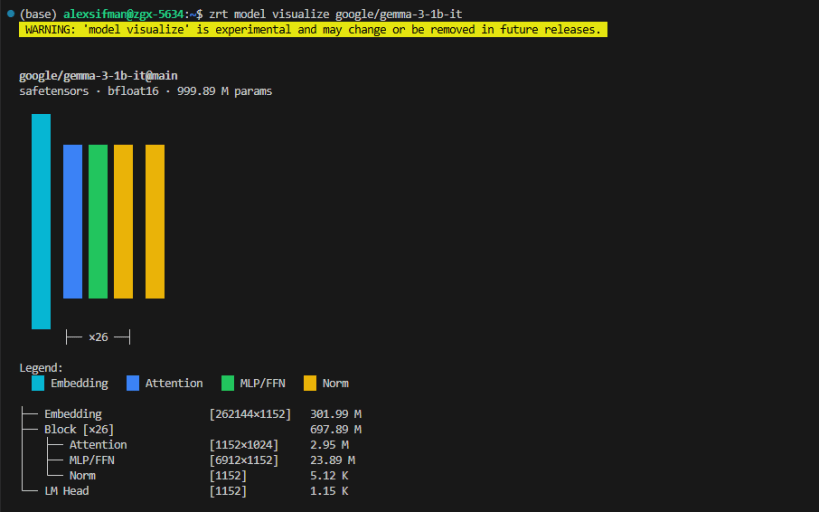

zrt is a command-line tool that wraps vLLM to provide a streamlined experience for serving large language models on Linux. It handles environment setup, model lifecycle management, and exposes an OpenAI-compatible HTTP API - making it easy to pull, serve, and observe LLM workloads with a few simple commands.
Designed for Linux servers with GPU workloads, zrt is useful for developers and teams who want a production-ready alternative to Ollama backed by the vLLM inference engine.
For documentation, visit our zdocs page at https://zdocs.datascience.hp.com/docs/zruntime/overview
Found an issue? Have a feature request? Open an issue at https://github.com/HPInc/zrt-support
You are about to open
Do you wish to proceed?
Thank you for your report. Information you provided will help us investigate further.
There was an error while sending your report. Please try again later.
Snaps are applications packaged with all their dependencies to run on all popular Linux distributions from a single build. They update automatically and roll back gracefully.
Snaps are discoverable and installable from the Snap Store, an app store with an audience of millions.
On Arch Linux, snap can be installed from the Arch User Repository (AUR). The manual build process is the Arch-supported install method for AUR packages, and you’ll need the prerequisites installed before you can install any AUR package. You can then install snap with the following:
git clone https://aur.archlinux.org/snapd.git
cd snapd
makepkg -si
Once installed, the systemd unit that manages the main snap communication socket needs to be enabled:
sudo systemctl enable --now snapd.socket
If AppArmor is enabled in your system, enable the service which loads AppArmor profiles for snaps:
sudo systemctl enable --now snapd.apparmor.service
To enable classic snap support, enter the following to create a symbolic link between /var/lib/snapd/snap and /snap:
sudo ln -s /var/lib/snapd/snap /snap
Either log out and back in again, or restart your system, to ensure snap’s paths are updated correctly.
To install HP Z Runtime, simply use the following command:
sudo snap install zrt --classic
Browse and find snaps from the convenience of your desktop using the snap store snap.

Interested to find out more about snaps? Want to publish your own application? Visit snapcraft.io now.


