

Alpha Matte Remover
Install latest/stable of Alpha Matte Remover
Ubuntu 16.04 or later?
Make sure snap support is enabled in your Desktop store.
Install using the command line
sudo snap install alpha-matte-removerDon't have snapd? Get set up for snaps.
Details for Alpha Matte Remover
Package name
- alpha-matte-remover
License
- MIT
Last updated
- Yesterday - latest/stable
Report a Snap Store violation
Report Alpha Matte Remover for a Snap Store violation
Snap Store Violation Report submitted successfully
Thank you for your report. Information you provided will help us investigate further.
Error submitting report
There was an error while sending your report. Please try again later.
Share this snap
Generate an embeddable card to be shared on external websites.
Chroma key, border flood-fill alpha extractor, mask brush & batch cutout
Alpha Matte Remover is a local Linux desktop tool for extracting clean RGBA transparent cutouts from studio photos, logos, and chroma backdrops without uploading files to external servers. An independent Linux desktop alternative to online background removal tools for building alpha mattes, refining masks, and batch exporting transparent assets.
Key Features:
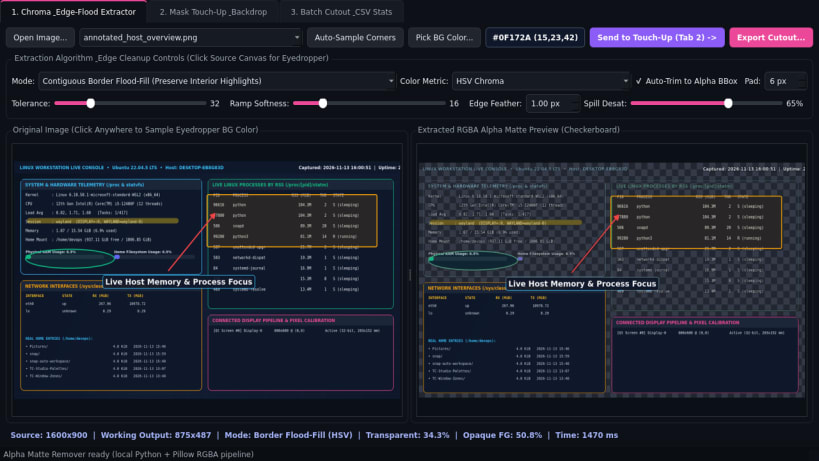
- Chroma & Edge-Flood Alpha Extractor: Eyedropper and 4-corner auto-sampled background detection with Contiguous Border Flood-Fill (preserving matching interior highlights) and Global Euclidean RGB / HSV Color Distance Ramp, soft Gaussian alpha edge feathering, color-spill desaturation, and auto-trim to the non-transparent bounding box.
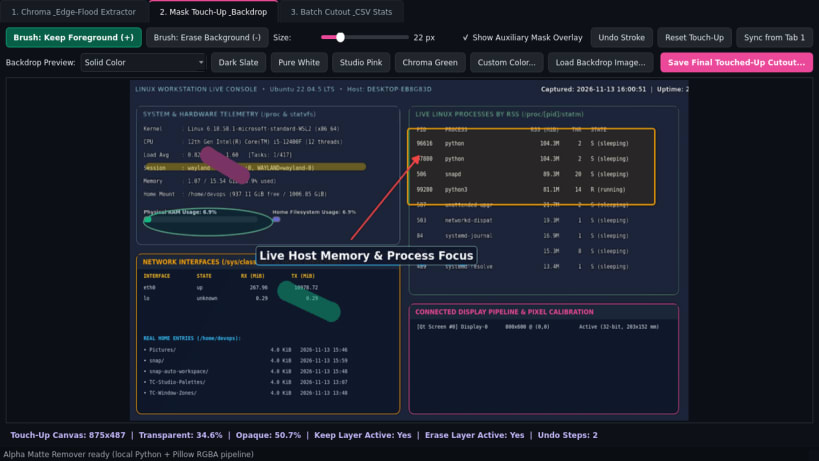
- Interactive Mask Touch-Up & Backdrop Preview: Checkerboard, solid color, and custom backdrop image preview with interactive Keep-Foreground and Erase-Background brush strokes painted onto an auxiliary mask layer.
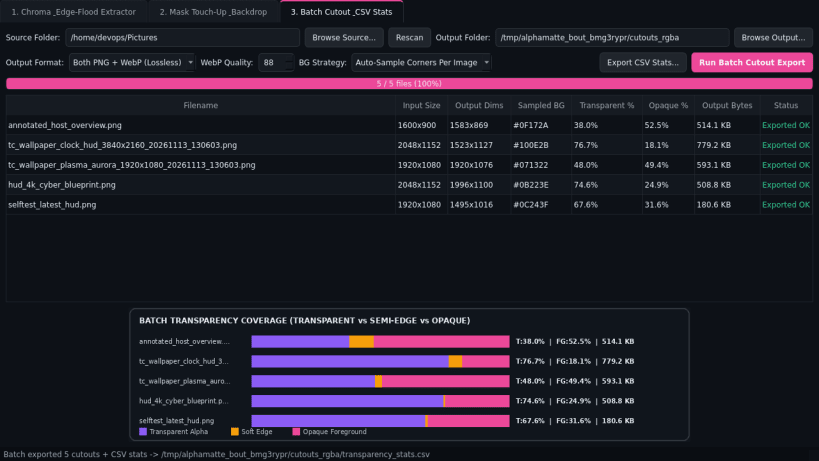
- Batch Transparent Cutout Exporter: Processes product and logo folders into 32-bit RGBA PNG and lossless or lossy alpha WebP outputs with per-image transparency coverage CSV statistics.
Disclaimer: Alpha Matte Remover is an independent open-source project by TC Studio and is not affiliated with, endorsed by, or sponsored by Cedar Lake Ventures.
| Revision | Channel | Version | Build | Commit | Download SBOM |
|---|
The build and commit information is derived from build infrastructure records.
Install Alpha Matte Remover on your Linux distribution
Choose your Linux distribution to get detailed installation instructions. If yours is not shown, get more details on the installing snapd documentation.


