

Audio Signal and Distortion Analyzer (audio-thd-analyzer)
Install latest/stable of Audio Signal and Distortion Analyzer
Ubuntu 16.04 or later?
Make sure snap support is enabled in your Desktop store.
Install using the command line
sudo snap install audio-thd-analyzerDon't have snapd? Get set up for snaps.
Details for Audio Signal and Distortion Analyzer
Package name
- audio-thd-analyzer
License
- MIT
Last updated
- Today - latest/stable
Report a Snap Store violation
Report Audio Signal and Distortion Analyzer for a Snap Store violation
Snap Store Violation Report submitted successfully
Thank you for your report. Information you provided will help us investigate further.
Error submitting report
There was an error while sending your report. Please try again later.
Share this snap
Generate an embeddable card to be shared on external websites.
Calibration tone synthesizer and FFT THD, SNR & crosstalk audio analyzer
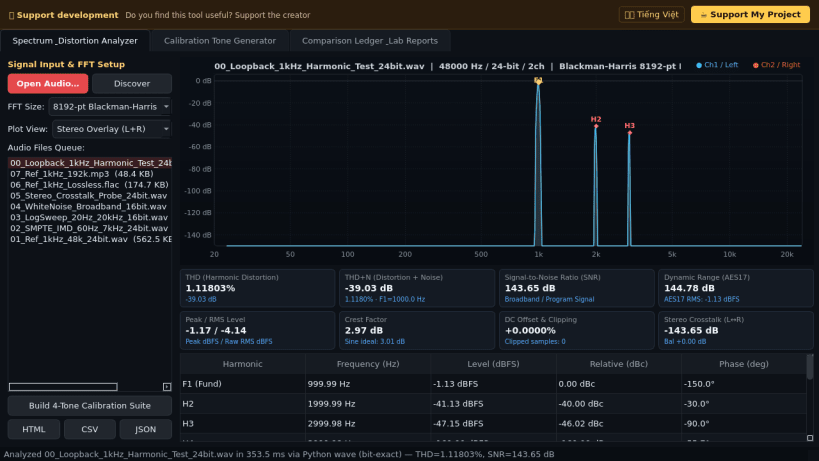
Audio Signal and Distortion Analyzer is a desktop acoustic measurement, calibration tone generator, and harmonic spectrum workbench for Linux. A lightweight Linux alternative to RightMark Audio Analyzer for evaluating audio files, loopback captures, and codec fidelity with precision spectral metrics.
Key Features:
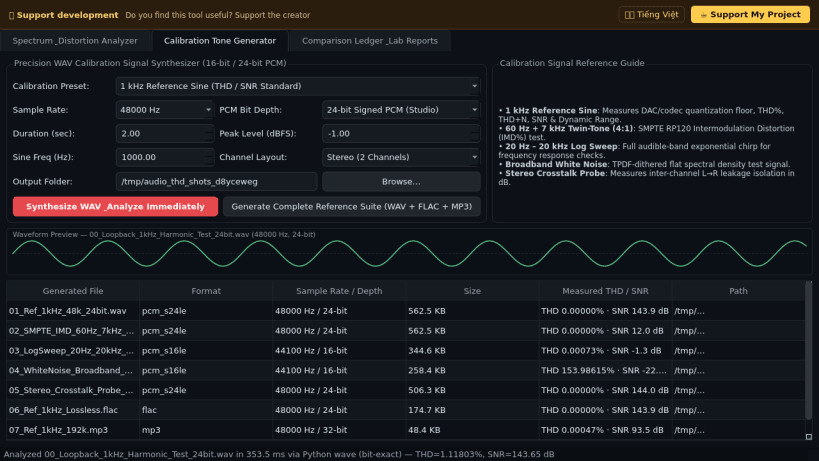
- Precision Calibration WAV Synthesizer: Generates bit-exact 16-bit and 24-bit PCM WAV calibration signals at 44.1 kHz, 48 kHz, and 96 kHz including 1 kHz reference sine, 60 Hz + 7 kHz SMPTE twin-tone IMD, 20 Hz to 20 kHz logarithmic sweep, white noise, and dual-channel stereo crosstalk test probes.
- Multi-Format Audio Decoding: Reads uncompressed PCM WAV directly and decodes FLAC, MP3, Ogg Vorbis, Opus, AAC, and M4A audio files via bundled FFmpeg into floating-point frames.
- Windowed Radix-2 FFT Distortion Metrics: Applies a 4-term Blackman-Harris window with Welch spectral averaging to compute Total Harmonic Distortion (THD % and dB), THD+N (dB), Signal-to-Noise Ratio (SNR dB), Dynamic Range, Peak and RMS dBFS, Crest Factor, DC Offset, and Stereo Crosstalk (dB).
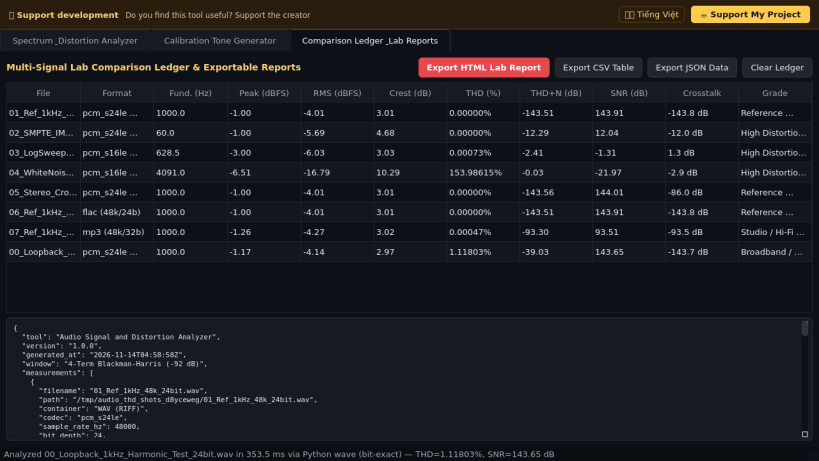
- Harmonic Spectrum Plot & Lab Reports: Renders an interactive logarithmic frequency spectrum with H1 through H10 harmonic markers and exports HTML, CSV, and JSON lab reports.
Disclaimer: This project is an independent open-source tool and is not affiliated with, sponsored by, or endorsed by RightMark Gathering.
| Revision | Channel | Version | Build | Commit | Download SBOM |
|---|
The build and commit information is derived from build infrastructure records.
Install Audio Signal and Distortion Analyzer on your Linux distribution
Choose your Linux distribution to get detailed installation instructions. If yours is not shown, get more details on the installing snapd documentation.


