

Volume and Window Hotkeys (audio-window-hotkeys)
Install latest/stable of Volume and Window Hotkeys
Ubuntu 16.04 or later?
Make sure snap support is enabled in your Desktop store.
Install using the command line
sudo snap install audio-window-hotkeysDon't have snapd? Get set up for snaps.
Details for Volume and Window Hotkeys
Package name
- audio-window-hotkeys
License
- MIT
Last updated
- Yesterday - latest/stable
Websites
Contact
External link warning
You are about to open
Do you wish to proceed?
Report a Snap Store violation
Report Volume and Window Hotkeys for a Snap Store violation
Snap Store Violation Report submitted successfully
Thank you for your report. Information you provided will help us investigate further.
Error submitting report
There was an error while sending your report. Please try again later.
Share this snap
Generate an embeddable card to be shared on external websites.
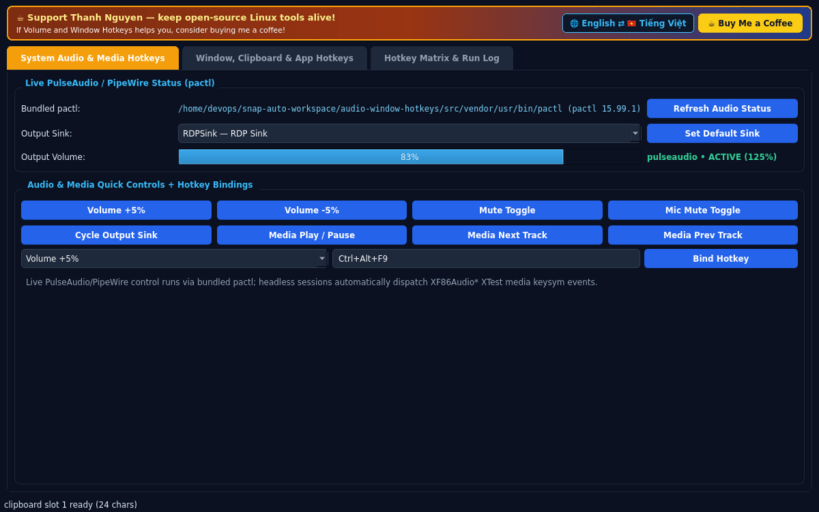
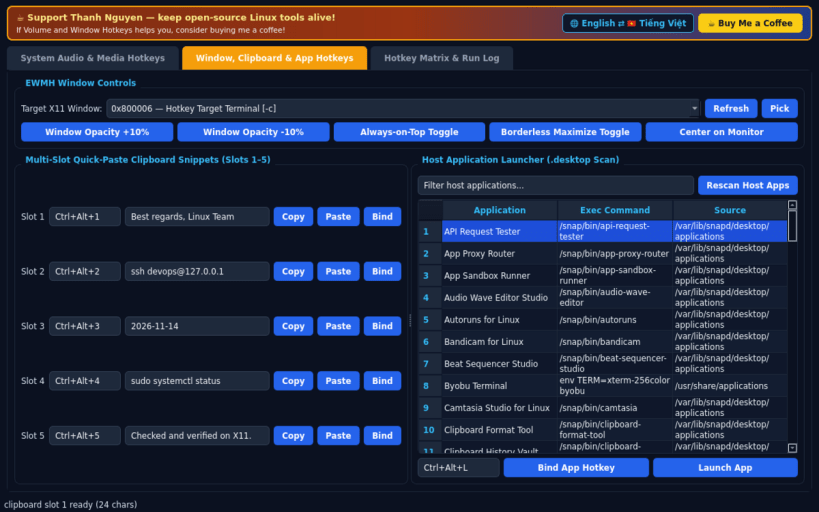
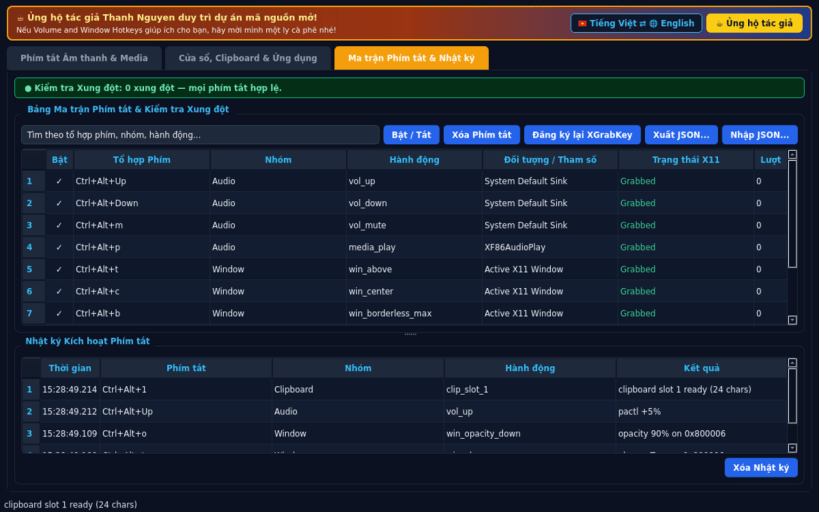
Global X11 hotkeys for PulseAudio volume, EWMH windows, snippets, and apps
A lightweight Linux X11 global hotkey manager inspired by HotKeyz for controlling system audio volume, window opacity and placement, quick-paste clipboard slots, and desktop application launching. Disclaimer: This project is an independent open-source tool and is not affiliated with, sponsored by, or endorsed by Skynergy.
FEATURES
- System Audio & Media Hotkeys: adjust PulseAudio or PipeWire volume (+5%, -5%, Mute, Mic Mute, Cycle Output Sink) via bundled pactl with XF86Audio media key fallback via XTest, plus live sink status readout.
- Window, Clipboard & App Hotkeys: bind global X11 hotkeys (XGrabKey) to EWMH window opacity (+10%/-10%), Always-on-Top, Borderless Maximize, and Center on Monitor, 5 Quick-Paste Clipboard snippet slots, and host desktop application discovery across system and user directories.
- Unified Hotkey Matrix & Run Log: searchable hotkey grid with duplicate and BadAccess conflict detection, toggle ON/OFF, JSON export/import, trigger audit log, and instant English / Vietnamese UI switching.
SUPPORT & DONATE
- Created by Thanh Nguyen — https://buymeacoffee.com/thanhnv128b
| Revision | Channel | Version | Build | Commit | Download SBOM |
|---|
The build and commit information is derived from build infrastructure records.
Install Volume and Window Hotkeys on your Linux distribution
Choose your Linux distribution to get detailed installation instructions. If yours is not shown, get more details on the installing snapd documentation.


