

Barcode Label Printer
Install latest/stable of Barcode Label Printer
Ubuntu 16.04 or later?
Make sure snap support is enabled in your Desktop store.
Install using the command line
sudo snap install barcode-label-printerDon't have snapd? Get set up for snaps.
Details for Barcode Label Printer
Package name
- barcode-label-printer
License
- MIT
Last updated
- Yesterday - latest/stable
Report a Snap Store violation
Report Barcode Label Printer for a Snap Store violation
Snap Store Violation Report submitted successfully
Thank you for your report. Information you provided will help us investigate further.
Error submitting report
There was an error while sending your report. Please try again later.
Share this snap
Generate an embeddable card to be shared on external websites.
Code128, EAN-13 and QR price label designer with A4/Letter sheet PDF export
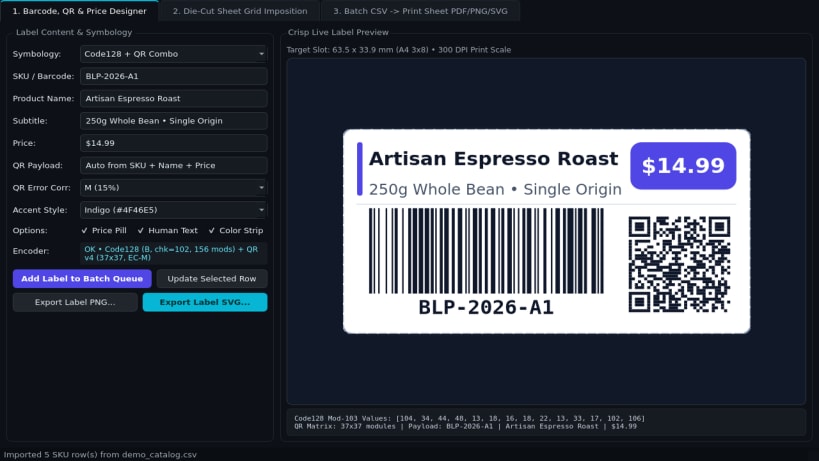
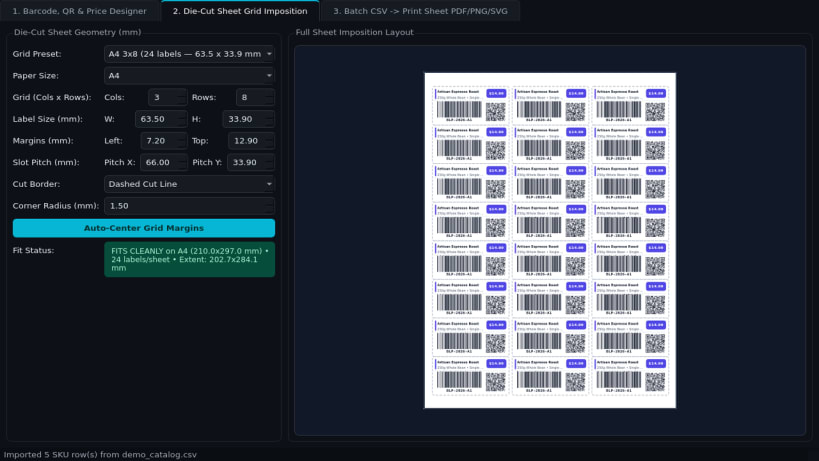
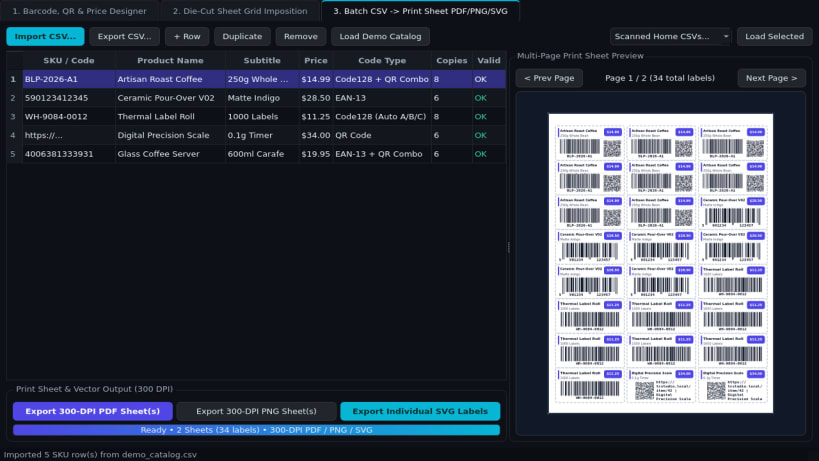
Barcode Label Printer is an offline Linux desktop label studio for designing Code128, EAN-13, and 2D QR price labels, arranging die-cut A4 and US Letter sticker grids, and generating multi-page 300-DPI print sheets from CSV catalogs.
Key Features:
- Barcode, QR & Price Label Designer: Pure-Python Code128 (subsets A/B/C with Mod-103 checksum), GS1 EAN-13 parity bar encoding with automatic check-digit computation, and QR matrix rendering combined with SKU, product title, subtitle, and price badge in a crisp live preview.
- Die-Cut Sheet Grid Imposition: Built-in A4 and US Letter grid presets (2x7, 3x8, 4x10, 3x7, 3x10, 2x4) plus custom rows, columns, margins, horizontal/vertical pitch in millimeters, and optional cut borders or crop marks.
- Batch CSV to Print Sheet Export: Imports product CSV files (sku, title, price, code_type) with copy counts and exports multi-page 300-DPI printable PDFs via QPdfWriter, 300-DPI PNG sheets, and individual vector SVG labels.
Disclaimer: Barcode Label Printer is an independent open-source project by TC Studio and is not affiliated with, endorsed by, or sponsored by Avery Dennison Corporation.
| Revision | Channel | Version | Build | Commit | Download SBOM |
|---|
The build and commit information is derived from build infrastructure records.
Install Barcode Label Printer on your Linux distribution
Choose your Linux distribution to get detailed installation instructions. If yours is not shown, get more details on the installing snapd documentation.


