
Capy
Install latest/beta of Capy
Ubuntu 16.04 or later?
Make sure snap support is enabled in your Desktop store.
Install using the command line
sudo snap install capy --betaDon't have snapd? Get set up for snaps.




Details for Capy
Package name
- capy
License
- Proprietary
Last updated
- 6 November 2026 - latest/beta
- 5 November 2026 - latest/edge
Websites
Contact
External link warning
You are about to open
Do you wish to proceed?
Report a Snap Store violation
Report Capy for a Snap Store violation
Snap Store Violation Report submitted successfully
Thank you for your report. Information you provided will help us investigate further.
Error submitting report
There was an error while sending your report. Please try again later.
Share this snap
Generate an embeddable card to be shared on external websites.
Private peer-to-peer meeting rooms
Capy is a meeting room that lives on the computers of the people in it. There is no account: you sign in with 24 words that stay on your computer, and rooms sync directly between their members. While everyone is offline, an always-on peer keeps an encrypted copy it cannot read.
- Rooms by invite. Create a room or paste an invite, and a member lets you in. Chat with replies, reactions, threads, files, photos, and voice and video messages.
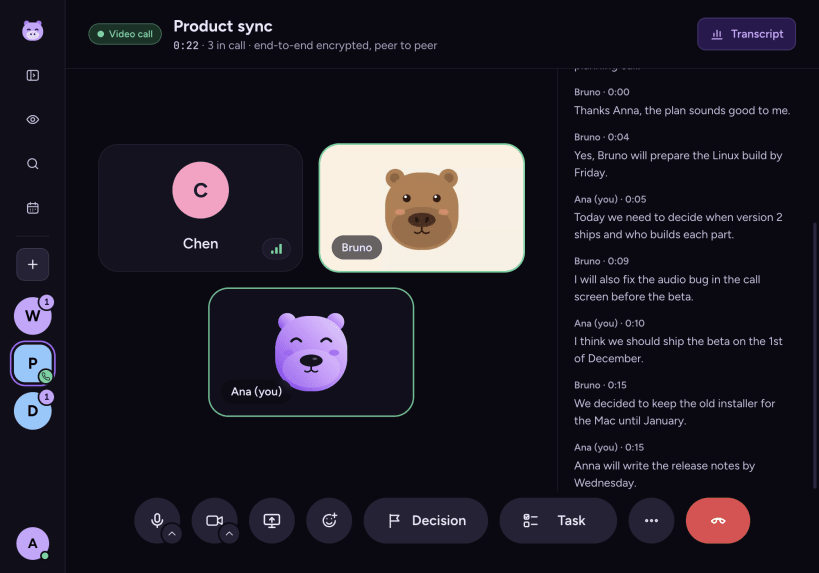
- Calls. Audio and video calls with screen sharing, raised hands, polls and breakout rooms.
- Meetings. Schedule meetings with an agenda. After a call, its notes show who came and the decisions and tasks people marked during it.
- On-device AI. With a model downloaded to your computer, Capy writes a transcript of your own voice, the call's minutes, and suggestions for decisions and tasks. All of it runs on your computer.
- Secure rooms. Rooms for 2 to 8 people that keep only their chat and are erased when their call ends.
Capy is in beta. The Snap Store keeps it up to date.
| Revision | Channel | Version | Build | Commit | Download SBOM |
|---|
The build and commit information is derived from build infrastructure records.
Install Capy on your Linux distribution
Choose your Linux distribution to get detailed installation instructions. If yours is not shown, get more details on the installing snapd documentation.