

Image Grid Slicer (carousel-tile-slicer)
Install latest/stable of Image Grid Slicer
Ubuntu 16.04 or later?
Make sure snap support is enabled in your Desktop store.
Install using the command line
sudo snap install carousel-tile-slicerDon't have snapd? Get set up for snaps.
Details for Image Grid Slicer
Package name
- carousel-tile-slicer
License
- MIT
Last updated
- Yesterday - latest/stable
Report a Snap Store violation
Report Image Grid Slicer for a Snap Store violation
Snap Store Violation Report submitted successfully
Thank you for your report. Information you provided will help us investigate further.
Error submitting report
There was an error while sending your report. Please try again later.
Share this snap
Generate an embeddable card to be shared on external websites.
Slice posters, panoramas, and carousels into numbered image grids and tiles
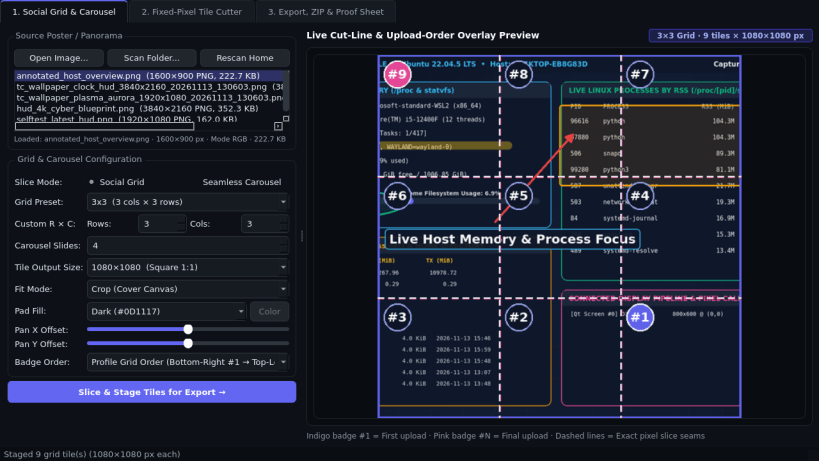
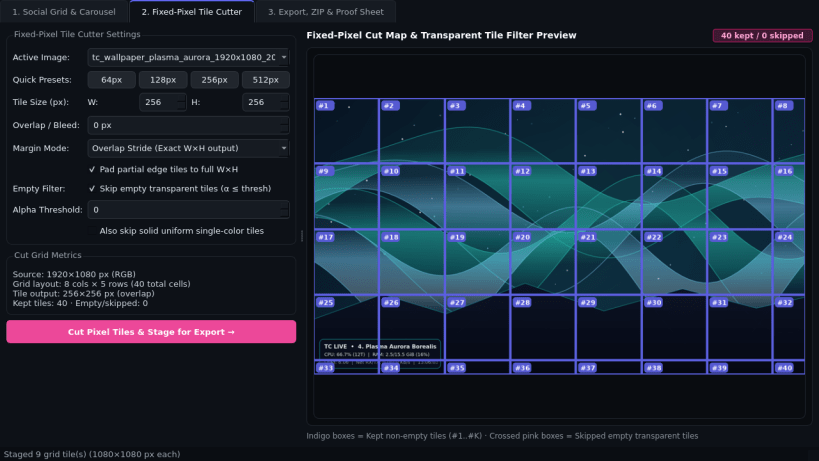
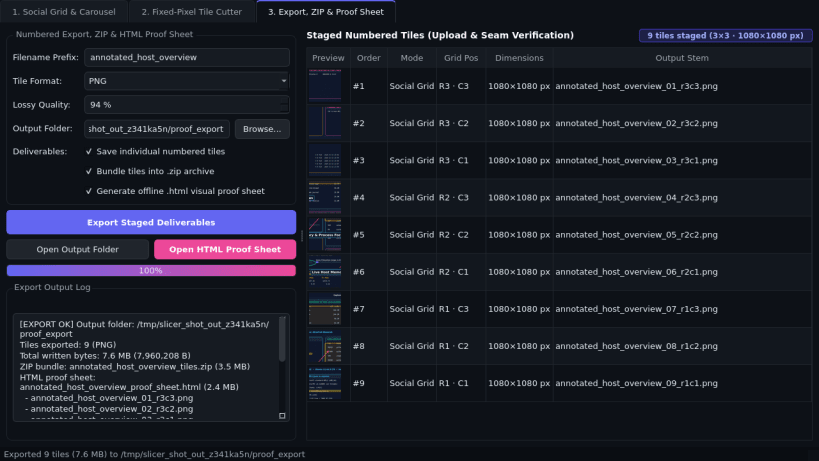
Image Grid Slicer is an offline Linux desktop utility for splitting posters, panoramas, game textures, and map sheets into aligned grid tiles and seamless swipeable carousel slides. An independent Linux desktop alternative to Grid Post for slicing posters and panoramas into upload-ordered social grids, carousels, and fixed-pixel tile sets.
Key Features:
- Social Grid & Seamless Carousel Slicer: Slice images into 3x1, 3x2, 3x3, 3x4, or custom Rows x Cols grids, or 2-10 seamless swipeable carousel slides (1080x1080, 1080x1350, 1080x1920) with live cut-line overlay, crop/pad fit mode, and upload-order badge numbering (#1..#N).
- Fixed-Pixel Tile Cutter: Cut large maps, atlases, or textures into exact WxH pixel tiles (32-1024 px) with configurable overlap/bleed margin and an option to skip empty transparent tiles automatically.
- Numbered Export, ZIP & HTML Proof Sheet: Export sequentially numbered PNG, JPEG, or WebP tiles, an optional .zip archive bundle, and a standalone offline .html visual grid proof sheet to verify seam alignment in any browser.
Disclaimer: Image Grid Slicer is an independent open-source project by TC Studio and is not affiliated with, endorsed by, or sponsored by Grid Post.
| Revision | Channel | Version | Build | Commit | Download SBOM |
|---|
The build and commit information is derived from build infrastructure records.
Install Image Grid Slicer on your Linux distribution
Choose your Linux distribution to get detailed installation instructions. If yours is not shown, get more details on the installing snapd documentation.


