

ClipDeck
Install latest/stable of ClipDeck
Ubuntu 16.04 or later?
Make sure snap support is enabled in your Desktop store.
Details for ClipDeck
Package name
- clipdeck
License
- MIT
Last updated
- Today - latest/stable
- Today - latest/edge
Websites
Contact
Source code
Report a bug
External link warning
You are about to open
Do you wish to proceed?
Report a Snap Store violation
Report ClipDeck for a Snap Store violation
Snap Store Violation Report submitted successfully
Thank you for your report. Information you provided will help us investigate further.
Error submitting report
There was an error while sending your report. Please try again later.
Share this snap
Generate an embeddable card to be shared on external websites.
Searchable clipboard history, pinboards and encrypted storage
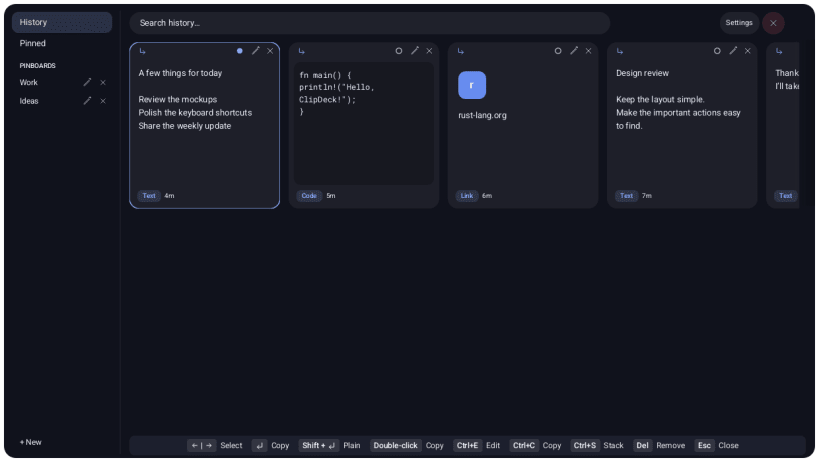
Keep useful clips close at hand. ClipDeck is a native Linux clipboard manager with a compact overlay, searchable history and named pinboards.
- Save and find text, links and images.
- Pin useful clips and organize them into boards.
- Edit text clips and queue clips in a paste stack.
- Pause clipboard watching from the tray or Settings.
- Choose optional encrypted local storage backed by your desktop keyring.
- Import and export clipboard history.
Encrypted storage requires access to the desktop Secret Service. Connect it with:
sudo snap connect clipdeck:password-manager-service
On GNOME Wayland, open system Settings → Keyboard → View and Customize
Shortcuts → Custom Shortcuts. Add ClipDeck, set the command to
/snap/bin/clipdeck toggle, and assign Ctrl+Shift+V. ClipDeck must already
be running. Open system Settings directly if the app's button fails.
Clipboard source identity may be unavailable on Linux, so sensitive content is not always excluded automatically. Pause watching when handling private content. JSON exports are plaintext.
| Revision | Channel | Version | Build | Commit | Download SBOM |
|---|
The build and commit information is derived from build infrastructure records.
Install ClipDeck on your Linux distribution
Choose your Linux distribution to get detailed installation instructions. If yours is not shown, get more details on the installing snapd documentation.


