

Cloudreve
Install latest/stable of Cloudreve
Ubuntu 16.04 or later?
Make sure snap support is enabled in your Desktop store.

Details for Cloudreve
Package name
- cloudreve
License
- GPL-3.0-only
Last updated
- 12 November 2026 - latest/stable
- Today - latest/beta
Websites
Contact
Source code
Report a bug
External link warning
You are about to open
Do you wish to proceed?
Report a Snap Store violation
Report Cloudreve for a Snap Store violation
Snap Store Violation Report submitted successfully
Thank you for your report. Information you provided will help us investigate further.
Error submitting report
There was an error while sending your report. Please try again later.
Share this snap
Generate an embeddable card to be shared on external websites.
Self-hosted file management and sharing system
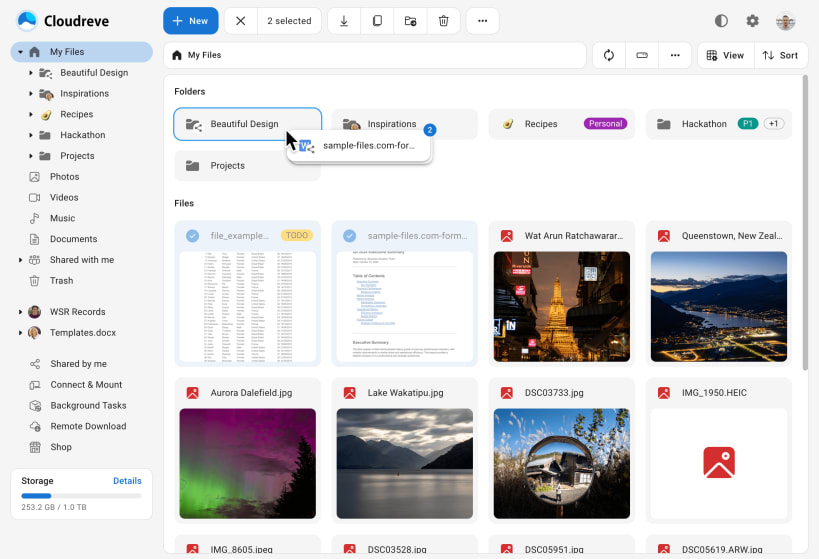
Cloudreve is a self-hosted cloud drive. Upload, organize, preview and share files from a browser or over WebDAV, with several users and groups. Files can be kept on this machine, on another Cloudreve node, on OneDrive or on S3-compatible and other object storage.
Getting started
The service starts right after installation and listens on 127.0.0.1:5212 (this machine only). Open http://localhost:5212 and register an account: the first registered account becomes the administrator.
To open it to your network:
sudo snap set cloudreve listen=:5212
Data and settings
The configuration file, the SQLite database and uploaded files are kept in /var/snap/cloudreve/common/data. Database, Redis, TLS and slave node settings go in conf.ini in that folder; restart the service after editing it. To store files on disks mounted under /media or /mnt:
sudo snap connect cloudreve:removable-media
This is the community edition, without the optional helper programs: thumbnails are made for JPEG, PNG and GIF images and music covers only, and remote download needs a separately installed aria2 or qBittorrent.
| Revision | Channel | Version | Build | Commit | Download SBOM |
|---|
The build and commit information is derived from build infrastructure records.
Install Cloudreve on your Linux distribution
Choose your Linux distribution to get detailed installation instructions. If yours is not shown, get more details on the installing snapd documentation.


