
Data Codec Workbench
Install latest/stable of Data Codec Workbench
Ubuntu 16.04 or later?
Make sure snap support is enabled in your Desktop store.
Install using the command line
sudo snap install data-codec-workbenchDon't have snapd? Get set up for snaps.
Details for Data Codec Workbench
Package name
- data-codec-workbench
License
- MIT
Last updated
- Yesterday - latest/stable
Report a Snap Store violation
Report Data Codec Workbench for a Snap Store violation
Snap Store Violation Report submitted successfully
Thank you for your report. Information you provided will help us investigate further.
Error submitting report
There was an error while sending your report. Please try again later.
Share this snap
Generate an embeddable card to be shared on external websites.
Multi-step developer text codec pipeline for Base64, Hex, URL, HTML & Zlib
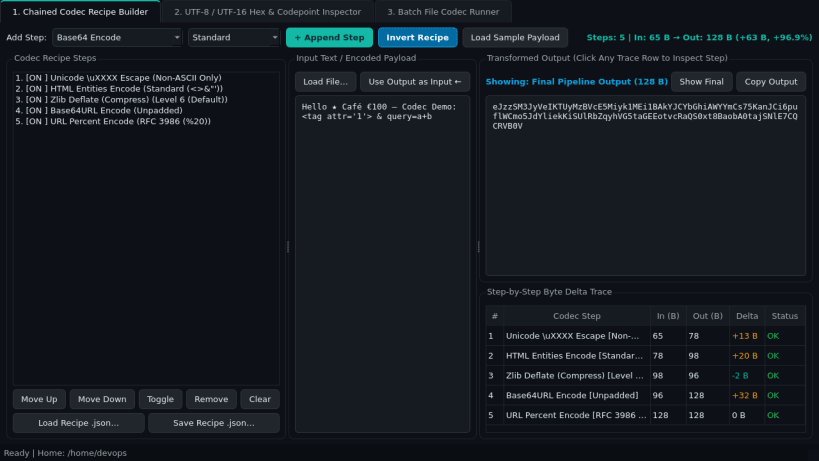
Data Codec Workbench is a desktop developer text serialization, character encoding, and batch file conversion utility for Linux workstations. Chain deterministic encoding and compression steps, inspect UTF-8 and UTF-16 byte offsets alongside Unicode codepoints, and apply saved JSON codec recipes across local text files.
Key Features:
- Chained Codec Recipe Builder: Stackable encode and decode pipeline supporting Base64, Base64URL, Base32, Hex, URL Percent, HTML Entities, Unicode \uXXXX escapes, JSON String escaping, Zlib Deflate/Inflate, Gzip, ROT13, and Case Transform with instantaneous output updates and step-by-step byte deltas.
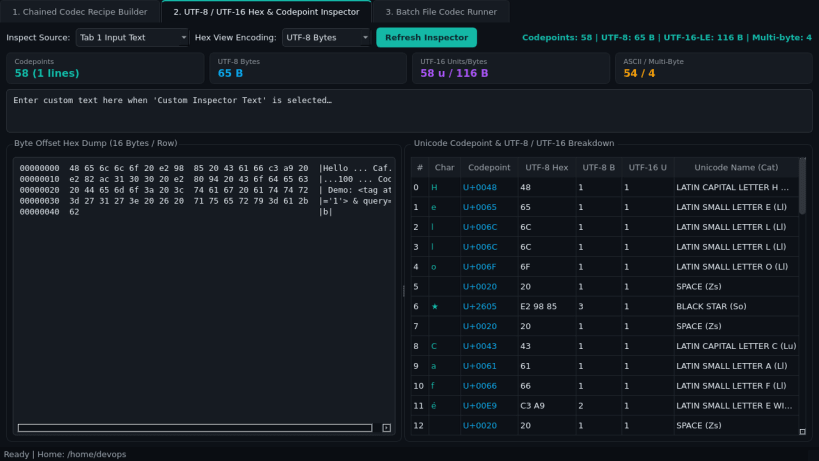
- UTF-8 / UTF-16 Hex & Codepoint Inspector: Displays canonical side-by-side hex offset dumps, UTF-8 byte lengths, UTF-16 code units, Unicode U+XXXX codepoint tables, and character statistics.
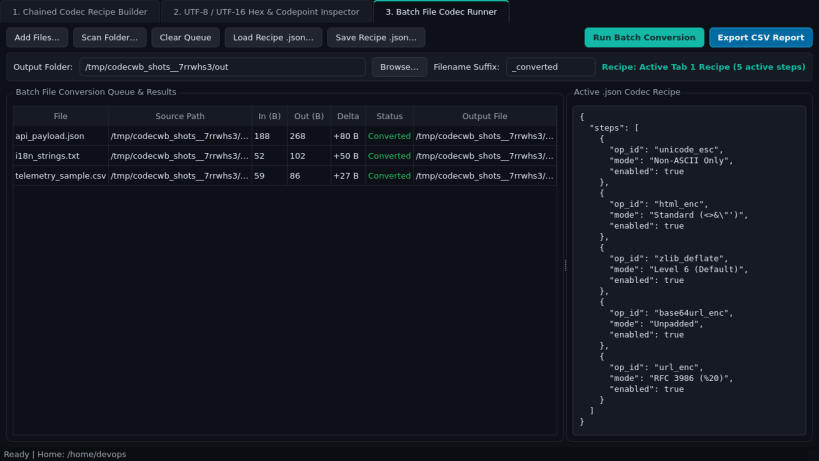
- Batch File Codec Runner: Saves and loads portable .json codec recipes, applies multi-step transforms across text files in bulk, and exports CSV summary reports.
Disclaimer: Data Codec Workbench is an independent open-source project by TC Studio and is not affiliated with, endorsed by, or sponsored by any third-party developer encoding vendor.
| Revision | Channel | Version | Build | Commit | Download SBOM |
|---|
The build and commit information is derived from build infrastructure records.
Install Data Codec Workbench on your Linux distribution
Choose your Linux distribution to get detailed installation instructions. If yours is not shown, get more details on the installing snapd documentation.


