

Document Content Searcher (doc-pdf-content-search)
Install latest/stable of Document Content Searcher
Ubuntu 16.04 or later?
Make sure snap support is enabled in your Desktop store.
Install using the command line
sudo snap install doc-pdf-content-searchDon't have snapd? Get set up for snaps.
Details for Document Content Searcher
Package name
- doc-pdf-content-search
License
- MIT
Last updated
- Today - latest/stable
Websites
Contact
External link warning
You are about to open
Do you wish to proceed?
Report a Snap Store violation
Report Document Content Searcher for a Snap Store violation
Snap Store Violation Report submitted successfully
Thank you for your report. Information you provided will help us investigate further.
Error submitting report
There was an error while sending your report. Please try again later.
Share this snap
Generate an embeddable card to be shared on external websites.
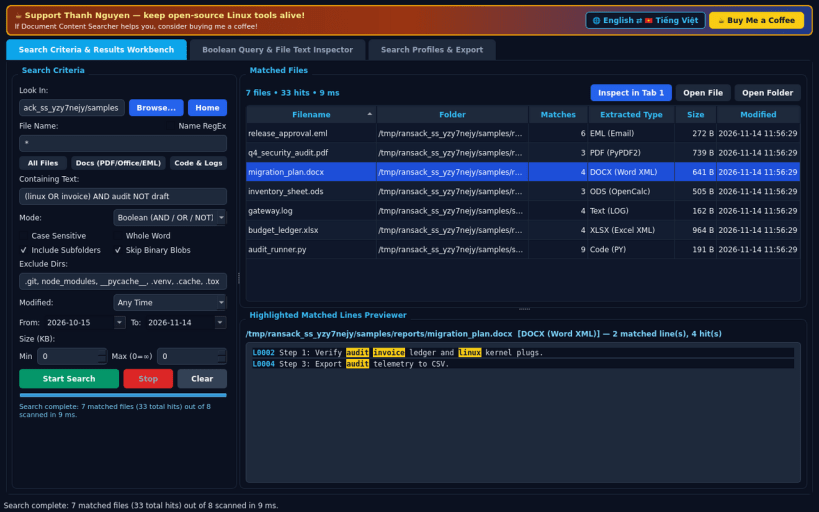
Deep PDF, Office, email and source code content searcher
A deep immediate document and source code content searcher for Linux, serving as an independent open-source Linux alternative to Agent Ransack. Not affiliated with, sponsored by, or endorsed by Mythicsoft.
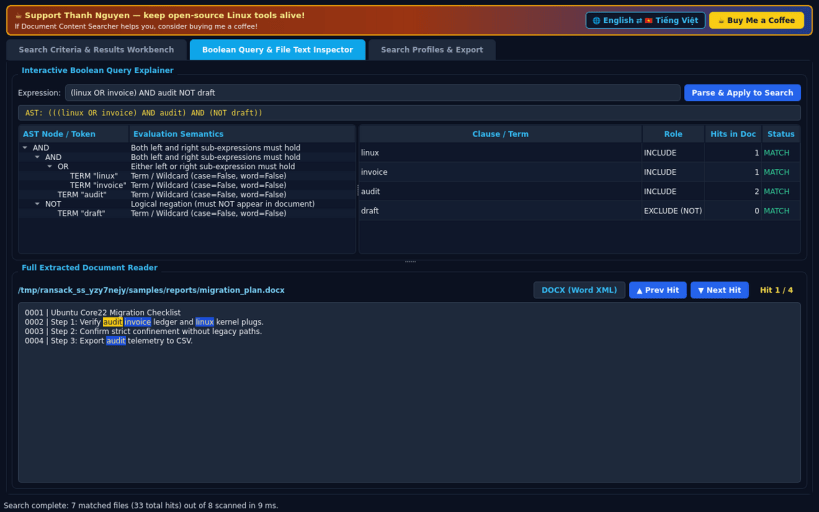
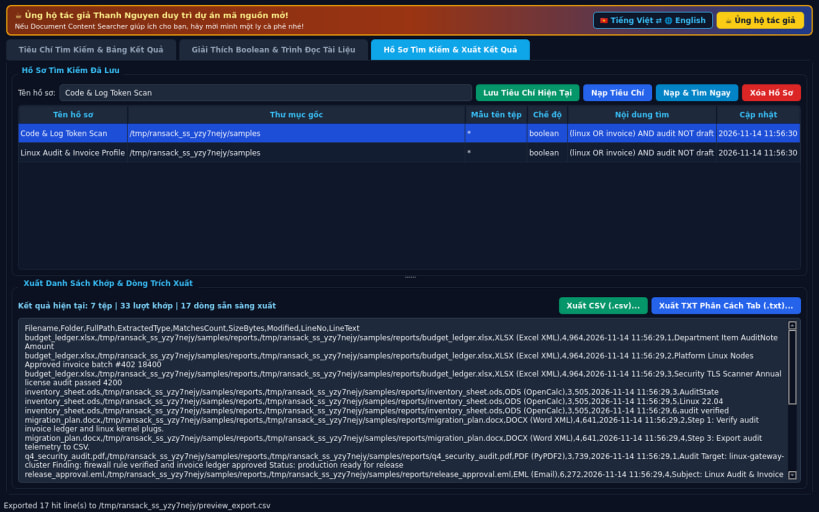
FEATURES • Tab 0 — Search Criteria & Results Workbench: Three-pane layout with Look In folder (including strict hostfs path resolution), recursive subfolder toggle, glob/regex filename masks, Plain Text / Boolean (AND, OR, NOT) / RegEx content modes, date modified & size range filters, directory exclusions, matched files grid, and Highlighted Matched Lines Previewer inside PDF (PyPDF2), DOCX, XLSX, ODT, ODS, EML, and code/log files. • Tab 1 — Boolean Query & File Text Inspector: Interactive Boolean AST expression explainer and clause hit matrix paired with a full extracted document reader featuring Next Hit / Prev Hit navigation. • Tab 2 — Search Profiles & Export: Save and reload search criteria JSON profiles and export matched files with exact hit lines to CSV or tab-separated TXT.
SUPPORT & DONATE • Created by Thanh Nguyen — https://buymeacoffee.com/thanhnv128b
| Revision | Channel | Version | Build | Commit | Download SBOM |
|---|
The build and commit information is derived from build infrastructure records.
Install Document Content Searcher on your Linux distribution
Choose your Linux distribution to get detailed installation instructions. If yours is not shown, get more details on the installing snapd documentation.


