

Dual Screen Utilities
Install latest/stable of Dual Screen Utilities
Ubuntu 16.04 or later?
Make sure snap support is enabled in your Desktop store.
Install using the command line
sudo snap install dual-screen-utilitiesDon't have snapd? Get set up for snaps.
Details for Dual Screen Utilities
Package name
- dual-screen-utilities
License
- MIT
Last updated
- Today - latest/stable
Websites
Contact
External link warning
You are about to open
Do you wish to proceed?
Report a Snap Store violation
Report Dual Screen Utilities for a Snap Store violation
Snap Store Violation Report submitted successfully
Thank you for your report. Information you provided will help us investigate further.
Error submitting report
There was an error while sending your report. Please try again later.
Share this snap
Generate an embeddable card to be shared on external websites.
Multi-monitor cursor lock, X11 window swapper, wallpaper slicer & dimmer
A Linux X11 alternative to Dual Monitor Tools. Independent open-source project, not affiliated with or endorsed by Dual Monitor Tools.
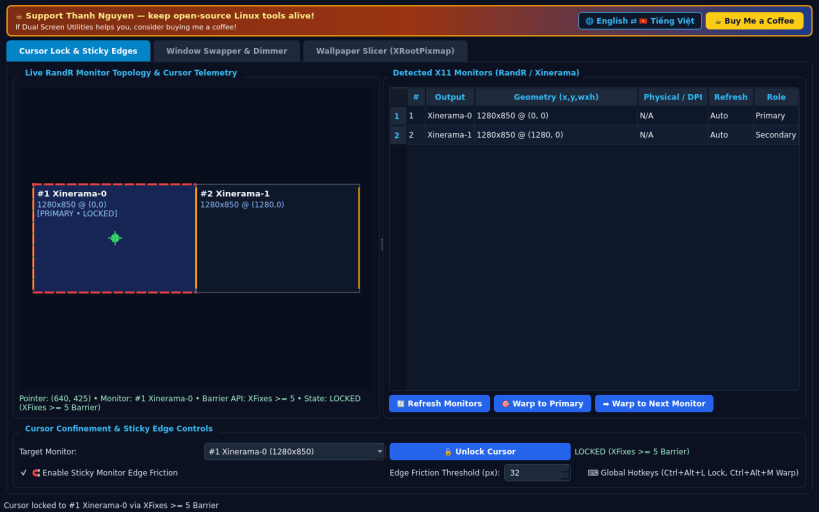
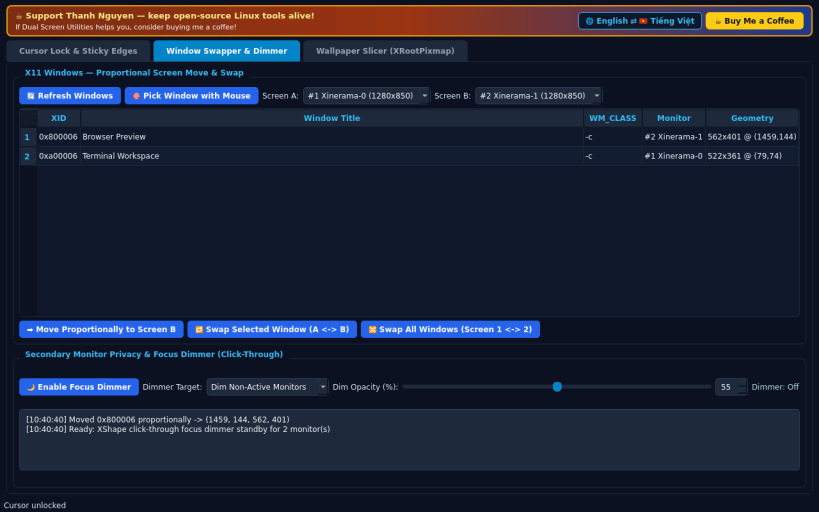
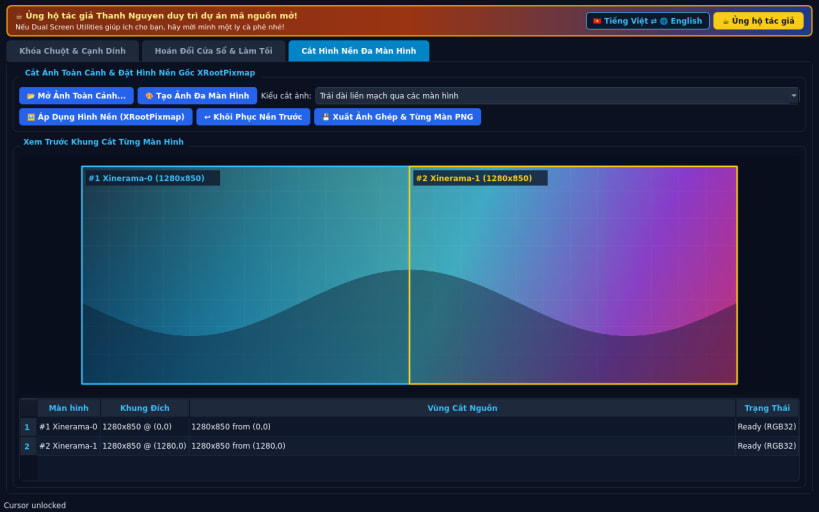
FEATURES • Cursor Lock & Sticky Edges: Real X11 RandR/Xinerama monitor schematic with live pointer telemetry, hardware XFixes >= 5 pointer barriers (with active boundary clamp fallback), configurable sticky edge crossing friction, cursor warp to primary/next monitor, and optional global hotkeys (Ctrl+Alt+L, Ctrl+Alt+M). • Swap Windows Across Screens & Monitor Dimmer: Browse or crosshair-pick any X11 window, move or swap windows proportionally across screens via EWMH _NET_MOVERESIZE_WINDOW, swap all windows between Screen 1 and Screen 2, and toggle a click-through translucent secondary monitor dimmer (_NET_WM_WINDOW_TYPE_DOCK + XShape). • Multi-Monitor Wallpaper Slicer (XRootPixmap): Load panoramic images or generate multi-monitor gradient calibration panoramas, slice per-monitor crops matching exact RandR monitor (x, y, w, h) geometry, apply directly to the X11 root window (_XROOTPMAP_ID / ESETROOT_PMAP_ID), or export sliced composite PNGs.
NOTES • Designed for X11 and XWayland sessions; Wayland-native windows and compositor-exclusive surfaces cannot be moved by X11 clients.
SUPPORT & DONATE • Created by Thanh Nguyen — https://buymeacoffee.com/thanhnv128b
| Revision | Channel | Version | Build | Commit | Download SBOM |
|---|
The build and commit information is derived from build infrastructure records.
Install Dual Screen Utilities on your Linux distribution
Choose your Linux distribution to get detailed installation instructions. If yours is not shown, get more details on the installing snapd documentation.


