
Install latest/edge of fifine Control Deck
Ubuntu 16.04 or later?
Make sure snap support is enabled in your Desktop store.
Install using the command line
sudo snap install fifine-control-deck --edgeDon't have snapd? Get set up for snaps.

You are about to open
Do you wish to proceed?
Thank you for your report. Information you provided will help us investigate further.
There was an error while sending your report. Please try again later.
Generate an embeddable card to be shared on external websites.
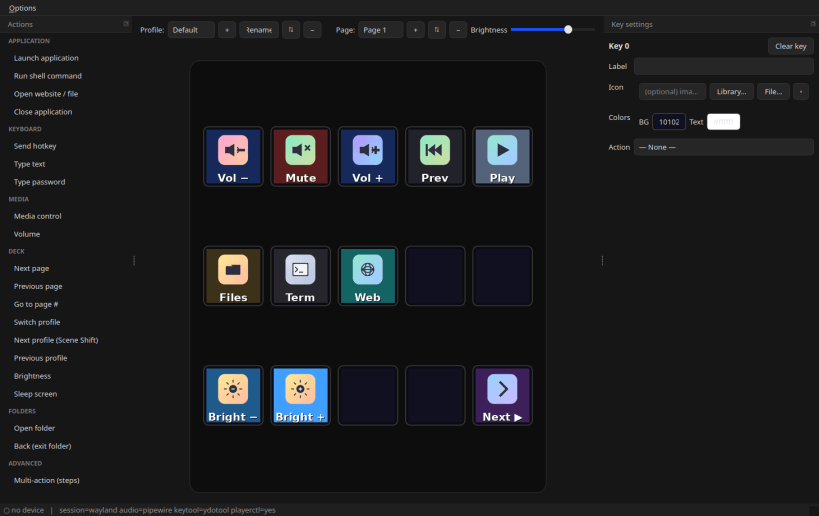
A native Linux control application for the fifine Control Deck (a Mirabox / Hotspot "Stream Dock" style macro keypad with per-key LCDs). Draw icons and labels on the keys and bind them to actions: launch apps, hotkeys, media and volume control, scripts, brightness, page/profile switching, folders and multi-step macros — with a PyQt6 configuration GUI.
Website: https://zoutmax.github.io/fifine-control-deck-linux/
NOTE: the deck is accessed over USB (/dev/hidraw). Under strict confinement the app needs the raw-usb / hardware-observe interfaces connected; on a classic desktop the reliable path for full device access is the classic build (see docs/SNAP.md).
Choose your Linux distribution to get detailed installation instructions. If yours is not shown, get more details on the installing snapd documentation.












