

Graphics and Video Decode Inspector (gpu-video-caps-inspector)
Install latest/stable of Graphics and Video Decode Inspector
Ubuntu 16.04 or later?
Make sure snap support is enabled in your Desktop store.
Install using the command line
sudo snap install gpu-video-caps-inspectorDon't have snapd? Get set up for snaps.
Details for Graphics and Video Decode Inspector
Package name
- gpu-video-caps-inspector
License
- MIT
Last updated
- Today - latest/stable
Report a Snap Store violation
Report Graphics and Video Decode Inspector for a Snap Store violation
Snap Store Violation Report submitted successfully
Thank you for your report. Information you provided will help us investigate further.
Error submitting report
There was an error while sending your report. Please try again later.
Share this snap
Generate an embeddable card to be shared on external websites.
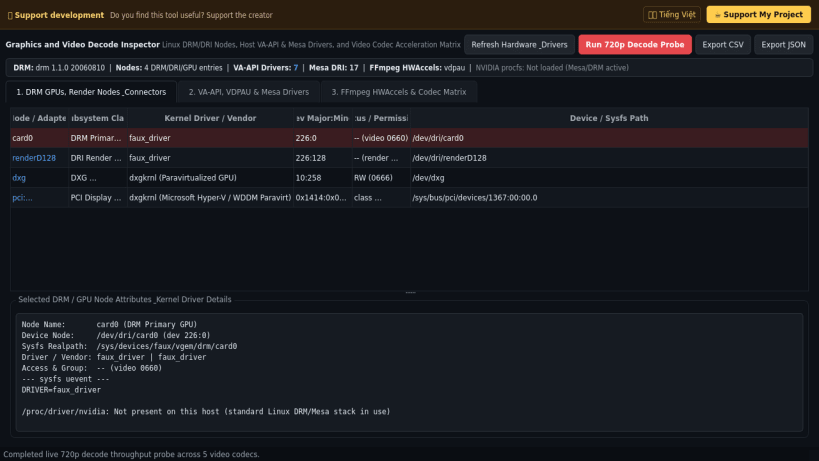
Inspect Linux DRM GPUs, VA-API/Mesa video drivers & codec decode matrix
Graphics and Video Decode Inspector is a desktop graphics adapter, display connector, video acceleration driver, and codec capability utility for Linux. An independent Linux alternative inspired by desktop video decode capability viewers, it inspects kernel DRM devices, DRI render nodes, installed VA-API and Mesa driver modules, and video codec acceleration support with JSON and CSV reporting.
Key Features:
- DRM GPU & Display Connector Inspection: Enumerates /sys/class/drm graphics cards, display connectors, supported video modes, EDID status, /dev/dri renderD nodes, and kernel driver module details including /proc/driver/nvidia when present.
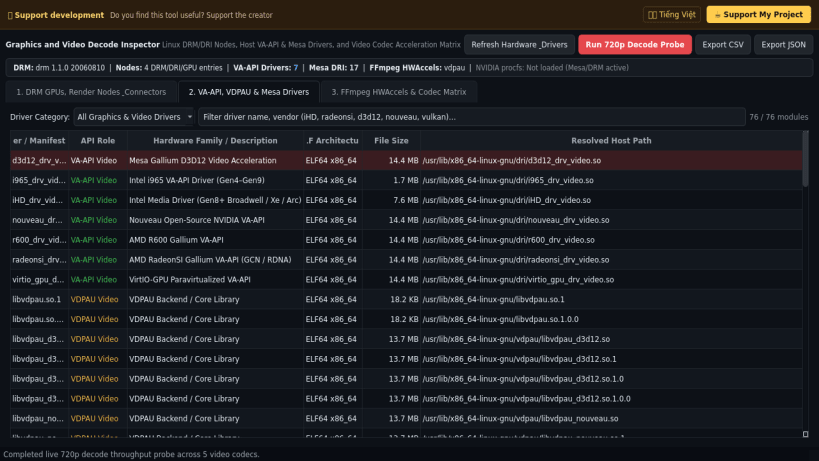
- Host VA-API, VDPAU & Mesa Driver Inventory: Detects installed *_drv_video.so VA-API backends, Mesa *_dri.so drivers, VDPAU libraries, and EGL/Vulkan vendor ICD manifests with ELF architecture and byte size details.
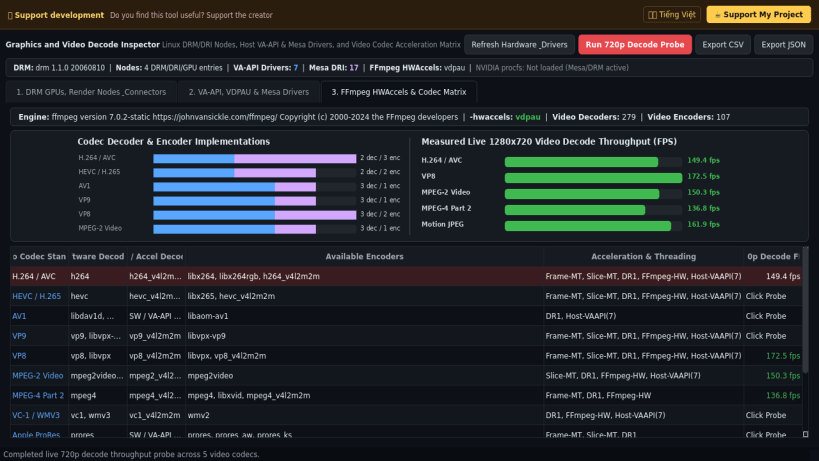
- FFmpeg HWAccels & Video Codec Matrix: Queries bundled FFmpeg -hwaccels, software and hardware video decoders/encoders across H.264, HEVC, AV1, VP9, VP8, MPEG-2, and ProRes, and measures real 720p video decode frame rate throughput.
- Structured JSON & CSV Export: Exports full GPU node, driver inventory, and codec acceleration matrices to JSON and CSV reports.
Disclaimer: This project is an independent open-source tool and is not affiliated with, sponsored by, or endorsed by NirSoft or Microsoft Corporation.
| Revision | Channel | Version | Build | Commit | Download SBOM |
|---|
The build and commit information is derived from build infrastructure records.
Install Graphics and Video Decode Inspector on your Linux distribution
Choose your Linux distribution to get detailed installation instructions. If yours is not shown, get more details on the installing snapd documentation.


