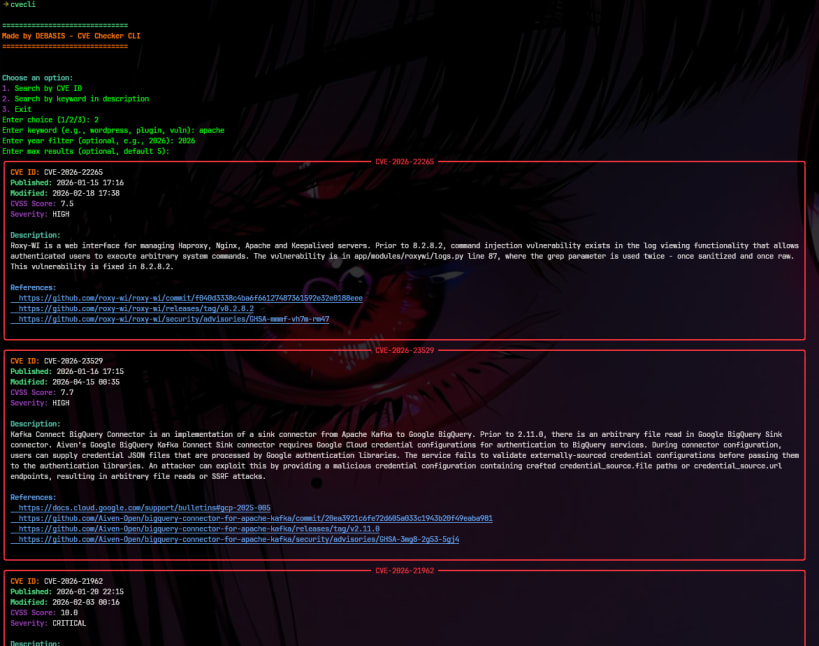
CVE Scanner CLI is a command-line security CVE lookup utility designed to help developers, system administrators, and security researchers quickly search and analyze known vulnerabilities from public CVE databases.
CVE (Common Vulnerabilities and Exposures) identifiers are widely used in cybersecurity to track and reference security flaws in software and systems. This tool simplifies the process of looking up those vulnerabilities directly from the terminal without needing to visit multiple websites or dashboards.
The tool supports two primary search modes:
• CVE ID Search
You can directly query a specific vulnerability using its CVE identifier (for example: CVE-2024-XXXX). The tool fetches structured information such as description, publication date, last modified date, severity scores, and external references.
• Keyword Search
You can search vulnerabilities based on software names, technologies, or general keywords. This is useful when you are exploring potential security issues in a system or library.
The results are displayed in a clean, color-formatted terminal interface using the Rich library, making it easier to read and understand security data at a glance.
Internally, the tool integrates with public vulnerability data sources such as CIRCL and NVD APIs to retrieve up-to-date CVE information. It processes and formats the raw API responses into a structured and human-readable output.
This CLI is designed to be lightweight, fast, and easy to use. It can be executed in interactive mode or via direct command-line arguments, making it suitable for both quick lookups and scripting workflows.
CVE Scanner CLI is especially useful for:
The goal of this tool is to make vulnerability information more accessible directly from the terminal, reducing the need for external tools or manual searches while improving workflow efficiency.
You are about to open
Do you wish to proceed?
Thank you for your report. Information you provided will help us investigate further.
There was an error while sending your report. Please try again later.
Snaps are applications packaged with all their dependencies to run on all popular Linux distributions from a single build. They update automatically and roll back gracefully.
Snaps are discoverable and installable from the Snap Store, an app store with an audience of millions.
Snap can be installed from the command line on openSUSE Leap 15.x and Tumbleweed.
You need first add the snappy repository from the terminal. Choose the appropriate command depending on your installed openSUSE flavor.
Tumbleweed:
sudo zypper addrepo --refresh https://download.opensuse.org/repositories/system:/snappy/openSUSE_Tumbleweed snappy
Leap 15.x:
sudo zypper addrepo --refresh https://download.opensuse.org/repositories/system:/snappy/openSUSE_Leap_15.6 snappy
If needed, Swap out openSUSE_Leap_15. for, openSUSE_Leap_16.0 if you’re using a different version of openSUSE.
With the repository added, import its GPG key:
sudo zypper --gpg-auto-import-keys refresh
Finally, upgrade the package cache to include the new snappy repository:
sudo zypper dup --from snappy
Snap can now be installed with the following:
sudo zypper install snapd
You then need to either reboot, logout/login or source /etc/profile to have /snap/bin added to PATH.
Additionally, enable and start both the snapd and the snapd.apparmor services with the following commands:
sudo systemctl enable --now snapd
sudo systemctl enable --now snapd.apparmor
To install cvecli, simply use the following command:
sudo snap install cvecli
Browse and find snaps from the convenience of your desktop using the snap store snap.

Interested to find out more about snaps? Want to publish your own application? Visit snapcraft.io now.