

Install latest/stable of cvecli
Ubuntu 16.04 or later?
Make sure snap support is enabled in your Desktop store.


Details for cvecli
Package name
- cvecli
License
- MIT
Last updated
- 25 September 2026 - latest/stable
Websites
Donations
Source code
Report a bug
External link warning
You are about to open
Do you wish to proceed?
Report a Snap Store violation
Report cvecli for a Snap Store violation
Snap Store Violation Report submitted successfully
Thank you for your report. Information you provided will help us investigate further.
Error submitting report
There was an error while sending your report. Please try again later.
Share this snap
Generate an embeddable card to be shared on external websites.
Command-line vulnerability lookup tool for security professionals and developers
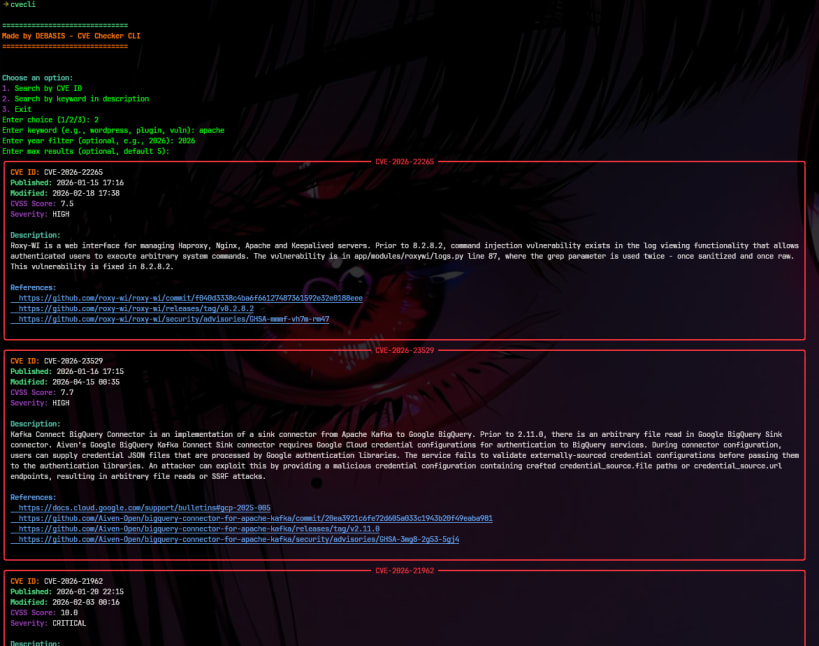
CVE Scanner CLI is a command-line security CVE lookup utility designed to help developers, system administrators, and security researchers quickly search and analyze known vulnerabilities from public CVE databases.
CVE (Common Vulnerabilities and Exposures) identifiers are widely used in cybersecurity to track and reference security flaws in software and systems. This tool simplifies the process of looking up those vulnerabilities directly from the terminal without needing to visit multiple websites or dashboards.
The tool supports two primary search modes:
• CVE ID Search
You can directly query a specific vulnerability using its CVE identifier (for example: CVE-2024-XXXX). The tool fetches structured information such as description, publication date, last modified date, severity scores, and external references.
• Keyword Search
You can search vulnerabilities based on software names, technologies, or general keywords. This is useful when you are exploring potential security issues in a system or library.
The results are displayed in a clean, color-formatted terminal interface using the Rich library, making it easier to read and understand security data at a glance.
Internally, the tool integrates with public vulnerability data sources such as CIRCL and NVD APIs to retrieve up-to-date CVE information. It processes and formats the raw API responses into a structured and human-readable output.
This CLI is designed to be lightweight, fast, and easy to use. It can be executed in interactive mode or via direct command-line arguments, making it suitable for both quick lookups and scripting workflows.
CVE Scanner CLI is especially useful for:
- Developers checking dependency vulnerabilities
- Security analysts performing quick CVE lookups
- DevOps engineers integrating vulnerability checks into workflows
- Students learning about cybersecurity and CVE tracking systems
The goal of this tool is to make vulnerability information more accessible directly from the terminal, reducing the need for external tools or manual searches while improving workflow efficiency.
| Revision | Channel | Version | Build | Commit | Download SBOM |
|---|
The build and commit information is derived from build infrastructure records.
Install cvecli on your Linux distribution
Choose your Linux distribution to get detailed installation instructions. If yours is not shown, get more details on the installing snapd documentation.











