# DeepOwn – A Local-First Data Vault
Your personal and work data, stored locally and synced directly across your own devices.
DeepOwn is a local-first data management app for keeping notes, records, documents, and attachments in encrypted vaults. Your vault data stays on your own devices and syncs directly between them over the same local network — without a central cloud server, cloud storage account, or third party holding your data.
Available for iPhone, iPad, Mac, Android, Windows, and Linux.
WHY CHOOSE LOCAL-FIRST DATA MANAGEMENT?
Cloud storage makes syncing convenient, but it usually means trusting someone else's servers with your data. Manual encrypted backups give you more control, but require regular maintenance.
DeepOwn takes a different approach: keep your data on your own devices and let them sync directly over your local network.
No cloud vault storage. No cloud account required. Just your own devices, your own data, and direct synchronization.
ONE DATA VAULT FOR YOUR PERSONAL AND WORK LIFE
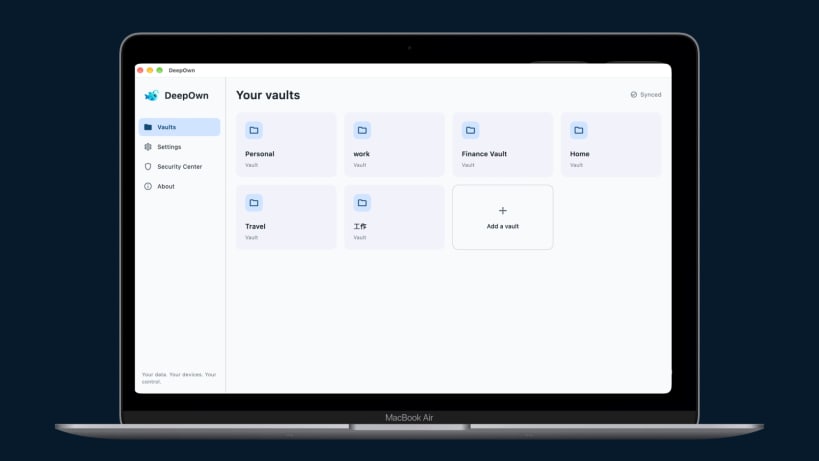
Use DeepOwn to organize different kinds of information in separate encrypted vaults:
Keep related information and files together, organized and accessible across your own devices.
AUTOMATIC DEVICE-TO-DEVICE SYNC
DeepOwn makes keeping your devices in sync simple:
Set up your identity once, install DeepOwn on your other devices, and let them stay in sync.
YOUR DATA, WITHOUT THE CLOUD
Your vault data is stored locally on your devices and protected with encryption.
DeepOwn does not upload your vault data to a central cloud storage service. You remain in control of where your information is stored and which devices hold it.
EVERY CHANGE HAS A HISTORY
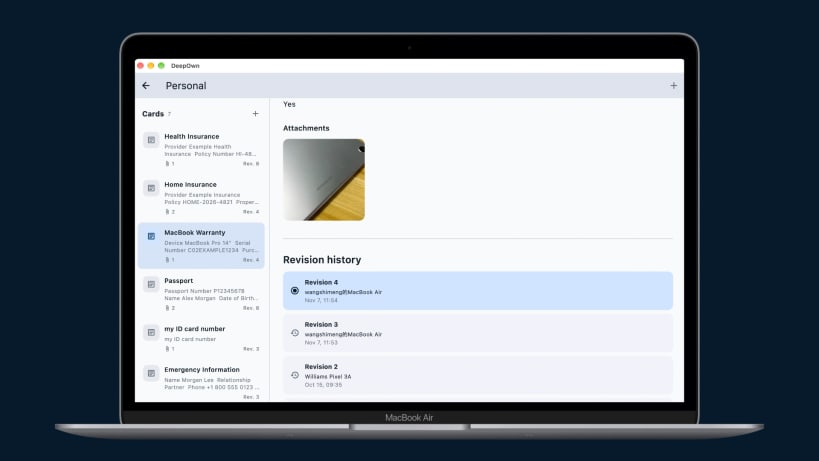
DeepOwn keeps revision history for each record, not just the latest version.
Each revision preserves the card's content and file attachments, allowing you to:
Your information stays useful even when it changes.
GET STARTED IN FOUR STEPS
Your data. Your devices. Your control.
You are about to open
Do you wish to proceed?
Thank you for your report. Information you provided will help us investigate further.
There was an error while sending your report. Please try again later.
Snaps are applications packaged with all their dependencies to run on all popular Linux distributions from a single build. They update automatically and roll back gracefully.
Snaps are discoverable and installable from the Snap Store, an app store with an audience of millions.
Snap is available for Red Hat Enterprise Linux (RHEL) 8 and RHEL 7, from the 7.6 release onward.
The packages for RHEL 7, RHEL 8, and RHEL 9 are in each distribution’s respective Extra Packages for Enterprise Linux (EPEL) repository. The instructions for adding this repository diverge slightly between RHEL 7, RHEL 8 and RHEL 9, which is why they’re listed separately below.
The EPEL repository can be added to RHEL 9 with the following command:
sudo dnf install https://dl.fedoraproject.org/pub/epel/epel-release-latest-9.noarch.rpm
sudo dnf upgrade
The EPEL repository can be added to RHEL 8 with the following command:
sudo dnf install https://dl.fedoraproject.org/pub/epel/epel-release-latest-8.noarch.rpm
sudo dnf upgrade
The EPEL repository can be added to RHEL 7 with the following command:
sudo rpm -ivh https://dl.fedoraproject.org/pub/epel/epel-release-latest-7.noarch.rpm
Adding the optional and extras repositories is also recommended:
sudo subscription-manager repos --enable "rhel-*-optional-rpms" --enable "rhel-*-extras-rpms"
sudo yum update
Snap can now be installed as follows:
sudo yum install snapd
Once installed, the systemd unit that manages the main snap communication socket needs to be enabled:
sudo systemctl enable --now snapd.socket
To enable classic snap support, enter the following to create a symbolic link between /var/lib/snapd/snap and /snap:
sudo ln -s /var/lib/snapd/snap /snap
Either log out and back in again or restart your system to ensure snap’s paths are updated correctly.
To install DeepOwn, simply use the following command:
sudo snap install deepown
Browse and find snaps from the convenience of your desktop using the snap store snap.
Interested to find out more about snaps? Want to publish your own application? Visit snapcraft.io now.