

DeepOwn
Install latest/stable of DeepOwn
Ubuntu 16.04 or later?
Make sure snap support is enabled in your Desktop store.
Details for DeepOwn
Package name
- deepown
License
- Proprietary
Last updated
- 10 November 2026 - latest/stable
Websites
Contact
Source code
Report a bug
External link warning
You are about to open
Do you wish to proceed?
Report a Snap Store violation
Report DeepOwn for a Snap Store violation
Snap Store Violation Report submitted successfully
Thank you for your report. Information you provided will help us investigate further.
Error submitting report
There was an error while sending your report. Please try again later.
Share this snap
Generate an embeddable card to be shared on external websites.
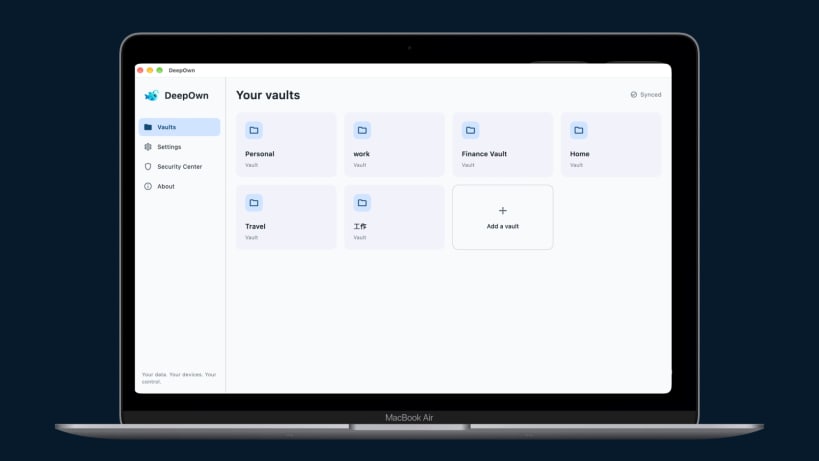
Encrypted data vaults with direct device-to-device sync. No cloud storage.
# DeepOwn – A Local-First Data Vault
Your personal and work data, stored locally and synced directly across your own devices.
DeepOwn is a local-first data management app for keeping notes, records, documents, and attachments in encrypted vaults. Your vault data stays on your own devices and syncs directly between them over the same local network — without a central cloud server, cloud storage account, or third party holding your data.
Available for iPhone, iPad, Mac, Android, Windows, and Linux.
WHY CHOOSE LOCAL-FIRST DATA MANAGEMENT?
Cloud storage makes syncing convenient, but it usually means trusting someone else's servers with your data. Manual encrypted backups give you more control, but require regular maintenance.
DeepOwn takes a different approach: keep your data on your own devices and let them sync directly over your local network.
No cloud vault storage. No cloud account required. Just your own devices, your own data, and direct synchronization.
ONE DATA VAULT FOR YOUR PERSONAL AND WORK LIFE
Use DeepOwn to organize different kinds of information in separate encrypted vaults:
- Personal data — notes, important records, photos, and personal documents.
- Work data — meeting notes, reference materials, technical documents, and work files.
- Project data — project records, specifications, design notes, and related attachments.
- Small business data — business records, internal documents, and operational information.
Keep related information and files together, organized and accessible across your own devices.
AUTOMATIC DEVICE-TO-DEVICE SYNC
DeepOwn makes keeping your devices in sync simple:
- Devices on the same local network discover each other automatically.
- Vault data syncs directly between your devices.
- No central cloud server is needed to transfer your vault data.
- Offline devices catch up when they reconnect to the same local network.
Set up your identity once, install DeepOwn on your other devices, and let them stay in sync.
YOUR DATA, WITHOUT THE CLOUD
Your vault data is stored locally on your devices and protected with encryption.
DeepOwn does not upload your vault data to a central cloud storage service. You remain in control of where your information is stored and which devices hold it.
EVERY CHANGE HAS A HISTORY
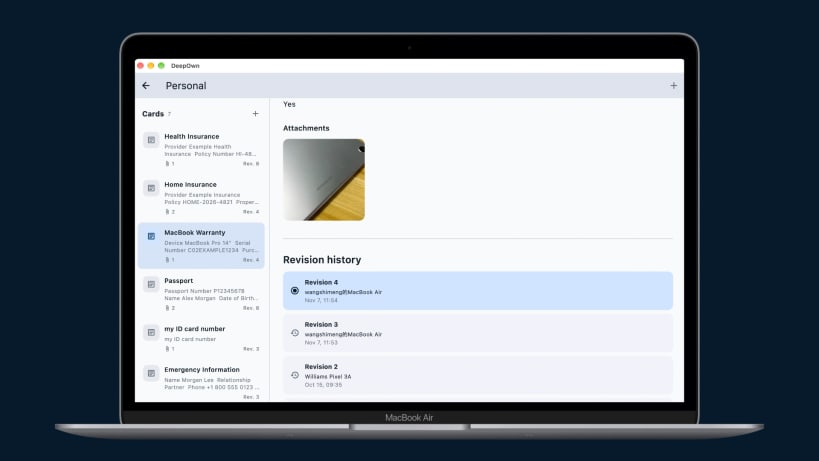
DeepOwn keeps revision history for each record, not just the latest version.
Each revision preserves the card's content and file attachments, allowing you to:
- View previous versions of your information.
- Recover earlier text and attachments.
- Keep a history of changes over time.
- Access synchronized revision history across your devices.
Your information stays useful even when it changes.
GET STARTED IN FOUR STEPS
- Set up your identity — create a new identity or restore an existing one with your 12-word recovery phrase.
- Create your vaults — organize personal information, work documents, project records, and files.
- Install DeepOwn on your other devices — visit https://deepown.app to download the version for your platform.
- Connect and sync — connect your devices to the same local network and open DeepOwn. They will discover each other and sync automatically.
Your data. Your devices. Your control.
| Revision | Channel | Version | Build | Commit | Download SBOM |
|---|
The build and commit information is derived from build infrastructure records.
Install DeepOwn on your Linux distribution
Choose your Linux distribution to get detailed installation instructions. If yours is not shown, get more details on the installing snapd documentation.


